Laura Marano
Aiseesoft FoneCopy moves contacts, photos, videos, audio files, music, ringtones, audiobooks, and other media between iPhone, iPad, iPod, and Android devices. This phone transfer software is built for switching phones, backing up phone data, and copying files between iOS and Android in a few clicks.

Aiseesoft FoneCopy - Lifetime/ 1 PC
Lifetime license for 1 PC | free upgrades
📄 Licensing & Support Details
- License Type: Lifetime license
- 30-Day Money-Back Guarantee
- Free Upgrades
- Technical Support
- 100% Secure.
📝 How to apply
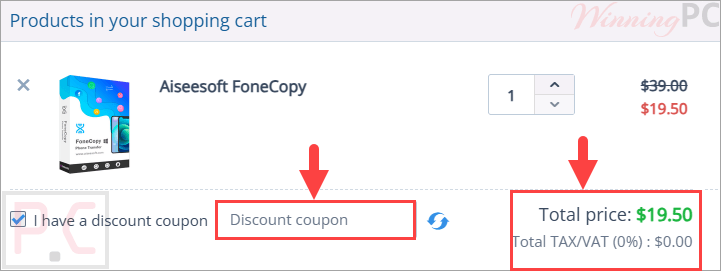
After you click ‘Copy Code’ in the coupon box above, the code is copied to your clipboard, and you will be taken to the checkout page to use your discount.
Aiseesoft FoneCopy: In-Depth Review & Features

Key Features:
- Transfer contacts, photos, videos, and audio files from Android to iPhone, iPad, or iPod.
- Sync contacts, photos, music, ringtones, audiobooks, and more from iOS devices to Android.
- Copy photos, contacts, videos, ringtones, audiobooks, and voice memos between iOS and Android.
- Move old phone data to a new phone using two USB cables.
- Select specific data types before transferring.
- Automatically convert media files for the target device.
- Keep the original files while adding the moved files to the target phone.
- Copy files from a dead or smashed phone if it can still be recognized by the computer.
- Remove data on the target mobile phone before copying.
Pros & Cons:
More screenshots:


Frequently Asked Questions
Are there any Aiseesoft FoneCopy promo codes available?
Yes. WinningPC is a good place to check for current coupons, along with the official Aiseesoft website.
What is the lowest price for Aiseesoft FoneCopy right now?
WinningPC currently lists a 50% off deal, dropping the Lifetime License from $39.00 to $19.50.
What does Aiseesoft FoneCopy do?
It transfers phone data such as contacts, photos, videos, music, ringtones, audiobooks, and other media between iOS and Android devices.
Can I transfer Android data to an iPhone?
Yes. It can transfer contacts, photos, videos, and audio files from Android to iPhone, iPad, or iPod.
Can I move iPhone data to Android?
Yes. It supports syncing contacts, photos, music, ringtones, audiobooks, and more from iPhone, iPad, or iPod to Android devices.
Does it support one-click transfer?
Yes. The software is designed to move phone data in one click.
Can I choose what data to transfer?
Yes. You can select data types and move only the files you need.
Will it delete my original files?
No. The provided data says it can keep both the original data and the moved files safely.
Can it work with a broken phone?
Yes, as long as the damaged iPhone or Android phone can still be recognized by the computer.
Does Aiseesoft FoneCopy work on Mac?
Mac support is not specified. The listed system requirements only mention Windows.
System Requirements & Details
| Operating System | Windows 11, 10, 8.1, 8, 7, Vista, XP SP2 or later |
| Processor | 1GHz Intel/AMD CPU or above |
| RAM & Storage | 1GB RAM or more |
| Supported Input | iPhone, iPad, iPod, Android devices |
| Supported Output | iPhone, iPad, iPod, Android devices |