
 Laura Marano
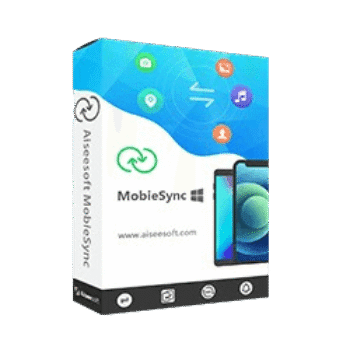
Aiseesoft MobieSync helps users transfer files between iPhone, iPad, Android devices, and computers. It also provides backup, restore, file organization, contact management, HEIC conversion, and ringtone creation features.
MobieSync
4 plans · best save 79%
1 Month/ 1 PC
Use it on 1 PC | 1-month free upgrades | 30-day money-back guarantee
Lifetime/ 1 PC
Use it on 1 PC | lifetime free upgrades | 30-day money-back guarantee
Lifetime/3 PCs ★ Best Deal
Use it on 3 PCs | lifetime free upgrades | 30-day money-back guarantee
Lifetime/5 PCs
Use it on 5 PCs | lifetime free upgrades | 30-day money-back guarantee
Aiseesoft MobieSync License Key Free Download
- Product name: MobieSync
- Website: https://www.aiseesoft.com/
- License type: 1-year
- Platform: Windows
- Link:
Aiseesoft MobieSync Giveaway - Download: mobiesync.exe
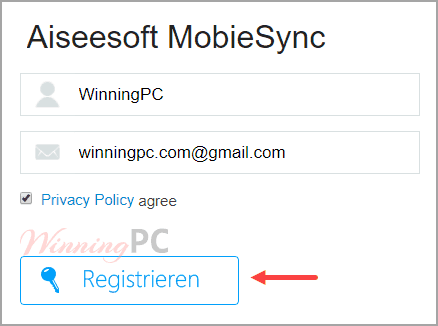
On the Aiseesoft MobieSync giveaway page, please enter your name and email address and click the “Register” button. In a few minutes, you will receive an email with an annual license.
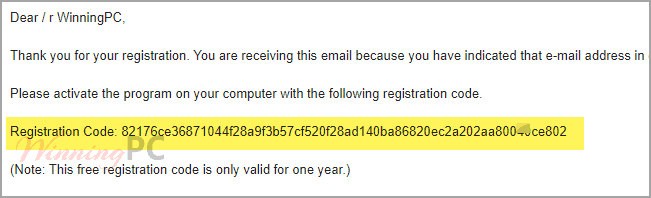
You will receive a registration code for the program to the email address provided. If you cannot find an email in your inbox, please check your spam inbox.
Install the software on your computer,

Register for the full version by the Aiseesoft MobieSync registration code above.


Aiseesoft MobieSync: In-Depth Review & Features

Key Features:
- Transfer files between iPhone, iPad, iPod touch, Android devices, and computers.
- Move data directly between iOS and Android devices.
- One-click contact backup and restore.
- Manage contacts by merging duplicates, editing details, and organizing groups.
- Transfer, preview, export, and organize photos.
- Sync music across devices with built-in playback support.
- Edit music ID3 information and create playlists.
- Create custom M4R iPhone ringtones.
- Transfer and manage videos, movies, podcasts, and TV shows.
- Export messages and iMessages to HTML, CSV, or TXT formats.
- Convert HEIC photos to JPEG or PNG.
- Rename iOS devices directly within the software.
- View device information such as storage usage, serial number, and device type.
- Organize files between albums, playlists, and contact groups.
Pros & Cons:
More screenshots:


Frequently Asked Questions
Where can I find the promo codes or deals for Aiseesoft MobieSync?
You can discover up-to-date coupon codes and active promotional offers right here on WinningPC, alongside any deals listed on the official Aiseesoft website.
What is the steepest price drop available right now for this sync tool?
The biggest saving currently active is a massive 79% OFF the Lifetime/3 PCs plan, which you can easily claim by using the discount code provided on WinningPC.
Will this let me move my old Android files to a new iPhone?
Yes, the software supports direct cross-platform syncing, allowing you to move files from an Android phone directly to an iOS device.
Can I read my saved text messages on my computer?
Yes. You can export your mobile messages to your PC in HTML, CSV, or TXT format, which preserves the sender details, emojis, and text content so you can read them offline.
How does the 1-click backup work?
The 1-click backup function allows you to save all supported mobile data to your computer instantly, and you can restore that backup back to your device just as quickly.
Do I need a separate program to handle HEIC images?
No. The built-in HEIC Converter takes the HEIC pictures captured on your iPhone and converts them to standard JPEG or PNG formats so you can view them on Windows.
Can I delete large files off my phone using this software?
Yes, you can browse your phone’s storage through the desktop interface and delete large videos, massive photo batches, or junk messages to clear up space.
Is there a way to fix my messy contact list?
Yes, the program has a dedicated contact management area where you can quickly merge duplicate entries, delete old numbers, and edit names.
System Requirements & Details
| Operating System | Windows 11, 10, 8.1, 8, 7, Vista, XP (SP2 or later) |
| Processor | 1GHz Intel/AMD CPU or above |
| RAM & Storage | 1G RAM or more |
| Supported Input | iOS 6.0 and higher (iOS 27 beta/26 included), iPadOS 13 to 27 beta, Android 4.0 to 16 |
| Supported Output | PC, iOS devices, Android devices |




Dear, registration code didn’t work, when put email and the system send code , when put the same , error shown, (The registration code is invalid)