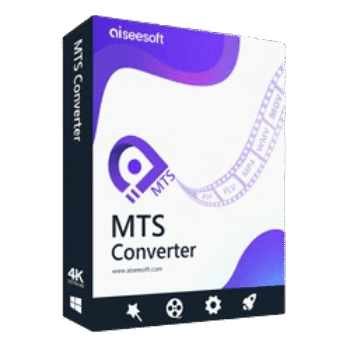
Aiseesoft MTS Converter enables users to convert MTS and M2TS files into popular video and audio formats. It also includes video editing tools, 3D conversion options, device presets, subtitle support, and batch processing capabilities.
Aiseesoft MTS Converter for Windows
2 plans · best save 50%
Aiseesoft MTS Converter for Mac
2 plans · best save 50%
📄 Licensing & Support Details
- License Type: 1 Year, Lifetime license.
- 30-Day Money-Back Guarantee
- Free Upgrades
- 24/7 Customer Support
- 100% Secure.
📝 How to apply
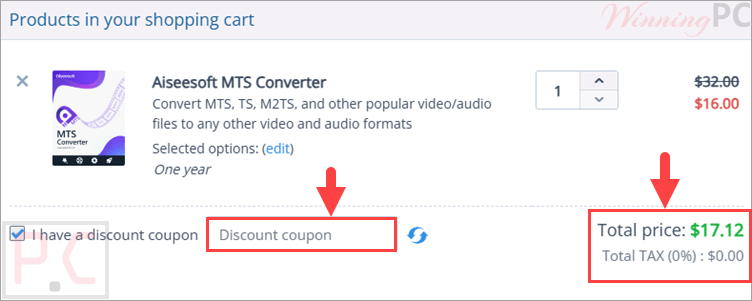
Click ‘Copy Code’ in the upper coupon box to copy the sequence and proceed to the checkout area, where the code can be applied for a reduced cost.
Aiseesoft MTS Converter: In-Depth Review & Features

Key Features:
- Convert MTS/M2TS files to MP4, MOV, AVI, WMV, FLV, MKV, MPEG, and more
- Export audio to MP3, AAC, FLAC, WAV, OGG, APE, CUE, and other formats
- Preserve original video and audio quality during conversion
- Supports HD, SD, 4K, MTS, M2TS, TS, and related formats
- Ready-made profiles for iPhone, iPad, iPod, Samsung Galaxy devices, PSP, PS4, Xbox One, and Xbox 360
- Compatible with Windows Media Player, VLC, and QuickTime
- Supports editing workflows for Adobe Premiere, Sony Vegas, and Avid Media Composer
- Convert 2D MTS videos into multiple 3D formats
- Customize encoder, frame rate, resolution, bitrate, aspect ratio, and audio parameters
- Crop videos and remove black borders
- Rotate and flip videos
- Trim unwanted sections from videos
- Merge multiple clips into a single file
- Add text or image watermarks
- Adjust brightness, contrast, saturation, hue, and volume
- Add, replace, or remove audio tracks
- Import external subtitles in SRT, ASS, and SSA formats
- Preview videos before conversion
- Capture snapshots during playback
- Batch convert multiple MTS/M2TS files simultaneously
- AMD APP Acceleration support for faster conversion.
Pros & Cons:
More screenshots:


Frequently Asked Questions
Where can I find the latest Aiseesoft MTS Converter coupon codes?
The easiest way is to check WinningPC, where updated discounts and promotional offers are regularly listed. You can also monitor official Aiseesoft promotions for seasonal sales.
What’s the biggest discount currently available?
Right now, users can save 50% OFF on both the 1-Year License and Lifetime License through the deal featured on WinningPC.
What does Aiseesoft MTS Converter do?
It converts MTS and M2TS files from AVCHD camcorders into popular video and audio formats for playback, sharing, or editing.
Can it convert MTS files to MP4?
Yes. MP4 is one of the supported output formats, along with MOV, AVI, WMV, MKV, FLV, and others.
Does it support batch conversion?
Yes. You can convert multiple MTS or M2TS files simultaneously.
Can I edit videos before converting them?
Yes. The software includes tools for trimming, cropping, rotating, merging, watermarking, and adjusting video effects.
Is 3D video conversion supported?
Yes. It supports several 3D modes, including Anaglyph, Side-by-Side, and Top-and-Bottom formats.
Can I add subtitles to my videos?
Yes. External subtitle files in SRT, ASS, and SSA formats can be added to videos.
Which camcorder brands are supported?
The software supports AVCHD footage from Sony, Panasonic, Canon, JVC, Hitachi, Leica Camera, and other compatible camcorders.
System Requirements & Details
| Operating System | Windows 11, 10, 8.1, 8, 7, Vista, XP (SP2 or later) Mac OS X 10.12 or higher |
| Processor | 1GHz Intel/AMD CPU or above |
| RAM | 1GB RAM or more |
| Supported Input | MTS, M2TS, TS, AVI, MOV, MP4, MKV, WMV, FLV, MPEG, VOB, AAC, FLAC, MP3, WAV, OGG, APE, and many more. |
| Supported Output | MP4, MOV, AVI, MKV, WMV, FLV, VOB, WebM, MP3, AAC, WMA, M4A, FLAC, WAV, AIFF, AU, and more. |