

Aiseesoft Total Video Converter Giveaway Download
Aiseesoft Total Video Converter
Convert any video/audio to other popular video/audio formats with high quality.
- Product
- Total Video Converter
- Product website
- aiseesoft.com
- License
- 1-Year
- Platform
- Windows 11, 10, 8, 7
Mac OS X 10.7 or higher - Usage
- Personal use only
- Updates
- No future upgrades
- Support
- No support
- Updated
- 2026-09-30
Continue on aiseesoft.de
The publisher handles registration and license delivery on its official website.
50% Off Aiseesoft Total Video Converter Lifetime
Aiseesoft Total Video Converter Coupon Codes
Aiseesoft Total Video Converter for Windows
3 plans · best save 50%
1 Year ★ Best Deal
Use it on 1 PC | 1-year free upgrades | 30-day money-back guarantee
Lifetime
Use it on 1 PC | lifetime free upgrades | 30-day money-back guarantee
Platinum
Use it on 1 PC | lifetime free upgrades | 30-day money-back guarantee
Is this Aiseesoft Total Video Converter giveaway safe and legit?
Yes. This is a legitimate offer from Aiseesoft directly, not a key generator or cracked build.
No crack or keygen
You download Aiseesoft’s official software and activate it with a genuine license key issued by the publisher. Nothing is patched or repackaged.
Official publisher giveaway
The free key is distributed through Aiseesoft’s own giveaway page, not a grey-market key site or unauthorized reseller.
Secure checkout for paid plans
If you choose to buy instead, payment is handled on Aiseesoft’s encrypted store. No payment details pass through WinningPC.
30-day money-back guarantee
Paid licenses come with a full 30-day refund window. The giveaway key is free, so there’s no financial risk either way.
How to Claim Aiseesoft Total Video Converter Key
- Click the giveaway link below to open the official Aiseesoft Total Video Converter giveaway page.
- Enter your name and email address in the registration form.
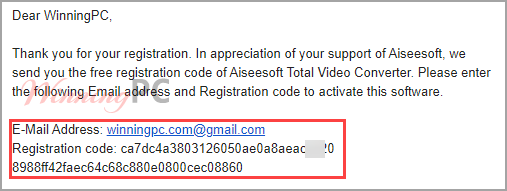
- Check your inbox for the confirmation email from Aiseesoft; it contains your free license code.
- Download and install Total Video Converter on your Windows PC from the link in the email.
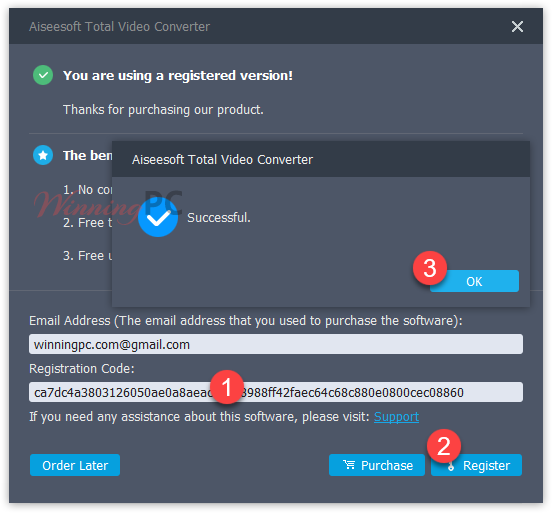
- Open the software, select Register, then enter the email address and license code from step 3 to activate your 1-year license.
Aiseesoft Total Video Converter review: what it actually does
Aiseesoft Total Video Converter has a genuinely broad core conversion engine. Over 1,000 supported formats covers everything from standard MP4s to camcorder-native MTS and MXF files that simpler tools often refuse to open. NVIDIA GPU acceleration keeps things fast even on large batches, and the one-click enhancement suite adds real value for phone or drone footage: upscaling, noise reduction, and stabilization all run without manual sliders. Where the product is thinner is the editing toolkit. Trim, crop, rotate, and watermark cover the basics, but this is not a timeline editor. If you need to assemble a rough cut or do color grading, you’ll still want a dedicated app.

Key features
- Convert 1,000+ video and audio formats, including 4K UHD and camcorder-native files (MTS, MXF, M2TS).
- NVIDIA GPU-accelerated conversion, up to 50x faster than CPU-only processing.
- One-click video enhancement: 4K upscaling, noise reduction, stabilization, and brightness correction.
- 2D-to-3D conversion with 14 supported 3D modes (Anaglyph, Side-by-Side, Top-and-Bottom).
- Device and software presets for iPhone, iPad, Android, Xbox, PlayStation, Adobe Premiere, DaVinci Resolve, and more.
- Edit video: trim, crop, rotate, merge, add watermark, adjust audio tracks, add subtitles.
pros & cons
more Aiseesoft Total Video Converter screenshots!


Frequently Asked Questions
Where is the best place to find promo codes for Aiseesoft Total Video Converter?
You can discover the latest deals, promotional offers, and valid coupons for this software directly on WinningPC. We regularly partner with the developer to ensure our pages provide reliable, working discounts alongside their official store promotions.
What is the maximum savings currently available for this conversion tool?
Right now, you can secure a massive 50% OFF discount through the exclusive deals featured on WinningPC.
Can I use this program to change my video files to 4K resolution?
Yes, it fully supports encoding and decoding for 4K UHD. You can easily upscale your standard HD or SD videos into stunning 4K, or convert a 4K file down to a lower resolution if needed.
Is it possible to prepare videos for playback on smartphones and tablets?
Absolutely. The software can format your media to be fully compatible with portable devices, including iPads, iPhones, Samsung Galaxy models, Xbox consoles, and more.
Does this tool include options to modify or trim my videos?
It features a complete set of editing tools. You can trim clips, merge multiple files into one, crop out black edges, add watermarks, and rotate sideways footage before exporting.
Am I able to fix shaky camera footage or remove background noise?
Yes, it functions as a video-enhancing software. With a single click, you can stabilize shaky recordings, remove annoying dirt-like spots, and automatically adjust brightness and contrast.
Can I rip the background music out of a video file?
Definitely. The software is capable of working with audio files, allowing you to easily extract the audio track from any video and save it in formats like MP3, FLAC, or WAV.
Does it support adding new subtitles to a movie?
You can easily insert, change, or delete subtitles in formats such as *.srt, *.ssa, and *.ass to ensure your video has clear and synchronized text.
System Requirements & Details
| Operating System | Windows 11, 10, 8.1, 8, 7, Vista, XP Mac OS X 10.12 or higher |
| Processor | 2GHz Intel or AMD CPU or above |
| RAM & Storage | 2GB or more |
| Supported Input | Video, Audio, GIF Images |
| Supported Output | Various video and audio formats for devices and media players. |
| Supported Devices | Apple Devices, Android Devices, Game / TV (Xbox, PS4, PS3, etc.), Editing software (Adobe Premiere, Avid Media Composer, Sony Vegas, etc.), Players (Windows Media Player, VLC, QuickTime) |
| Other requirements | NVIDIA GPU recommended for hardware-accelerated conversion (up to 50x faster) |





Just another Chinese illegal closed source user interface pirating a GPLv3 or undistributeable build of FFMPEG to do the actual conversion. I prefer to give my patronage to LEGAL user interfaces that correctly attribute the FFMPEG project and abide by their license terms like xmedia recode or handbrake. I certainly would NEVER PAY Chinese software pirates for their illegal GUIs.
Registration code: 18390203dbba1foboa27bc381485f2098955541f2ed73443
thanks so much, it’s a powerful video converter software!
send me code
The giveaway is over.
Hi,
The giveaway is available now!