Cathryn Lee
AliveColors lets you edit photos, create scalable graphics, and apply artistic effects by combining raster and vector tools. It also features AI image generation, neural filters, and smart objects for non-destructive editing.
AliveColors Business
Lifetime license for 1 PC | Free updates for 1 year from the date of purchase.
📄 Licensing & Support Details
- License Type: Business license (includes 1 year of free updates to all new versions of the software.)
- Free technical support.
- Secure checkout.
- The registration code will be sent to your email in minutes.
- Save more when you buy multiple licenses.
- We offer special discounts for schools, universities, libraries, and museums.
- AliveColors offers refunds within two months of purchase, primarily for technical issues. Please note that subscription plans are non-refundable.
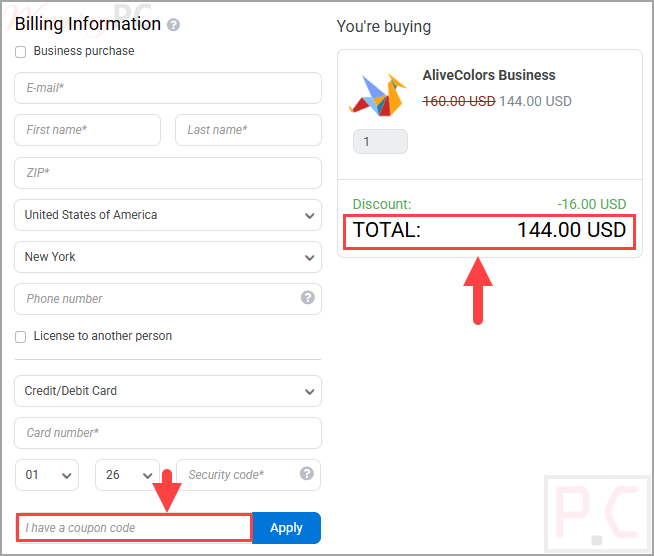
📝 How to apply
- To claim your discount, click ‘Copy Code’ in the box above.
- We’ll copy the code for you and send you to the checkout page to apply it.
AliveColors: In-Depth Review & Features

Key Features:
- AI Image Generation: Create custom visuals directly from text prompts within the program.
- Smart Objects & Adjustment Layers: Experiment with color and tone safely using non-destructive editing that protects your original files.
- Vector Shape Tools: Design elegant logos, layouts, and scalable graphics with professional precision.
- Advanced Photo Correction: Enhance images using noise reduction, full RAW file editing, portrait retouching, and focus correction.
- AI Object Selection: Automatically detect objects and use Refine Edges to isolate tricky boundaries like hair or fur.
- Batch Processing: Edit entire photo collections at once to save time and increase productivity.
- Built-in AKVIS Plugins: Access unique filters, neural networks, and artistic FX brushes to stylize your work.
Pros & Cons
More screenshots:


Frequently asked questions
Where can I find a coupon code for AliveColors?
The latest and best deals can be found on WinningPC, alongside the official software website or the developer’s social media channels.
Is this software free to use?
Yes, it is completely free if you are using it for personal or home projects.
Will this work on my Mac computer?
Yes, it is fully compatible with macOS, as well as Windows and Linux operating systems.
Can I edit RAW photos with it?
Yes, it includes full RAW file editing capabilities alongside extensive prepress and color correction tools.
Does it have artificial intelligence features?
Yes, it includes AI filters, text-to-image generation directly in the app, and intelligent object selection tools.
Can I make logos with this program?
Yes, it includes Vector Shape Tools specifically for creating scalable graphics, illustrations, and logos.
Is there a discount available for AliveColors?
Yes, WinningPC offers a coupon code AKV***TGG that provides a 10% discount on it.
System Requirements & Details
| Language Support | English, German, French, Spanish, Italian, Japanese, Chinese (Simplified), and Russian. |
| Operating System | Windows 7/8/8.1/10/11; macOS 10.12 (Sierra)-macOS 15 (Sequoia); Linux (Debian/Ubuntu/Red Hat/CentOS/Fedora/openSUSE). |
| Supported Input | RAW files, Many supported formats, Text prompts (for AI) |
| Supported Output | Raster images, Scalable vector graphics |