
On this page
AmoyShare ID3Genius Giveaway
AmoyShare ID3Genius
ID3Genius is an advanced ID3 tag editor that auto-fetches and updates music metadata in bulk. It can also add album art to MP3. Fast and accurate.
- Product
- AmoyShare ID3Genius
- Product website
- amoyshare.com
- License
- 1-Year
- Platform
- Windows 11/10/8
- Usage
- Non-commercial use only
- Updates
- No future upgrades
- Support
- Includes free technical support during the license period
Continue on amoyshare.com
The publisher handles registration and license delivery on its official website.
The limited-time giveaway!
The free license is no longer available.
Claiming your free ID3Genius key, step by step
- Open AmoyShare’s official ID3Genius giveaway page using the button below.
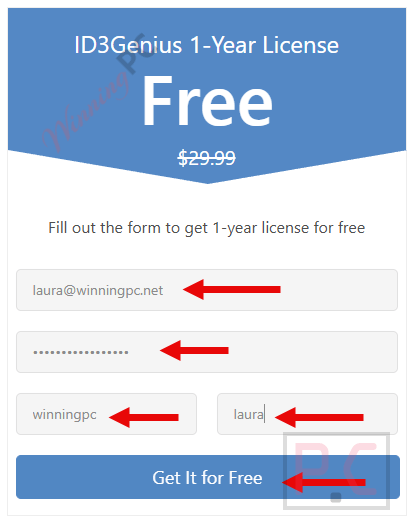
- Fill in the form to create your ID3Genius account, then click “Get it for Free”. Already have an AmoyShare account? Just log in with the email you registered.
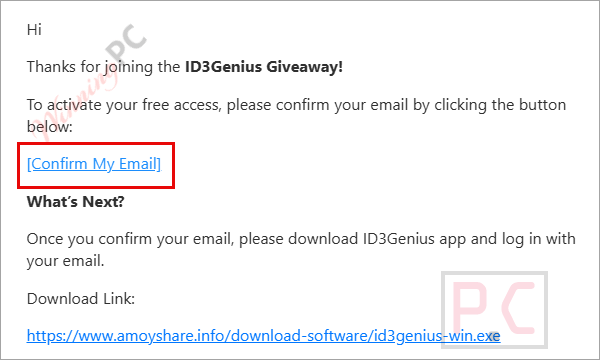
- Open the confirmation email from AmoyShare and click the link inside. Don’t skip this one: the license only attaches to your account after that click. Nothing in your inbox? Check Spam/Junk, or claim again.
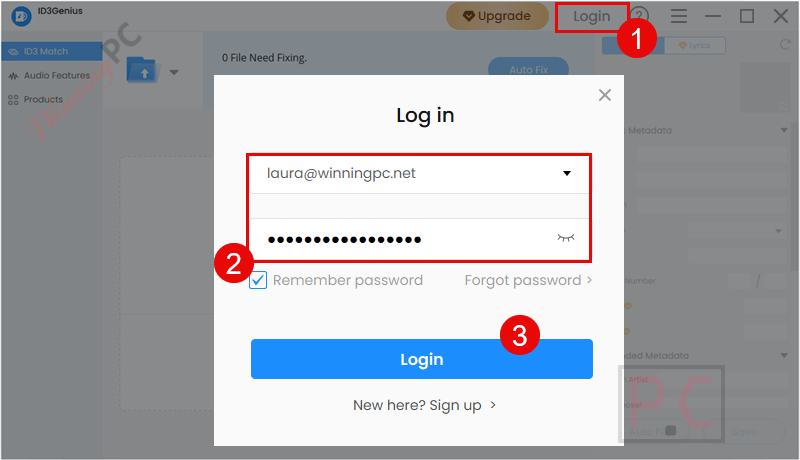
- Install ID3Genius for Windows, launch it and sign in with the same account. The 1-year license activates on its own, so there’s no serial number to paste.
Top Music Tag Editor Sofwtare Coupon Code

Zortam Mp3 Media Studio Pro - Lifetime License
1 PC License | Lifetime Free Version Updates

Is the AmoyShare ID3Genius giveaway safe and legit?
Yes. This is AmoyShare’s own promotion, and the license is tied to your account by the publisher rather than handed out as a shared key.
No crack or keygen
You install the official ID3Genius build and it activates when you sign in. Nothing is patched or repackaged.
Run by the publisher
The giveaway lives on AmoyShare’s own site, so no reseller or grey-market key is involved.
Your music stays on your PC
AmoyShare says files are processed locally and never uploaded to a server. Auto Fix does look song details up online, which is how it finds matches.
What you hand over
A name, email address and password to create the account. Use an email you’re happy to get AmoyShare’s mail at.
How well does AmoyShare ID3Genius work?
The Auto Fix button is the whole pitch, and it’s the right one. Rather than typing artists and album names by hand, AmoyShare ID3Genius checks each song against sources like MusicBrainz, Spotify and YouTube and fills the gaps for an entire folder in one pass. That’s where it earns its keep: ripped CDs and old downloads with blank tags. The audio analysis is the part that surprised us. Basic taggers don’t calculate key and Camelot values, and DJs who mix harmonically will actually use them.
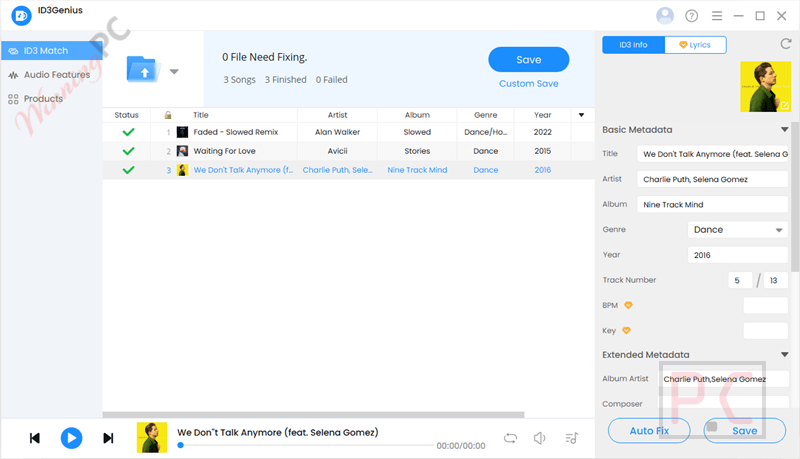
The limits are the usual ones for auto-taggers. Rare releases, bootlegs and your own recordings won’t be in any database, so you’ll still edit those by hand, and the unlimited preview plus one-click Reset make that low-risk. If you live in Mp3tag’s scripting and format strings, though, this is the friendlier tool, not the more flexible one.
Key features
- One-click fixes for whole folders: title, artist, album, genre and cover art matched from several online databases at once.
- Lyrics you can keep: search and embed lyrics, with optional per-line timestamps, or copy and download them.
- DJ-ready analysis: BPM, key, Camelot, energy, danceability, valence and loudness.
- Deeper tag fields: composer, ISRC, label, rating and album artist alongside the basics.
- Library housekeeping: sort by any tag, auto-sort into folders and batch-rename files from their tags.
What we think
Frequently Asked Questions
How can I get AmoyShare ID3Genius license key for free legally?
The safest and most reliable way to obtain a legal key is through WinningPC’s official partnership giveaway with AmoyShare.
Is ID3Genius safe to use?
Yes. It is a legitimate software tool. When downloaded via our links, it is free from viruses and malware.
Can I get free updates with the giveaway key?
Generally, giveaway versions do not include free upgrades to future major versions. For lifetime updates, consider the paid version.
Does ID3Genius work with FLAC and M4A, or only MP3?
Both work. AmoyShare lists MP3, FLAC, M4A, WAV and OGG. ID3 is really an MP3 standard (FLAC and OGG store tags as Vorbis comments, M4A uses MP4 tags), but you edit all of them the same way in the app.
Should I save tags as ID3v2.3 or ID3v2.4?
ID3v2.3 for most people. It handles album art, lyrics and Unicode, and almost every player and car stereo reads it. Choose v2.4 only if your software asks for it, because older devices may not read it properly.
What happens after the 1-year license expires?
The software will revert to a trial version or cease to function. You can then choose to purchase a lifetime license using our discount code.
System Requirements & Details
| Operating system | Windows 11/10/8; macOS 11 or later |
|---|---|
| Supported input formats | MP3, FLAC, M4A, WAV, OGG (AmoyShare says “and more” but doesn’t publish a full list) |
| Output | Saves tags back into the original file; no audio format conversion |
| Tag standards | ID3v1, ID3v2.3, ID3v2.4, Unicode |
| Other requirements | AmoyShare account; internet connection for activation and Auto Fix lookups |



Windows explorer can edit many media tags straight out of the box!
An always free alternative is taggscanner is from Russia which is a minor concern… but is available as portable and in x86 and 64bit editions and tested under Vista and it works. Discogs database access requires an account and authentication via a modern browser that is not available under Vista so the oauth URL will have to be performed under a different more modern version of windows and the oauth code taken back to the Vista machine… the freeDB is very inaccurate with incomplete data on many songs and many songs not even included. MusicBrainz is unreliable often returning a 503 temporarily unavailable error. But it’s free and unlimited usage. unlike this giveaway.