Chris Bruner
AMS PhotoGlory is a powerful photo editor application that lets us restore old photos, colorize B&W pics, and remove scratches from images. Whether we are fixing, repairing, or enhancing black-and-white photographs, we have the tools to breathe new life into our pictures and make them more beautiful and lively, even if we’ve never experienced edited photos before. With an intuitive interface and a rich set of features, including the Healing Brush, Clone Stamp, and Patch tools, we can fix stains, tears, rips, and splotches.
Besides, AMS PhotoGlory offers intelligent color correction to auto-enhance or manual control over brightness, contrast, color balance, and tone curves with a single click. More than 100 photo effects are provided; I can easily apply vintage filters, toning, and film-style presets or create my own custom look.
AMS Software PhotoGlory Coupon Oct 2026 (100% Working)
PhotoGlory Standard
70% off coupon code: regular price $27.5, discounted price $8.25
Key Features and Screenshots
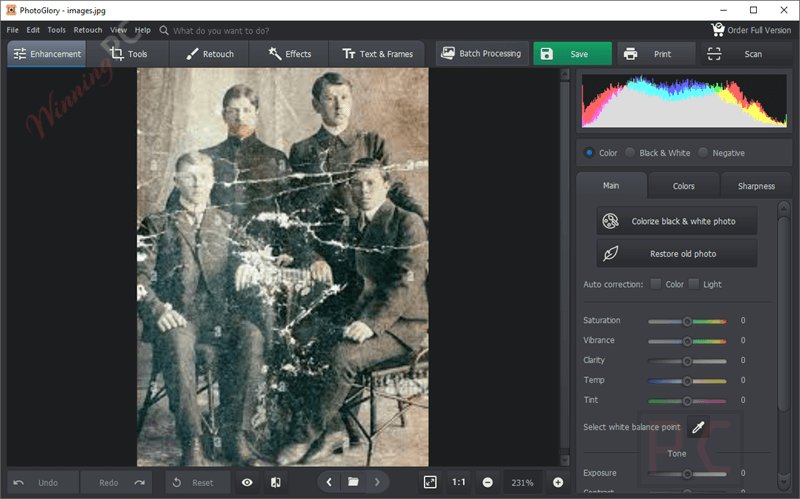
- Automatic colorization: Turn black-and-white photos into color with one click.
- Erase damage in seconds: Remove scratches, stains, ink splotches, and tears with smart tools.
- Pro-level color correction: Auto-fix lighting and color balance in one blow. Manual RGB channel tweaking via curves. Replace or enhance specific colors.
- Reconstruct torn photos: Assemble severely damaged or fragmented images and improve the overall composition with intuitive repair tools.
- Healing Brush: Automatically conceals minor defects with a single stroke.
- Clone Stamp & Patch Tool: Manually fix serious flaws like holes or large stains.
- Cropping grids: Trim torn edges and improve composition easily.
- Manual tone adjustment: Use a coloring brush and palette for precise color control.
- 100+ one-click effects: Choose from Vintage, Movie, Toning, Photographic Films, and more.
- Custom effects: Create and save your own presets.
- Vignette options: Add soft white or dramatic black borders for a retro feel.
- Restoration-Specific Tools: Noise reduction to clean up grainy textures and a sharpness enhancer to bring back detail in blurry areas.
- Auto enhancement: Adjust brightness, exposure, contrast, saturation, hue, and vibrance in a single click.
- Manual fine-tuning: Adjust luminance, replace colors, and sharpen details.
- Batch processing: Restore entire photo albums at once, saving time for large collections
How to Use (Step-by-Step Guide)
Step 1. Download & Install PhotoGlory
Click download, run the installer, and follow the on-screen prompts to complete installation.
Step 2. Import Your Old Photo
Click Open Photo on the main screen. Browse and select your scanned old photo (JPEG, PNG, BMP, or TIFF formats supported). Your image will now appear in the editing interface.
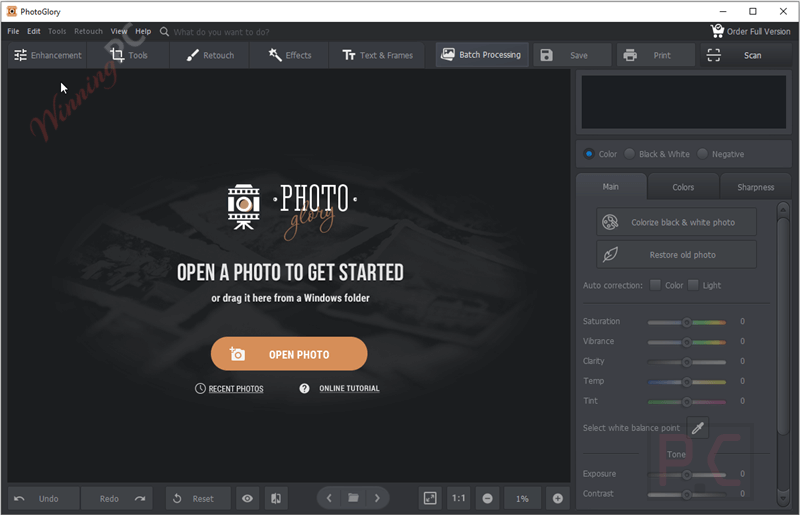
Step 3. Enhance Overall Quality
– Start with Auto Correction: Click the Enhance Photo tab. Choose Auto Correction to fix lighting and contrast.
– Fine-tune using sliders for: Brightness, Contrast, Saturation, Shadows, Temperature, etc.
– Use the Curves tool under Advanced to adjust tone and color more precisely (optional).
Step 4. Restore & Repair Damages
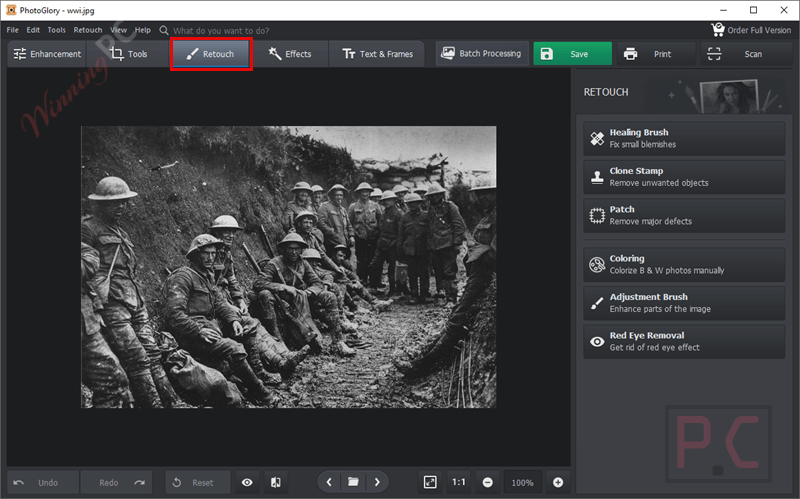
Go to the Retouch tab. Use:
– Healing Brush: Paint over small scratches, dust, or stains.
– Clone Stamp: Duplicate clean areas over rips, folds, or heavy damage.
– Patch Tool: Select a damaged area and drag to a clean part of the photo to fix it.
– Coloring: Colorize B&W photos manually
– Adjustment Brush: Enhance parts of the image
– Red Eye Removal: Get rid of the red eye effect.
Step 5. Crop & Adjust Composition
Open the Crop Tool. Choose from presets (e.g., 4:3, 16:9) or use freehand crop. Remove torn edges or improve photo framing.

Step 6. Apply Effects & Finishing Touches
Go to the Effects tab. Choose from 100+ one-click effects: Vintage, Retro, Sepia, Black & White, Toning, and more. Adjust effect intensity with a slider. Optional: Add a vignette for cinematic edges.

Step 7. Save or Export Your Restored Photo
Click Save or Export on the top menu. Choose format: JPG, PNG, TIFF, BMP. Select quality and output size. Save to your desired folder.
Frequently Asked Questions
Can PhotoGlory really colorize black & white photos automatically?
Yes! With just one click, PhotoGlory can automatically add natural-looking colors to grayscale images. You can further fine-tune the result using the built-in color brush for more precision.
What types of damage can PhotoGlory fix?
PhotoGlory can remove scratches, stains, dust, tears, ink spots, and other common forms of wear. Heavily damaged photos can be restored using tools like the Healing Brush, Clone Stamp, and Patch Tool.
Does PhotoGlory reduce the quality of my original photo?
No, the original file remains untouched. However, some users have noted that export resolution may be lower if using the trial version or exporting in certain modes. Always double-check settings before saving your final file.
Can I restore scanned printed photos using this software?
Yes. In fact, PhotoGlory is perfect for restoring scanned paper photos. Just scan your image at a high resolution (300–600 DPI) and import it into PhotoGlory for editing.
What’s the difference between the Standard, Deluxe, and Pro versions?
The Standard version offers essential tools like colorization and auto-enhancement. Deluxe adds more advanced repair tools, while Pro includes everything, including the “Restore Old Photo” feature. Check the comparison chart on the official site before purchasing.
How much does PhotoGlory cost, and are there discounts?
Pricing typically ranges from $19 to $39, depending on the version (Standard, Deluxe, or Ultimate). On WinningPC, you can use the coupon code AMS-ST***EB70 to save 70% off the regular price.
Why Choose WinningPC
- Why Trust? We are committed to providing 100% valid and verified coupon codes, so you can always shop with confidence.
- Found an Invalid Coupon or a Better Deal? If you encounter an invalid code or a better offer, please let us know. Our team updates all discount information regularly to ensure accuracy.
- Official Authorization: We only share authentic discounts from trusted software developers.
- No Fake Discounts: Unlike some sites, we never use misleading deals. The final price you see is the true discounted price.
- Secure Purchases: All transactions are processed on the official vendor’s website, ensuring authenticity and data protection.
- Extra Support: If you face order or vendor issues, contact us. We’ll liaise with the vendor to help resolve your problem quickly.
Technical Details
| Language Support | English, Français, Italian, Spanish, Swedish, and more… |
| Money Back Guarantee | 30-Day |
| Operating System | Windows 11, 10, 8, 7 |
| Shipping | Register code will be sent to your email in minutes |
| Subscription | Lifetime |
| Support Services | Tickets |