
On this page
How to claim your free AOMEI license
AOMEI Backupper Professional
An all in one backup restore software for Windows 11, 10, 8.1, 8, 7 to protect data and system, replace or upgrade hard disk for Windows desktops and laptops.
- Product
- AOMEI Backupper Pro v8.4
- Product website
- aomeitech.com
- License
- 1-Year
- Platform
- Windows 11/10/8.1/8/7
- Usage
- Personal use only
- Updates
- Free updates for 1 year
- Support
- No support
- Updated
- 2026-10-16
Continue on aomeitech.com
Share to reveal your free license code, then activate it inside the app.
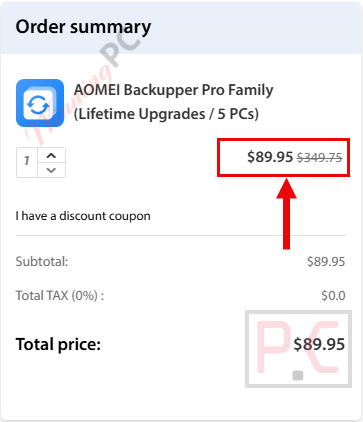
74% Off AOMEI Backupper Pro Family (Lifetime Upgrades / 5 PCs)
How to Get a License Key for Free
To keep things simple, just follow these steps:
- Completely remove the old version from your computer.
- Restart your PC, then install the new version.
- Activate the new version and enjoy!
- Download and install the software on your computer.
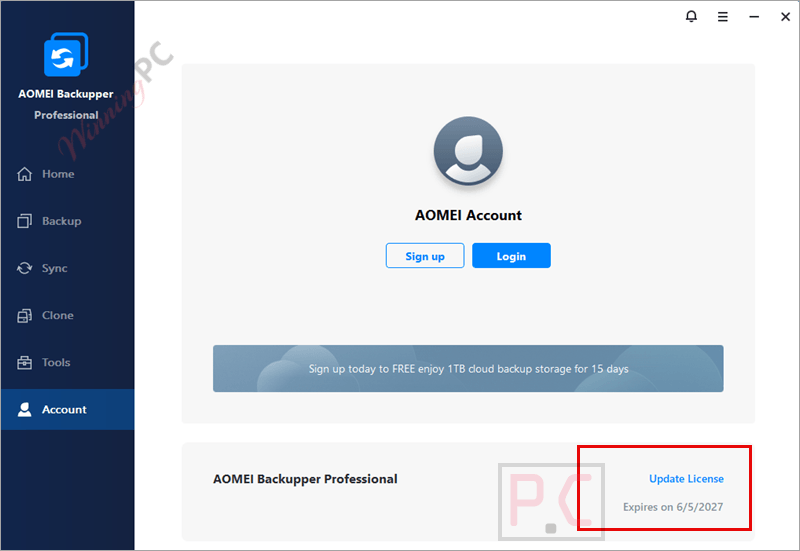
- Activate the full version of Pro in Menu> Register using the license key above for AOMEI Backupper Pro.
- Got it for 1-year free!


AOMEI Backupper Professional Plans & Coupon Codes

AOMEI 2026 Halloween promotion: Up to 80% OFF
Join AOMEI's Halloween Sale 2026 and save up to 80% on popular software and the new Family Bundle. Protect, manage, and recover your valuable data for less. The event ends on Nov 15th, 2026!
AOMEI Backupper Professional
5 plans · best save 80%
Professional Lifetime
1 PC / License | One-time fee | Lifetime use and upgrades
Professional Family Lifetime
5 PCs / License | One-time fee | Lifetime use and upgrades

Special Offer: Up to 80% Off ★ Best Deal
Limited Time Offer for Upgrade AOMEI Backupper to Lifetime Up to Today Only – Hurry!
📄 Licensing & Support Details
- License Type: Yearly and Lifetime licenses available
- Delivery: Instant license code delivery
- Support: Perpetual free technical support
- Refund Policy: 90-day unconditional money-back guarantee
- Security: 256-Bit SSL secure order protection
📝 How to apply
- Click the “Copy” button in the coupon section above to grab this deal.
- The code will be applied automatically, and you’ll be taken to the checkout page to enjoy the discount.
In-Depth Review & Features
AOMEI Backupper Professional is a Windows backup, sync, and disk cloning software designed to protect files, operating systems, and entire drives. It helps users create backups, sync folders in real time, and clone disks or systems for upgrades and disaster recovery.

Key Features
- Backs up files, folders, entire disks, and specific partitions manually or automatically.
- Monitors directories to sync newly added, modified, or deleted files in real-time.
- Executes daily, weekly, or monthly scheduled backups using incremental or differential methods.
- Triggers specific tasks based on system events or when a USB is plugged in.
- Deletes old image files automatically based on your set backup cycle or count to save disk space.
- Creates WinPE bootable media to boot and restore a PC when Windows fails to load.
- Runs pre-assigned programs or scripts before and after operations.
- Sends email notifications detailing the success, failure, or required human intervention of a task.
Pros & Cons
More AOMEI Backupper Professional screenshots!
Backup: start your data insurance journey with backup Windows (create an image file) or back up hard disks, partitions, or any files/ folders:

Sync: Provide multiple modes to better synchronize your files

Clone: Clone or migrate your system to SSD or other disks, clone a hard disk drive/ a partition to another

Tools: Manage your system and data efficiently with common tools and other backup tools (note: some tools such as “Create Portable Version” are only on higher editions – Technical and Server)

Frequently Asked Questions
What is AOMEI Backupper Professional?
It’s a PC backup and recovery software offering system, disk, file backup, and clone features.
What are the key features of AOMEI Backupper Professional?
Features include system and disk cloning, file and folder backup, real-time and mirror sync, and the ability to create bootable media.
Does it offer any tools for data recovery on failing disks?
It includes features for cloning failing disks to prevent data loss.
Can I schedule backups with AOMEI Backupper Professional?
Yes, it allows the scheduling of backups with flexible options like daily, weekly, and event triggers.
Is there a discount for AOMEI Backupper Professional?
Yes, using coupon code AOQ***60 from WinningPC provides up to 80% off.
How can I get a free license code for AOMEI Backupper Pro?
To obtain a free one-year license code for AOMEI Backupper Pro, you can visit the product page on WinningPC. There, you can check for available giveaways and copy the license code provided.
System Requirements & Details
| Feature | Specifications |
|---|---|
| Language Support | English, Français, Italian, Portuguese, Russian, Spanish, Swedish, and more… |
| Operating System | Windows 11, 10, 8.1, 8, 7 |
| Subscription | 1-Year, Lifetime |
| Supported Input | Files, folders, partitions, disks, system images |
| Supported Output | Backup images, cloned disks, synced folders, bootable recovery media |




Hi
The provided activation key is invalid , I keep receiving an error message on screen which says :
” Registration failed. Your license code is invalid .. ”
Please advise.
Kind regards
Please provide a new license code.
dear admin
The provided key does not activate the app , I have tried it many times on AOMEI Backupper Pro v8.4
and just got an error message which says :
Registration failed. Failed to verify license code , please try again later….
Same for me !
When I download in my Firefox v152.0.4 web browser in my updated 64-bit W10 Pro. PC, I get:
”
ExpiredRequestRequest has expired
“
Sorry about that. The download link on our site is only valid for 15 minutes after the request is made. If the link has expired, please submit another request to receive a new download link.
This Giveaway was taken from here:
https://www.computerbild.de/download/Aomei-Backupper-Pro-Kostenlose-Vollversion-fuer-1-Jahr-23541889.html
Direct download link:
https://c.computerbild.de/red_downloads/11614641/Aomei_Backupper_Pro.zip
The provided registration key does not work even after I reinstalled the app ! There is no way to register that key , any new key ?
See here: https://www.chip.de/downloads/Aomei-Backupper-Pro-Vollversion_165052495.html
And try the key I posted bellow: AMAB-UXXOD-L9PRT-UNDRJ
Maybe it still works.
Hi, did you use this registration key with the giveaway installer that we provided?
Hi
Every time I clicked on the link ( Installer ) which you provided but I received this error :
This XML file does not appear to have any style information associated with it. The document tree is shown below.
ExpiredRequestRequest has expired
Sorry for the inconvenience! We’ve made a note of this error and will fix it ASAP. Thank you.