
On this page
Ascomp PDF-compress Professional Giveaway
Ascomp PDF-compress Professional
Compress PDF files, reduce file sizes and prepare documents efficiently for sharing with PDF-compress.
- Product
- Ascomp PDF-compress Professional
- Product website
- ascompsoftware.com
- License
- Lifetime
- Platform
- Windows 11, 10, 8.1, 8 7, Server 2022/2025
- Updates
- Free updates for one month
- Support
- Free tech support for one month
Continue on ascompsoftware.com
The publisher handles registration and license delivery on its official website.
The limited-time giveaway!
The free license is no longer available.
Ascomp PDF-compress Professional Plans & Coupon Code

Ascomp PDF-compress Pro
Lifetime license (lifelong use; including updates, download & support for two years)

ASCOMP All-in-One Pack
Free update & Free technical customer for 24 months

Is the PDF-compress giveaway legit, and is it safe to install?
Yes. This is ASCOMP’s own promotion, and the software comes straight from the publisher’s customer area.
Nothing cracked or patched
You download the official installer from your own ASCOMP account and activate it with your Customer ID. No keygen, no modified files.
Straight from the publisher
ASCOMP is a German developer that has been selling Windows utilities since 2003, and it runs both the giveaway and the shop itself. There’s no reseller or grey-market key involved.
Your PDFs stay on your PC
Compression happens locally and nothing gets uploaded, which matters when the files are contracts, invoices or business records.
14-day refund on the paid license
If you buy with the coupon and it doesn’t suit you, ASCOMP refunds the full amount within 14 days, no reason needed. The giveaway costs nothing, so there’s no risk there either.
How to Get Ascomp PDF-compress Professional Key Free
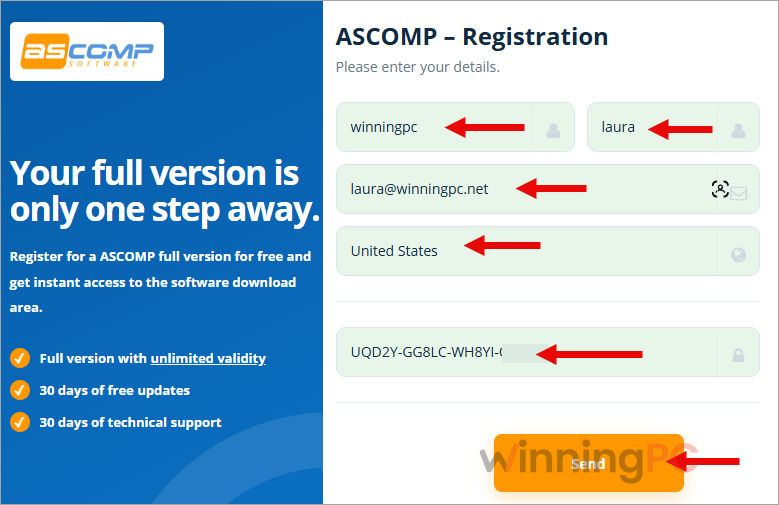
- Fill in the giveaway form on this page with your details and an email address you can actually check.
- Open the email from ASCOMP. It contains your ASCOMP login: a Customer ID and a password. If it hasn’t arrived after a few minutes, look in your spam folder.
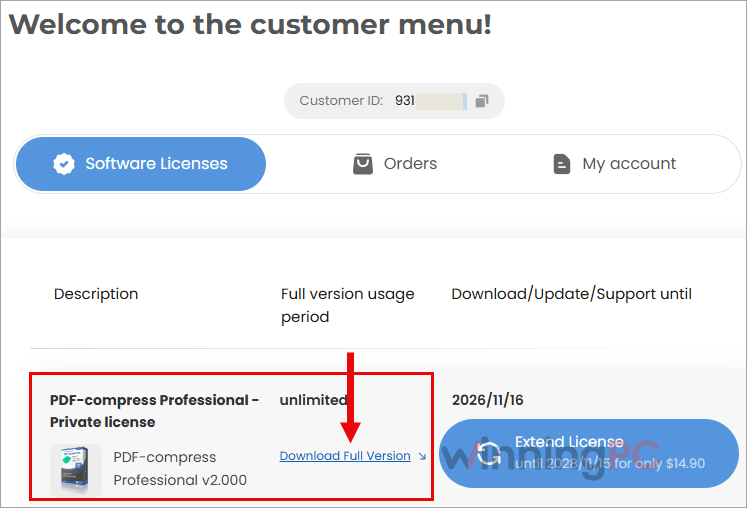
- Log in to the ASCOMP customer area with those details. Your registered full version of PDF-compress Professional is waiting there, so download it and install it on your PC.
- When the program asks for registration, enter your Customer ID. That’s your license, and it doesn’t expire.

How well does PDF-compress actually shrink files?
Ascomp PDF-compress Professional’s headline claim is “up to 95%”, and you should read that as the best case. ASCOMP’s more useful number is the average: almost 50% across a test of more than 1,000 random PDFs. That’s the realistic expectation. Image-heavy and scanned documents give the software the most to work with, since image recompression is where most of the savings come from, while a text-only PDF simply has less fat to trim. What I like is the control. Leave “Adjust image quality” unticked and images keep their original quality. Tick it when a file absolutely has to squeeze under an email limit and you can live with softer scans. And because it all runs offline, it’s a better fit for sensitive paperwork than any free compression website.

Key features
- Lossless image recompression using JBIG2/JPEG2000 and MRC optimization, so scans get smaller without visibly losing sharpness.
- Cleanup of dead weight: removes blank pages, annotations and redundant data, and packs embedded fonts and metadata.
- Batch processing through a three-step wizard (select files, configure, set output), handy when you’re shrinking a whole archive folder at once.
- Safe output options: save a renamed copy tagged “[compressed]”, send results to a different folder, or save in PDF 2.0, so your originals stay untouched.
- Web view optimization for PDFs you plan to offer as downloads on a website.
What we think
More Ascomp PDF-compress Professional screenshots!


Frequently Asked Questions
Is the PDF-compress Professional giveaway really free?
Yes. You pay $0 and get a lifetime license for non-commercial use. The only cost is filling in the form with a working email address.
Do I get a license key?
No, not a classic serial key. ASCOMP emails you a Customer ID and password, and the Customer ID is what activates the software. Keep that email, because you’ll need it again if you reinstall Windows.
Can I use the giveaway version for work?
No. The giveaway license is non-commercial only. If you compress PDFs for clients or a business, ASCOMP offers commercial licensing, including a company license that covers five users on up to five computers.
What happens when the one month of updates ends?
The software keeps working. The license is lifetime, so you simply stop receiving new versions and free technical support after the first month. If staying current matters to you, the paid license with the coupon includes two years of both.
Will compressing my PDFs make them look worse?
It doesn’t have to. Leave the “Adjust image quality” option unchecked and PDF-compress recompresses images without lowering their quality. Only tick that option when you need the smallest possible file and can accept softer images.
How much smaller will my PDFs get?
Roughly half, on average. In ASCOMP’s own test of more than 1,000 random PDFs the average reduction was almost 50%, with up to 95% possible on the right file. Scanned and image-heavy documents shrink the most, while text-only PDFs shrink far less.
Does it work on Windows 11 and ARM laptops?
Yes. PDF-compress supports Windows 11, 10, 8.1, 8 and 7, Windows Server 2012 through 2025, and Windows on ARM devices.
System Requirements & Details
| Requirement | Details |
|---|---|
| Operating system | Windows 11, 10, 8.1, 8, 7; Windows Server 2012, 2016/2019, 2022/2025 |
| Processor | Intel-compatible, Windows on ARM |
| Memory (RAM) | 2 GB minimum, 4 GB recommended |
| Disk space | 50 MB |
| Supported input formats | |
| Supported output formats | PDF (optional save as PDF 2.0) |
| Interface languages | English, German, Spanish, Italian, Chinese, Greek, Russian, Arabic |
| Current version | 2.000 (released June 22, 2026) |
| Internet connection | Not needed to compress files; needed to download the installer from your ASCOMP account |




All of the license keys provided above (#1 to #3) do not work!