
 Laura Marano
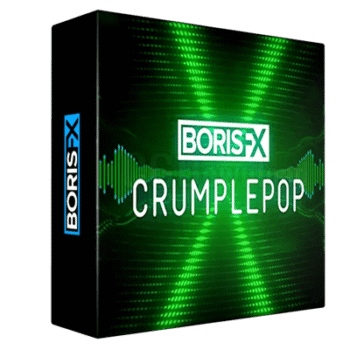
Boris FX CrumplePop is the ultimate audio plugin toolkit that is designed to enhance the sound quality of recordings, making them sound clean and professional. With its help, you can remove background noise, cut out echo, and improve voice clarity in just a few clicks, whether you’re working on podcasts, videos, Zoom calls, or on-location interviews. It works seamlessly with all major editing platforms, like Premiere Pro, Final Cut Pro, Pro Tools, DaVinci Resolve, Audition, and more. It provides you with everything you need for audio editing and production without the need for a studio setup.
How to Download CrumplePop Plugin for Free?
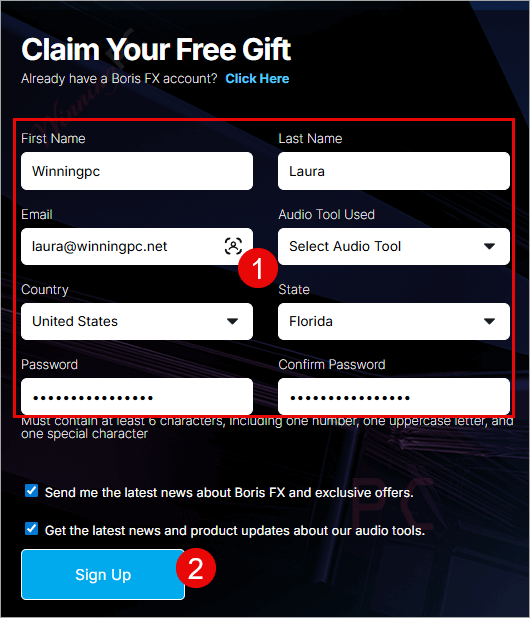
Click on the giveaway link below, and insert your information to claim your free gift from Boris FX.
- Product name: CrumplePop Starter Pack
- Website: https://borisfx.com/products/crumplepop/
- License type: lifetime
- Platform: Windows
- Giveaway: CrumplePop giveaway link
- Download: n/a
After signing up successfully, please verify your email address by clicking the link in your inbox.
The CrumplePop Starter Pack is now available. RustleRemover and PopRemover, two of the top AI audio products, are included.

Getting Started:
- Download the Boris FX Hub above.
- Click ”install a free watermarked trial of CrumplePop.”
- Select the VST3 option, and then open your favorite host app, such as VEGAS Pro.
- Once open, drag & drop CrumplePop onto the clip, and adjust the knob control. It’s that easy!
Main Features
- AI-Powered Audio Cleanup: Instantly remove noise, echo, hiss, hum, and other distractions.
- Voice Enhance: Improve clarity and richness of voice recordings for natural, professional sound.
- Standalone SoundApp: Desktop app for quick audio cleanup, leveling, and clarity fixes.
- EchoRemover: Remove echo and reverb from untreated rooms.
- AudioDenoise: Eliminate background hiss, electrical noise, and mic bumps automatically.
- WindRemover: Remove wind noise from outdoor recordings.
- TrafficRemover: Reduce car and street sounds in your audio.
- ClipRemover: Restore clipped or distorted recordings.
- Levelmatic: Automatically balance and smooth out audio levels.
- PopRemover: Remove plosive “p” and “b” sounds.
- RustleRemover: Cancel lavalier mic rustle noise.
- Seamless Integration: Works with Premiere Pro, Final Cut Pro, DaVinci Resolve, Pro Tools, Audition, Logic, GarageBand, and more.
- Private and secure: All processing happens locally on your device; no cloud uploads.
Technical Details
| Language Support | English, Français, Italian, Spanish, Swedish, and more… |
| Money Back Guarantee | 15-Day |
| Operating System | Windows 10/11 64-bit (32-bit isn’t supported) MacOS 11.0 or Later |
| Shipping | Register code will be sent to your email in minutes |
| Subscription | 1-Month, 1-Year, Lifetime |
| Support Services | Forum, Tickets |




I have uninstalled it, the giveaway does not apply to me, trial. Cubase user here.
Does it work with Audacity?
Hi,
No. As I know, Boris FX CrumplePop plugins don’t work with Audacity.
“After signing up successfully, please verify your email address by clicking the link in your inbox.
Boris Fx Crumplepop Giveaway Page
The CrumplePop Starter Pack is now available. RustleRemover and PopRemover, two of the top AI audio products, are included.
Get Boris Fx Crumplepop For Free
Getting Started:
Download the Boris FX Hub above.
Click ”install a free watermarked trial of CrumplePop.”
Select the VST3 option, and then open your favorite host app, such as VEGAS Pro.
Once open, drag & drop CrumplePop onto the clip, and adjust the knob control. It’s that easy!”
THAT’S NOT EASY! It’s laborious, space and resource wasting information intrusive just to get a VST3 plugin!