Chris Bruner

If you’ve ever tried to open a high-res MKV or an old AVI file only to be met with “Codec not supported” or a stuttering mess, you know the frustration. You shouldn’t have to download shady codec packs just to watch a movie. Cisdem Video Player is the “play everything” solution that actually works, and we’ve secured the best prices available right now.
Status: ✅ Active & Verified
Last Checked: October 2026
Offer: Up to 57% Off Lifetime Licenses
For Mac:

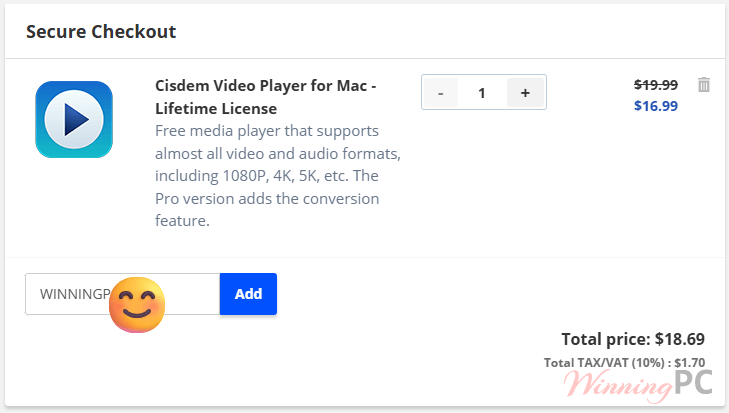
Cisdem Video Player for Mac - Lifetime License
15% Off coupon code, regular price $19.99, discounted price $16.99
Cisdem Video Player for Mac - Lifetime License for 2 Macs
40% Off coupon code, regular price $39.98, discounted price $23.79
Cisdem Video Player for Mac - Lifetime License for 5 Macs
57% Off coupon code, regular price $99.95, discounted price $42.49
For Windows:
Cisdem Video Player for Windows - Lifetime License
15% Off coupon code, regular price $19.99, discounted price $16.99
Cisdem Video Player for Windows - Lifetime License for 2 PCs
40% Off coupon code, regular price $39.98, discounted price $23.79
Cisdem Video Player for Windows - Lifetime License for 5 PCs
57% Off coupon code, regular price $99.95, discounted price $42.49
Summary table
| License Type | Coupon Code | Discount | Final Price |
| Lifetime (1 PC/Mac) | WinningPC*** | 15% OFF | $16.99 |
| Lifetime (2 PCs/Macs) | WinningPC*** | 40% OFF | $23.79 |
| Lifetime (5 PCs/Macs) | WinningPC*** | 57% OFF | $42.49 |
How to Claim Your Discount
- Select your plan & click the link: use our exclusive activation link to head to the official store.
- Confirm the drop: the discount is applied automatically at checkout or copy/paste the coupon code on our site.
- Instant activation: your license key hits your inbox immediately.
What is Cisdem Video Player?
Think of this as the refined, professional version of VLC. It’s a lightweight media player for Windows and Mac that prioritizes smoothness. Cisdem Video Player doesn’t care if you’re throwing a 30GB 8K raw file or a grainy 3GP clip from 2005 at it—it just plays.

Who is it for?
- Movie Buffs: Who want 4K/8K HDR playback without the “laggy” buffering.
- Content Creators: Who need to quickly preview raw footage in various formats.
- Casual Users: Who are tired of Windows Media Player or QuickTime failing to open common files.
Why It’s Better Than Default Players
- Hardware Acceleration (The “No-Lag” Guarantee)
Most players rely solely on your CPU, which leads to overheating and stuttering during 4K playback. Cisdem uses your GPU (Graphics Card) to do the heavy lifting. This means you can watch 8K footage while keeping your laptop cool and quiet. - The “Separate Mode” for Multitasking
Unlike most video players that lock your playlist and controls into one window, Cisdem lets you detach them. You can keep the video window on one monitor and your playlist/controls on another—perfect for organizing a long night of binge-watching. - Pro Conversion (The Big “Why” for the Paid Version)
The Pro license allows you to turn that unplayable MKV file into an MP4 optimized for your iPhone 15/16, Samsung Galaxy, or even YouTube. It’s a “set and forget” tool for people who need their media to be portable. - Smart Subtitle Handling
It doesn’t just load subtitles; it finds them. If you have a .srt file in the same folder, Cisdem detects it automatically. You can also switch between multiple audio tracks (e.g., Director’s Commentary) with a single click.
Pros & Cons
More screenshots


Frequently Asked Questions
Is the playback really free?
Yes. You can watch any video format at any resolution for $0. The “Pro” license (which our coupon covers) is only required if you want to convert those videos to other formats or devices.
What is the refund policy?
Cisdem offers a 30-day Money Back Guarantee. If the software doesn’t play your specific files or crashes on your system, you can get a full refund.
Can I use one license on both Mac and Windows?
No. Licenses are platform-specific. If you buy a Mac license, it will only activate on macOS.
Technical Specifications
| For Windows | OS: Windows 10, Windows 11 (64-bit). Processor: 1GHz Intel/AMD or above. RAM: 512MB (Though we recommend 4GB for 4K). Formats: MP4, MKV, AVI, MOV, ISO, H.265/HEVC, and more. |
| For Mac | OS: macOS 10.10 through macOS 15.0 Sequoia. Processor: Intel or Apple Silicon (M1/M2/M3) native support. Formats: All standard video plus Apple-specific formats like ProRes. |