

Coolmuster PDF Merger Giveaway
Coolmuster PDF Merger
Combine multiple PDF files into one document and maintain all original layouts, text, hyperlinks, etc.
- Product
- Coolmuster PDF Merger
- Product website
- coolmuster.com
- License
- 1-year
- Platform
- Windows 11/10/8/7
- Installer
- cool-pdf-merger.exe
- Usage
- Non-commercial only
- Updates
- No future upgrades
- Support
- No support
- Updated
- 2026-09-23
Continue on coolmuster.com
Share to reveal the official giveaway page, then register there to receive your license.
This giveaway ended on .
50% Off Coolmuster PDF Merger - Lifetime License(1 PC)
Coolmuster PDF Merger Coupon Code Oct 2026
Coolmuster PDF Merger
3 plans · best save 50%
1 Month (1 PC) ★ Best Deal
One License for 1 PC | All Features for 1 Month
You may also like

All Products Bundle, Lifetime (Windows)
One-time payment, permanent lifetime license | Free lifetime software upgrades
All Products Bundle, Lifetime (Mac)
One-time payment, permanent lifetime license | Free lifetime software upgrades
Is this Coolmuster PDF Merger giveaway safe and legit?
Yes, completely. Coolmuster is an established Windows software publisher, and this offer runs through their official giveaway program – not a grey-market reseller, keygen site, or third-party key shop.
No crack or keygen
You download Coolmuster’s official software build and activate it with a genuine publisher-issued registration code. Nothing is patched or repackaged.
Official publisher giveaway
The free key is issued directly by Coolmuster, the same company behind the product. It uses the same activation system as paid licenses.
Secure HTTPS checkout
If you choose a paid plan instead, payment is handled on Coolmuster’s own encrypted store. Your card details never touch WinningPC.
30-day money-back guarantee
Paid licenses are refundable within 30 days. The giveaway key is free, so there is no financial risk either way.
How To Get the Coolmuster PDF Merger License Key Free?
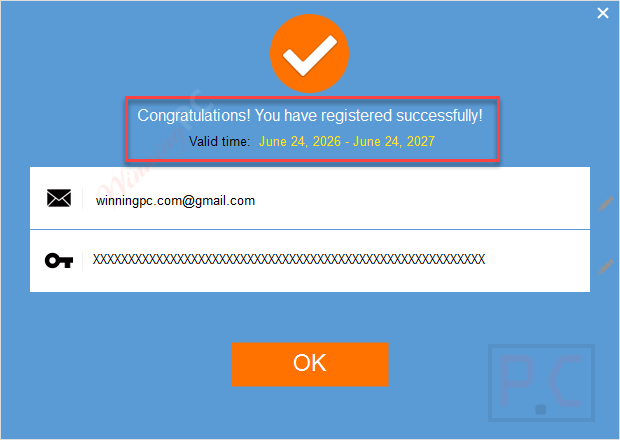
- Please enter your name, email address, and captcha on the Coolmuster PDF Merger giveaway page before clicking the “Submit” button. After that, you’ll get your registration code.
- To download the software for free, click the link above. Use your free license code to register it after installing it on your computer.
- Got it for 1 year free!


How well does Coolmuster PDF Merger work?
Coolmuster PDF Merger does one thing and keeps its scope deliberately narrow. The quality preservation is the real selling point: merged output retains text styles, embedded images, graphics, tables, and hyperlinks from every source file, without recompressing or reflowing the content. Batch import and the drag-to-reorder preview screen make multi-file projects manageable, and a non-technical user should be productive within minutes. The limitation worth knowing upfront is that this is strictly a merge utility. Splitting, compressing, annotating, or editing PDFs falls outside its scope entirely. If you need those capabilities alongside merging, you will want a second tool (or one of the free options in the comparison below). Windows only, too.

Key features
- Batch PDF merging. Combine as many PDF documents as you need in a single operation, with no file-count cap specified in documentation.
- PDF and image merging. Mix image files alongside PDFs in the same merge, with the output preserving original quality throughout.
- Drag-to-reorder preview. Arrange source files in any preferred order using the built-in preview screen before you merge.
- Multilingual support. Handles PDFs in any language, including non-Latin scripts, without limitation.
- Standalone operation. Runs without Adobe Acrobat or any additional PDF viewer installed on your system.
What we liked, what we didn’t
more More Coolmuster PDF Merger screenshots!


Common questions about Coolmuster PDF Merger
Where is the best place to find active promo codes for Coolmuster PDF Merger?
If you are looking for active deals or promotions, WinningPC is your go-to source. We regularly partner with software developers to provide verified discounts alongside their official website offers.
How can I get the absolute lowest price on this PDF tool right now?
You can currently claim a massive 50% OFF discount exclusively through WinningPC. Just use the coupon provided on this page to lock in your savings.
Will I need to purchase an Adobe Acrobat license to make this work?
No. The software is a completely standalone solution, meaning it does everything independently without relying on Adobe products.
Am I able to rearrange the order of my pages before they are joined?
Yes. Once you import your files, you can freely drag, customize, and preview the exact sequence before you hit the merge button.
If my PDFs have clickable web links inside them, will they break after merging?
No. The tool is engineered to preserve all original elements, including active hyperlinks, tables, and graphics, ensuring the final document is fully functional.
Can it handle really large documents without crashing?
Yes. The software features efficient handling mechanics specifically built to join large, heavy PDF files without sacrificing performance or speed.
Can I rename the final document before saving it to my hard drive?
Yes. You have complete freedom to rename your newly merged file right before the process is finished.
System Requirements & Details
| Feature | Specifications |
|---|---|
| Language Support | English, Français, Italian, Spanish, Swedish, and more… |
| Operating System | Windows 11/10/8/7 |
| CPU/Processor | 750MHz Intel or AMD CPU |
| Hard Disk Space | 1GB and above |
| RAM | 512MB or above |
| Supported Input | |
| Supported Output |



Yet another rented single function PDF program making use of 3rd party converter binaries… rather than creating just one all encompassing PDF tool that does everything the same 3rd party converter can do. trying to milk their customers for every penny they can.
Try https://giveaway.tickcoupon.com/softdiv-pdf-split-and-merge-key-free/ it does what this does and is a non-expiring license.