Laura Marano

Site Visualizer Pro is a heavy-duty website crawling tool that excels at generating visual sitemaps and mapping out outbound/inbound link structures. If you are doing manual SEO audits and getting bogged down in messy spreadsheets, finding a visual representation tool is critical.
- Status: ✅ Active & Verified
- Last Checked: October 2026
- Offer: 10% Off
- Code: WP**C10
For Single User License:

Site Visualizer Pro (Single User License) 1 Month
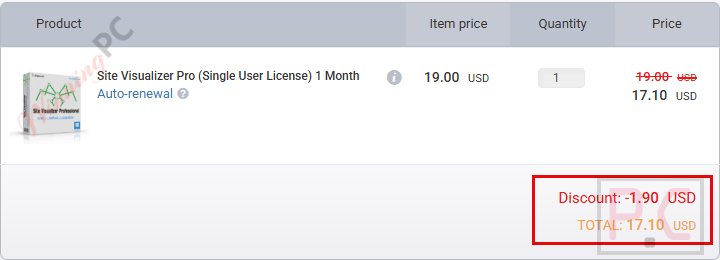
10% coupon code: regular price $19, discounted price $17.1
Site Visualizer Pro (Single User License) 6 Months
10% coupon code: regular price $59, discounted price $53.1
Site Visualizer Pro (Single User License) 12 Months
10% coupon code: regular price $99, discounted price $89.1
For Site License:
Site Visualizer Pro (Site License) 1 Month
10% coupon code: regular price $199, discounted price $179.1
Site Visualizer Pro (Site License) 6 Months
10% coupon code: regular price $599, discounted price $539.1
Site Visualizer Pro (Site License) 12 Months
10% coupon code: regular price $999, discounted price $899.1
For Company License:
Site Visualizer Pro (Company License) 1 Month
10% coupon code: regular price $79, discounted price $71.1
Site Visualizer Pro (Company License) 6 Months
10% coupon code: regular price $239, discounted price $215.1
Site Visualizer Pro (Company License) 12 Months
10% coupon code: regular price $399, discounted price $359.1
📄 Licensing & Support Details
- 1-month/6-month/12-month Subscription
- Price starts at $19
- Instant license delivery via Email
- Free & fast support that really helps
- Secure checkout
📝 How to apply
- To protect this exclusive deal from coupon-scraping bots, please activate the 10% discount using our direct link above.
- The code is auto-applied at checkout. (I highly recommend checking our price proof screenshot to ensure the 10% drops your total to exactly $17.10 before completing your purchase.)
What is Site Visualizer Pro?
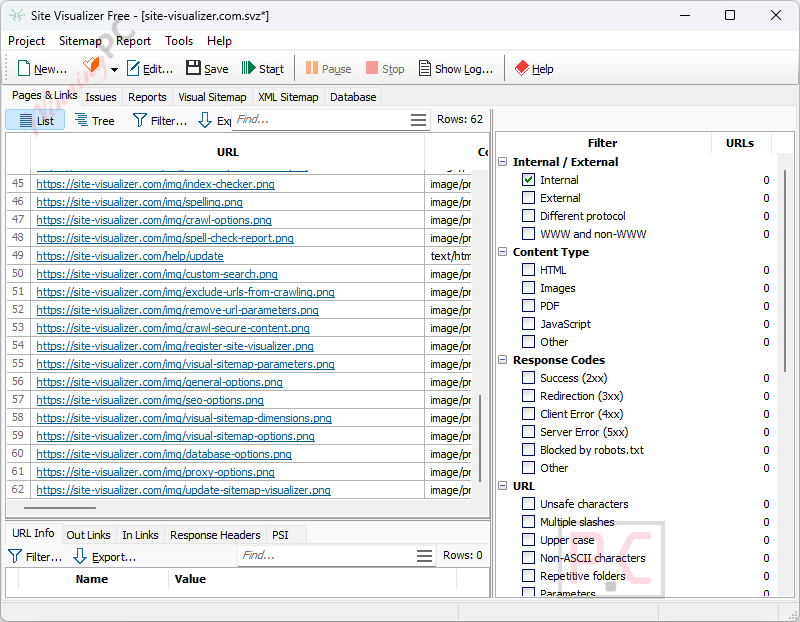
Site Visualizer Pro is a comprehensive website crawler designed specifically for webmasters and SEO specialists. It visually graphs a site’s architecture, displaying pages and links in both tabular forms and downloadable infographics. Whether you want to check your own site for broken links and duplicate content, or run a competitive analysis on someone else’s website, this tool pulls all the necessary on-page SEO parameters into one organized dashboard.
In-Depth Review & Features
In my experience testing SEO spiders, many of them return a massive data dump and leave you to figure out the hierarchy. Site Visualizer Pro takes a different approach.
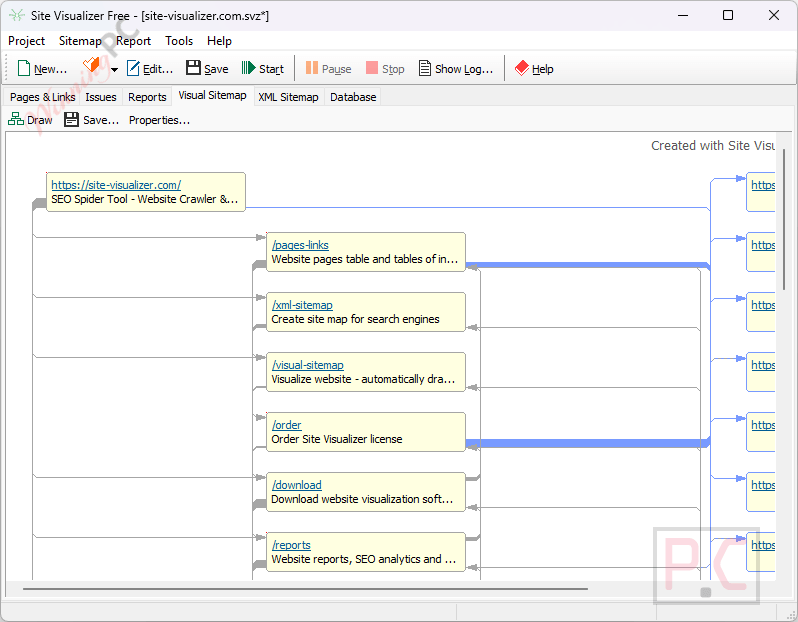
The standout feature for me is the Visual Sitemap Generation. By just clicking the “Draw” button, the software automatically maps out the site as an infographic, plotting pages and how they link to one another. I found this incredibly useful when explaining site architecture to clients—it’s much easier to show them a picture than a spreadsheet.
I also appreciated the Customizable Reporting System. While it comes with predefined reports (like Client Error Responses for 4XX broken links), you can write your own reports using SQL to query its local database. Amazingly, if you don’t know SQL, the developers offer to write a custom report for you at no charge.
Other core features include:
- Complete On-Page SEO Overview: Gathers titles, meta tags, H1-H6 headings, lengths, response codes, and image ALT text into an easy-to-read “Pages” table.
- Duplicate Content Checker: Quickly isolates duplicate titles, descriptions, and headings.
- Import Wizard: Lets you combine crawled data with external sources like Google Analytics and Webmaster Tools.
- Command Line Spider: You can run it in batch mode to automate daily routines like updating your XML sitemap.
Pros & Cons
More Site Visualizer Professional screenshots:
Report

Visual Sitemap
XML Sitemap
Frequently Asked Questions
Where can I find the best coupon code for Site Visualizer Pro?
WinningPC is currently the best place to find the verified coupon code for this product, offering the highest discount rate on the market.
Can I use Site Visualizer to create visual infographics of my site?
Yes. By clicking the “Draw” button, the program automatically visualizes the site’s structure as a set of pages and links, which you can save to an image file to share with clients or colleagues.
What if I need a specific report that isn’t included by default?
Site Visualizer uses a local database and SQL. If you know SQL, you can write your own reports. If you don’t, you can send the developers a report example, and they will code it for you at no charge.
Can this tool find broken links?
Yes. Every link found during a crawl is checked. You can double-click the “Client Error Responses” report to view all broken links (internal and external) and see exactly which page they originate from.
How does it handle duplicate content?
You can check if your site contains duplicate page titles, meta descriptions, H1-H6 headings, or link text anchors by using the corresponding duplicate content reports.
Can I combine Site Visualizer’s data with Google Analytics?
Absolutely. Using the Import Wizard, you can blend crawled data with external data from services like Google Analytics or Webmaster Tools for a more comprehensive analysis.
Is it possible to restrict the crawler to only certain parts of a site?
Yes. You can optimize scanning by using spider options to crawl only specified directories, exclude certain file types (like CSS or images), remove URL parameters, or even crawl password-protected areas.
Can I automate my daily SEO checks?
Yes. Most functions are available via a command-line interface. This allows you to automate batch mode routines, such as checking for broken links or generating daily XML sitemaps.
Does it check spelling?
Yes, the software includes a spelling feature to check your page titles, descriptions, keywords, and other tags for errors.
How does the XML sitemap generation work?
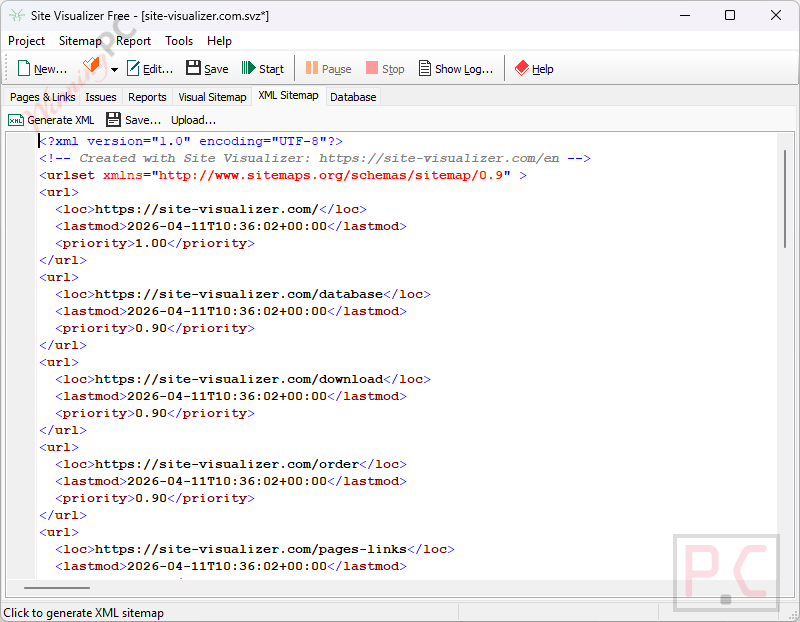
Site Visualizer can crawl your site, create an XML sitemap based on your configured settings, save it locally, and even automatically upload it to your website via FTP.
Technical Specifications
| Operating System | Not explicitly stated in the provided data. |
| Export Formats | MS Excel, CSV, XML (Sitemaps), Image files (Visual Sitemaps). |
| Supported Content Types Checked | HTML, PDF, PNG, CSS, JS. |
| Integrations | Google Analytics, Webmaster Tools (via Import Wizard), FTP (for XML sitemap upload). |