On this page
Filter Forge prices with the code applied
Filter Forge Basic 15.0 (Win) - Lifetime
For artists who work with smaller images and only use filters from the Filter Library
Filter Forge Basic 15.0 (Mac) - Lifetime
For artists who work with smaller images and only use filters from the Filter Library
Filter Forge Professional 15.0 (Win) - Lifetime
For expert users who work with large images, create custom filters, and want top performance.
Filter Forge Professional 15.0 (Mac) - Lifetime
For expert users who work with large images, create custom filters, and want top performance.
Filter Forge Studio 15.0 (Win) - Lifetime
The top edition that lets you use project files to share and reuse your artwork.
Filter Forge Studio 15.0 (Mac) - Lifetime
The top edition that lets you use project files to share and reuse your artwork.
How to use the Filter Forge coupon code
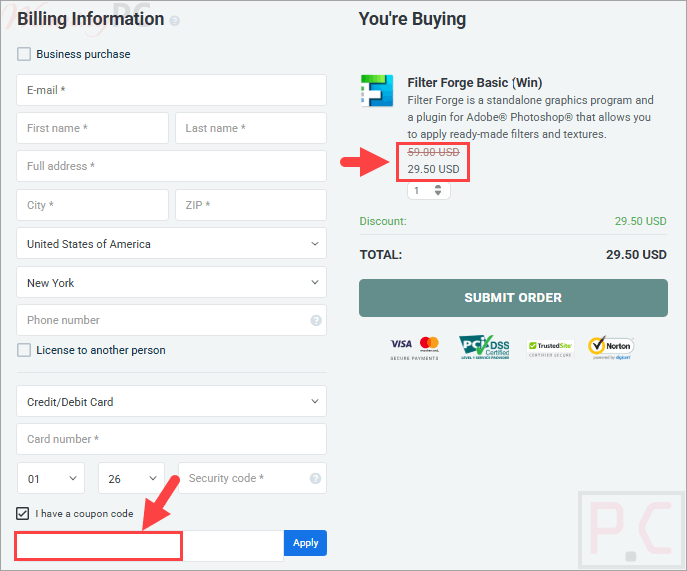
- Copy the Filter Forge coupon code from the box above. Checkout opens on PayPro Global, the authorized reseller it uses for all sales.
- Paste WINP*F50 into the discount or coupon field and apply it.
- Confirm the total has halved before you pay.
- Pay, then check your inbox for the license name and license key.
Filter Forge Pro License Key Free Download
- Product name: Filter Forge 7 Pro
- Website: https://filterforge.com/
- License type: lifetime
- Platform: Windows, macOs
- Download: Filter_Forge_7_Setup.exe
- Giveaway link:
click here
On the Filter Forge Pro giveaway page, fill your info out in the field provided, select the platform for your new Filter Forge license, then click on the “Send Request” button.

You will receive an email with your license name and your license key to activate the software.

Download and install the software by the above download link. Run the software, then copy and paste your license info to register the software.

What Filter Forge is good at
The pitch here is unusual: most of the value is not in the app, it is in the 14,173 filters the community has uploaded, and those are free to download. Filter Forge is the engine that runs them. Because every filter is procedural rather than a fixed image, you can re-render the same texture at any size up to 65000 x 65000 pixels without it turning to mush, and pull PBR maps out of it (albedo, roughness, metallic, normal, height, occlusion) for Unity or Unreal. That resolution independence is the reason 3D artists keep it around.
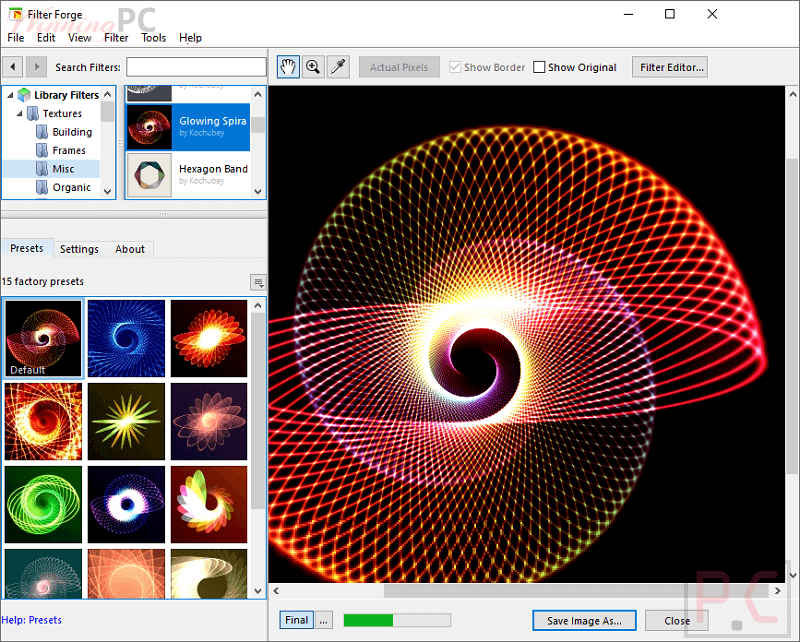
Where it gets harder is the node-based Filter Editor. It needs no code, but assembling blurs, gradients and Perlin noise into something that actually looks right is a skill, and version 15’s new design mode for highlighting connections is an admission that big component trees get messy. Version 15 also added a performance rank on every library filter, which sounds minor until you have waited on a slow one.
Key Features
- 6,792 photo effects and 7,381 textures in a free online library, with roughly 30,000 randomized variations per filter to browse.
- Procedural rendering at any resolution up to 65000 x 65000 pixels, with seamless tiling on most texture filters.
- PBR map export for game engines: albedo, roughness, metallic, normal, height and occlusion.
- Node-based Filter Editor for building or modifying filters, no coding needed.
- Runs standalone or as a plugin in Photoshop 2024 to 2026, Photoshop Elements, Affinity Photo 2 and Affinity 3, Corel PHOTO-PAINT and Paint.NET.
- Optional companion tools sold separately: Filter Forge Animator for keyframe animation, plus Filter Library Backup and Librarian for offline access to the whole library.
Pros & Cons:
Which Filter Forge edition should you buy?
| Feature | Basic | Professional | Studio |
|---|---|---|---|
| Price with code WINP*F50 | $29.50 | $69.50 | $129.50 |
| Regular price | $59 | $139 | $259 |
| Max image size | 3000 x 3000 px | 65000 x 65000 px | 65000 x 65000 px |
| Bit depth | 8-bit | 16 and 32-bit in plugin mode | 16 and 32-bit in plugin mode |
| CPU cores used | 2 | All | All |
| Filter Editor (create or modify filters) | No | Yes | Yes |
| Project files | No | No | Yes |
| Computers per license | 1 | 1 | 2 |
| Filter Library downloads | Unlimited | Unlimited | Unlimited |
| Best for | Applying library filters to normal-size photos | Building your own filters, PBR maps, large renders | Sharing and reusing artwork across two machines |
The jump from Basic to Professional is the one that matters. Basic downloads and applies filters, and that is it. If you ever want to open a library filter and change how it works, or export a texture bigger than 3000 pixels, you need Professional. Studio adds project files and a second seat on top.
Questions people ask about Filter Forge
Does the coupon code work on both Windows and Mac?
Yes. Both platforms carry the same list prices and the same 50% discount, so Basic is $29.50, Professional is $69.50 and Studio is $129.50 either way.
Does Filter Forge offer a refund?
Filter Forge does not publish a money-back guarantee on its site. Sales run through PayPro Global, whose own policy allows refunds to be requested within 30 days, but the decision sits with the software vendor.
Is it a one-time payment or a subscription?
Both exist. The three licenses covered by this coupon are permanent, one-time purchases.
Will a permanent license include Filter Forge 16?
No. A permanent license covers version 15 and its point updates. Future major versions require a paid upgrade through the upgrade options page, or you can buy the “plus lifetime upgrades” bundle at full price, which covers all future versions in one payment.
Which edition do I need to create my own filters?
Professional or Studio. The Filter Editor is not available in Basic, which can download and apply filters but cannot open one up and change how it works.
Is the filter library free?
Yes. All 14,173 filters in the online Filter Library are free to download and use, and the count keeps growing because users submit them.
System Requirements & Supported Formats
| Field | Value |
|---|---|
| Operating system (Windows) | Windows 10, Windows 11 x64 |
| Operating system (Mac) | macOS 14 Sonoma, macOS 15 Sequoia, macOS 26 Tahoe |
| Processor | Intel or Apple (M1) CPU on Mac |
| RAM | 4 GB |
| Max image size | 3000 x 3000 px (Basic), 65000 x 65000 px (Professional, Studio) |
| Bit depth | 8-bit (Basic); 16 and 32-bit in plugin mode (Professional, Studio) |
| High-precision formats | OpenEXR, PFM (Professional and Studio) |
| PBR maps produced | Albedo, Roughness, Metallic, Normal, Height, Occlusion |
| Host applications (Windows) | Photoshop 2024 to 2026, Photoshop Elements 2024 to 2026, Corel PHOTO-PAINT 2017 to 2021, Paint.NET, Affinity Photo 2 and 2.5, Affinity 3 |
| Host applications (Mac) | Photoshop 2024, 2025, 2026 |
| Other requirements | Internet connection for the Filter Library; a host app for plugin mode. The Windows plugin does not support Microsoft Store versions of host apps. |