
 Chris Bruner
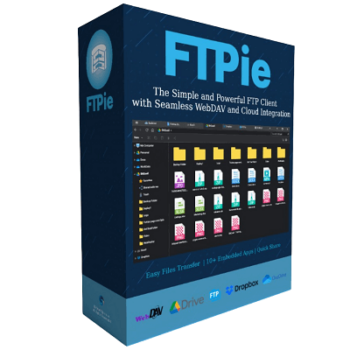
FTPie is a versatile FTP and cloud storage client that allows you to manage files across multiple platforms seamlessly. This tool supports popular cloud storage services like Dropbox, Google Drive, and OneDrive. It provides the function to allow you to manage your cloud files directly from its interface, making it easy to transfer, upload, download, and organize files without switching between different applications (between your PC, cloud storage, and FTP).
Another important feature of FTPie is the ability to edit documents, spreadsheets, and presentations directly within the app using integrated Google Docs and Microsoft Office tools. Furthermore, you are allowed to add multiple cloud storage accounts to FTPie without any limitations. If you want to create desktop shortcuts for quick access to your cloud and FTP folders, FTPie handles that, too.
FTPie Giveaway License Key Free Download
- Product name: FTPie
- Website: https://ftpie.com/
- License type: lifetime
- Platform: Windows
- Download: FTPie-Setup.exe
- Giveaway: FTPie giveaway link
How to get the license key?
On the FTPie giveaway page, please enter your email address, tick on Captcha, and then click on the “Get my free license” button.

Please check your mailbox to get your free license code

Click on the download link above to download and install the software on your computer. When the installation is done, please copy and paste your free license code to activate the software.

Got it for a lifetime free!

FTPie main screenshot!

Main Features
- Cloud and FTP Integration: A wide range of cloud storage services, including Dropbox, Google Drive, and OneDrive are supported in FTPie. With its help, you can simplify the process of transferring, uploading, downloading, and managing files by connecting to both cloud storage services and FTP servers.
- Seamless File Transfers: The software is designed to allow you to transfer files safely and securely. It supports secure FTP (FTPS) and SSH File Transfer Protocol (SFTP) to ensure high-speed file transfers with no data loss.
- Built-in Document Editing: FTPie integrates seamlessly with Google Docs and Microsoft Office. You are allowed to view, edit, and manage documents, spreadsheets, presentations, images, and PDFs directly within the software.
- Streamlined Sharing: One of FTPie’s standout features is its file sharing. You can share any local file or folder by generating shareable links with just a right-click.
- Quick Upload and Folder Shortcuts: The great thing about FTPie is the ability to upload files. With a handy shell extension, you are allowed to upload files or folders with a single right-click. Furthermore, frequently accessed FTP or cloud folders can be created as desktop shortcuts.
- Cross-Platform Support: FTPie is compatible with various platforms, from Google Drive and OneDrive to FTP/SFTP servers, to help you easily manage files no matter where your data resides.
Technical Details
| Language Support | English |
| Money Back Guarantee | 30-Day |
| Operating System | Windows Vista, Windows 7, Windows 8/8.1, Windows 10/11 |
| Shipping | Register code will be sent to your email in minutes |
| Subscription | Lifetime |
| Support Services |





Hi,
Do not know if this is a false positive, but, Avast tags FTPie containing IDP.Generic virus!
Hi,
yes, that’s a false report. We always check for viruses before deploying any new version. There are no problems with Avast on our side. Also, here’s the Virus Total report of the download link (Setup file):
https://www.virustotal.com/gui/url/e9befbd03369b8df16574bd1dd080c37480d1f1e94daa31805c4cdfe9a34dbbc?nocache=1
There is one false report of AV called Fortinet. We’re in contact with them to change the verdict. 95 other AVs identified the app as Clean.
Vlad
Thanks