Gif Me! Camera Pro is showing $0.00 on the US Google Play store, down from its usual $0.99. Google hasn’t published an end date for this one, so it could revert at any time. The Pro app itself carries no ads and no in-app purchases; unlike its free sibling. Price checked Sep 13, 2026 by Cathryn.
On this page
Get Gif Me! Camera Pro free on Google Play →
Check the price reads $0.00 before you tap Install. It goes through as a purchase, so it stays in your Google account library for good. How app giveaways work
Something not working? Leave a comment and we’ll help.
Gif Me! Camera Pro specs while it’s still $0.00
Price & specs
| App | Gif Me! Camera Pro |
| Developer | XnView |
| Store | Google Play |
| Regular price | $0.99 (US Google Play) |
| Price now | $0.00 |
| Offer ends | No end date announced |
| In-app purchases | None shown on the listing |
| Contains ads | None shown on the listing |
| Rating | 4.1★ (3.63K reviews) |
| Installs | 100K+ |
| Last updated | Sep 12, 2026 |
| Price checked | Sep 13, 2026 by Cathryn |
Gif Me! Camera Pro still can’t crop a GIF
Review & features
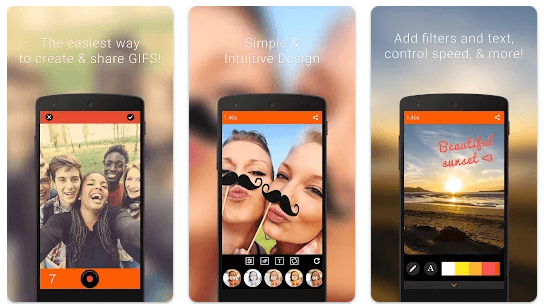
Gif Me! turns a burst of photos or a short video clip into an animated GIF straight from the phone’s camera, with filters, text, and stickers layered on before you share it. What reviewers keep flagging is the missing crop tool, a September 2024 review calls it out directly, and it’s still absent on the version currently up for grabs. If your GIF needs cropping, not just trimming or resizing, that step still has to happen in another app first.
Key features
- Capture GIFs directly with the camera, including stop-motion and burst sequences
- Import video, existing GIFs, or 150+ images to build one
- Pull source clips from Tenor to remix
- Add text, borders, stickers, and filters before exporting
- One-tap sharing to Facebook, X/Twitter, Instagram, and Giphy
Good enough for one GIF, not a daily editor
Verdict


![Passport Photo: ID Photo Print App for Free [Android]](https://winningpc.com/wp-content/uploads/2024/08/passport-photo-id-photo-print-767x770.png "passport photo id photo print")