Laura Marano

Hetman Photo Recovery restores digital pictures from hard disks, USB drives, memory cards, and directly from connected smartphones or digital cameras. It can safely undelete images lost due to accidental deletion, formatted media, emptied Recycle Bins, or severe file system damage.
- Status: ✅ Active & Verified
- Last checked: October 2026
- Offer: 60% Off
- Coupon code: 50D***OUNT

Hetman Photo Recovery
Lifetime License | One-Time Purchase | No Subscription
📄 Licensing & Support Details
- License Type: Home version for 1 PC
- 30-day money-back guarantee.
- Provides 24/7 technical support via email, live chat, and phone.
- Secure Payment.
- The registration code is sent to your payment instantly.
📝 How to apply
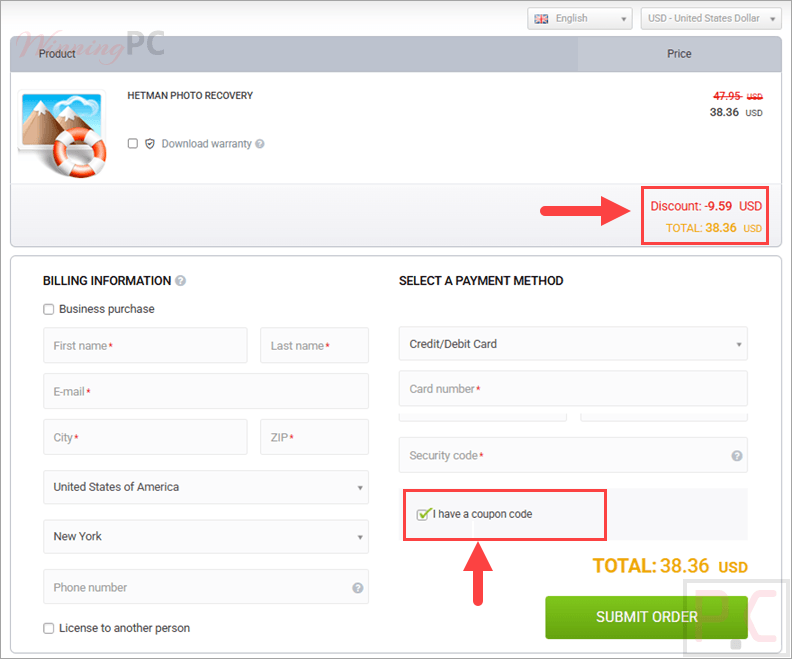
To grab this deal, click the ‘Copy Code’ button in the coupon box above. The code will be copied, and you will be redirected to the checkout page, where you can apply it to secure your discounted price.
Hetman Photo Recovery: Review & Features

Key Features
- Recovers popular image formats including JPEG, PSD, TIFF, PNG, BMP, and GIF.
- Restores RAW files (digital negatives) from major camera brands like Canon, Nikon, Sony, Olympus, and Panasonic.
- Undeletes photos from memory cards (SD, micro SD, Compact Flash) and USB pen drives.
- Extracts deleted images directly from the internal memory of digital cameras via a USB cord.
- Includes a built-in picture viewer for a full-size preview of deleted pictures before you start the recovery.
- Offers a Quick analysis mode to restore recently deleted files along with their original file names and locations.
- Provides a Comprehensive Analysis mode that uses signature searches to recover files from formatted or unreadable disks.
- Creates a virtual bit-precise image of your disk to safely recover data without stressing the damaged physical drive.
Pros & Cons
More screenshots:


Frequently Asked Questions
Where can I find a coupon code or deal for Hetman Photo Recovery?
The latest and best deals can be found on WinningPC, alongside the official software website or the developer’s social media channels.
What is the best discount currently available for Hetman Photo Recovery?
The best current discount is 60% OFF for a Lifetime Subscription, available directly on WinningPC.
What photo formats are considered RAW photos?
RAW photos are unmodified images containing unprocessed data directly from the digital camera matrix. Popular formats include CR2 (Canon), NEF (Nikon), ARW (Sony), ORF (Olympus), RAF (Fujifilm), and DNG (Adobe).
Which formats can a RAW photo be converted to without losing quality?
You can convert RAW photos to lossless formats like DNG, TIFF, PNG, or JPEG 2000 without losing quality.
How can I recover photos deleted from WhatsApp?
First, check the “WhatsApp Media” folder in your device’s internal memory. You can also try using WhatsApp’s integrated recovery feature in your chat history. If those fail, a third-party data recovery tool can scan for the deleted files.
What should I do if a photo won’t open after recovery?
Make sure the app you are using supports that specific image format. If it still won’t open, try a different viewer app, or copy the file to another computer to verify if the file itself is actually damaged.
Does this software work on Mac and Linux?
Yes, the utility is designed to work across Windows, MacOS, and Linux operating systems.
System Requirements & Details
| Language Support | English, and more… |
| Operating System | Windows (XP to 11), macOS (10.12 to 15), Linux (Ubuntu, Debian, Fedora, etc.) |
| Supported Input | Hard drives, memory cards (SD, CF, etc.), USB drives, smartphones, tablets, digital cameras |
| Supported Output | Separate hard drive, network disk, external hard drive, USB pen drive |
| File Systems | FAT/exFAT, NTFS/ReFS, APFS/HFS+, Ext2/3/4/ReiserFS, XFS/UFS |