Cathryn Lee

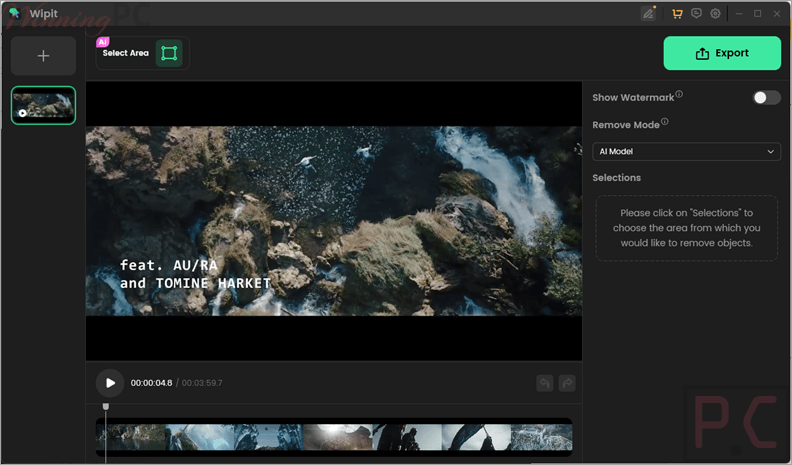
Wipit is an AI-powered tool designed to remove Sora watermarks, logos, text, and unwanted objects from your videos and photos. It helps you clean up visual content and repurpose media with just a few clicks.
- Status: ✅ Active & Verified
- Last checked: October 2026
- Offer: 69% Off
- Coupon code: IMOBE****SCOUNT

iMobie Wipit - Monthly Plan
65% off coupon code: regular price $19.99, discounted price $6.99
iMobie Wipit - Yearly Plan
66% off coupon code: regular price $46.99, discounted price $16.09
iMobie Wipit - 1 Computer Plan
65% off coupon code: regular price $55.99, discounted price $19.59
iMobie Wipit - 5 Computer Plan
69% off coupon code: regular price $199.99, discounted price $62.99
Education Discount

iMobie Educational Discount Offer
Claim the Discount Now with Your Educational Email. Simply enter your educational email address below to claim your 30% educational discount instantly.
📄 Licensing & Support Details
- Free upgrades
- 24/7 tech support
- Request a refund within 60 days for one-time and yearly plans, and within 7 days for monthly plans.
📝 How to apply
Click the ‘Copy Code’ button in the coupon box above. You’ll be redirected to checkout, where you can apply the code to claim your discount.

iMobie Wipit: In-Depth Review & Features
Key Features
- Sora Watermark Removal: Specifically optimized to detect and erase watermarks from Sora-generated videos.
- Object & People Eraser: Seamlessly remove photobombers, power lines, or any uninvited guests from your frames.
- Subtitle & Text Clearing: Quickly select and wipe out hardcoded subtitles or text overlays to refresh your content.
- Brand Reshaping: Erase old logos and prepare your media for new branding stamps.
- Photo Enhancement: Polish images by erasing skin blemishes and other small imperfections instantly.
- Segment-by-Segment Processing: Pinpoint edits down to the millisecond to ensure you only remove elements from specific parts of a video.
- Batch Import & Removal: Upload multiple files at once and remove several unwanted elements in a single click to save time.
- Custom Watermarking: Add your own brand marks with adjustable sizes and placement after cleaning the original file.
Pros & Cons
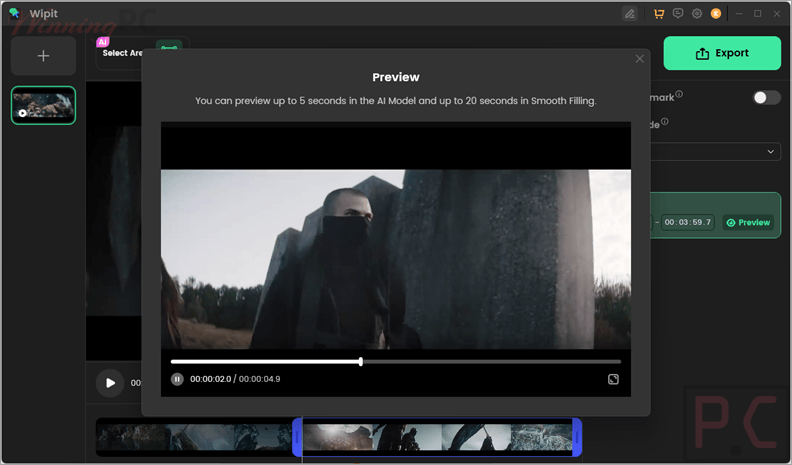
More screenshots:
Frequently Asked Questions
Where can I find a coupon code or deal for Wipit?
The latest and best deals for Wipit can be found on WinningPC or their social channels.
What is the best discount currently available for Wipit?
The best current discount is 69% OFF, available directly on WinningPC.
Can Wipit remove Sora watermarks?
Yes. You can upload Sora-generated videos, mark the watermark area with the brush tool, and the AI will remove it while maintaining 100% original quality.
Is Wipit free to use?
You can use Wipit to test the removal features and preview results for free, but you must purchase a plan to export the final video or image.
Can I remove multiple objects at once?
Yes, Wipit supports bulk removal, allowing you to select all unwanted items in a single file and erase them simultaneously.
What types of objects can the software erase?
Wipit can eliminate subtitles, outdated logos, people, power lines, text overlays, and facial blemishes.
Does Wipit work on Mac?
Yes, Wipit is compatible with macOS 10.15 and higher, as well as Windows 10 and above.
System Requirements & Details
| Feature | Specifications |
|---|---|
| Operating System | Windows 10 and above (64-bit only) macOS 10.15 (macOS Catalina) and above |
| Processor | Standard performance CPU recommended |
| Supported Input | PNG, JPEG, MP4, MOV |
| Supported Output | PNG, JPEG, MP4, MOV |