
On this page
How to claim your free IObit license
IObit Software Updater PRO 9
Keep your software up to date and your PC secure.
- Product
- IObit Software Updater PRO 9
- Website
- iobit.com
- License
- 6-Month
- Platform
- Windows 11/10/8.1/8/7/Vista/XP
- Installer
- software-updater-setup.exe
- Support
- No support
- Usage
- Non-commercial only
- Updates
- No future upgrades
- Updated
- 2026-09-12
Get your unique code by email
License key delivered free to your inbox within minutes.
Protected by Cloudflare Turnstile · Email quality checked by Reoon
All codes have been claimed or the giveaway has closed.
IObit Software Updater Coupon Codes & Deals

IObit Surprise Pack - 94% OFF with 4 Free Gifts
Bundle content: Smart Defrag 12 PRO | IObit Software Updater 9 PRO | IObit Uninstaller 16 PRO | Advanced SystemCare 20 PRO | Driver Booster 13 PRO | IObit Malware Fighter 13 PRO

IObit Software Updater 9 PRO (Free Gifts)
Bundle content: Protected Folder | Smart Defrag 12 PRO | IObit Software Updater 9 PRO

IObit Software Updater 7 PRO (1 PC) & 4 Free Gifts- Exclusive
Bundle content: Protected Folder | Start Menu 8 PRO | IObit Software Updater 7 PRO | IObit Software Updater 7 PRO | Smart Defrag 10 PRO
How to Get a IObit Software Updater License Key for Free
- Enter your email address on the giveaway form above to get your free license code.
- Download the installer and install the IObit Software Updater on your computer.
- Open IObit Software Updater Free and click on the “Enter code” button. Enter your Software Updater PRO license code and choose “Activate”.
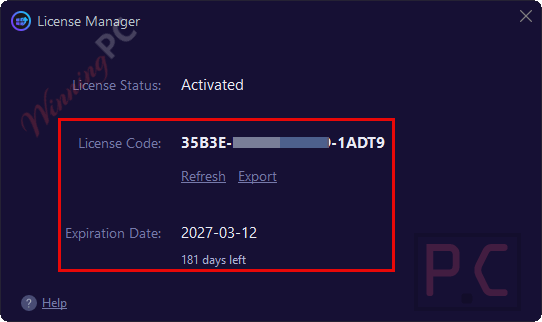
- Check the registration information; you have 6 months to use it for Free.

IObit Software Updater Pro 9 review: what it actually does
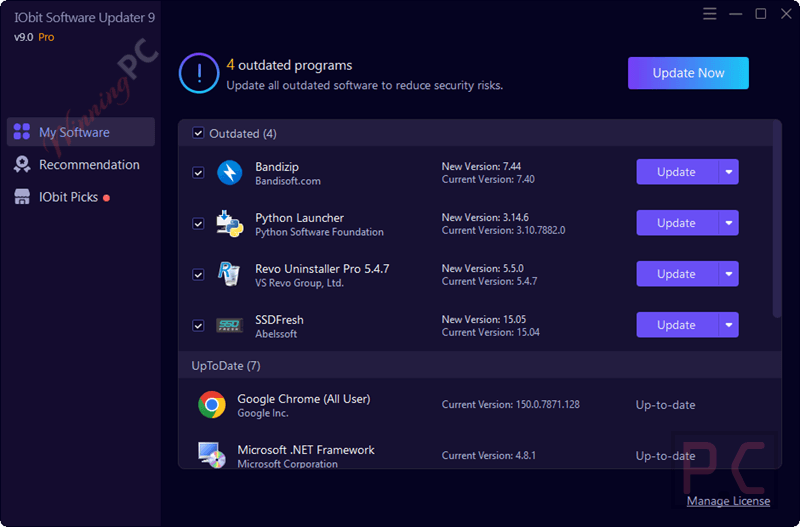
IObit Software Updater Pro solves a boring but real problem: apps quietly falling behind on security patches until one of them becomes the way in for an attacker. Point it at your installed software and it checks against a database of over 1,100 programs, from AI tools to security suites, then updates the ones that are out of date. The auto-update runs silently in the background, so it’s not fighting for your attention mid-task. One thing worth knowing: updates route through IObit’s own mirror servers rather than each vendor’s site directly. That’s convenient and generally reliable, but it does mean trusting IObit’s delivery pipeline as the middleman.
Key features
- Tracks and updates over 1,100 popular programs, including AI tools, security suites, multimedia software and utilities.
- Auto Update runs updates silently without interrupting what you’re doing.
- One-Click Bulk Installation batch-installs must-have apps on a new or freshly reinstalled PC.
- Double Clean installs official builds only, with no bundled software and no leftover setup files.
- Routes downloads through the fastest available mirror, including IObit’s own, for steadier updates.
pros & cons
What the free key doesn’t include
| PRO (paid) | Giveaway (free) | |
|---|---|---|
| Duration | 1-Year subscription | 6 months |
| Updates | Included | No future upgrades |
| Support | 24/7 English phone support | No support |
| Commercial use | Commercial & personal use | Non-commercial only |
| PC coverage | 1 or 3 PCs depending on plan | Limited time giveaway |
Screenshot


Frequently Asked Questions
What is IObit Software Updater?
IObit Software Updater is a tool designed to help you keep your software up-to-date, ensuring your PC runs smoothly and securely.
What are the key features of IObit Software Updater?
Key features include automatic updates, a large software database, one-click updates, recommendations for essential software, and secure installation without bundled malware.
How does it ensure safe installations?
It abides by strict updating processes to guarantee installations are free from additional bundles, installers, or malware.
Does IObit Software Updater support batch updates?
Yes, it allows you to update multiple programs at once with a single click.
How does it handle outdated software?
It scans your PC for outdated software and provides timely update notifications to ensure your programs are always up-to-date.
Does it include a restore point feature?
Yes, it creates a restore point before each update to ensure you can revert back if needed.
What are the differences between the Free and Pro versions?
– Update Frequency:
Free: Manual updates.
Pro: Automatic updates with scheduled checks.
– Software Database:
Free: Limited access to software database.
Pro: Access to a larger and more frequently updated software database.
– Batch Update:
Free: Limited batch updates.
Pro: Unlimited batch updates with one-click.
– Update Priority:
Free: Standard update priority.
Pro: High priority for updates and new software recommendations.
– Ad-Free Experience:
Free: Contains ads.
Pro: Ad-free interface.
– Support:
Free: Basic support.
Pro: Premium technical support.
Is there a discount available for IObit Software Updater?
Yes, you can use the coupon code UPS***T45 on WinningPC to save up to 94% on your purchase.
Can I receive a free license code for IObit Software Updater PRO?
Yes, you can visit WinningPC and join the giveaway to receive a free one-year license key.
System Requirements & Details
| Language Support | 34 languages |
| Money Back Guarantee | 60-Day |
| Operating System | Windows 11/10/8.1/8/7/Vista/XP |
| Shipping | Keycode will be sent automatically within minutes after your purchase |
| Subscription | 1-Year |
| Support Services | Email, Phone, Forums |




Let download the installer by the download
link above and use this license code. OR this giveaway has ended.
not working
License code: 3BAA8-9D765-25A98-2D4B2