

You feel annoyed because your online activities are being tracked, and personal data from your IP address is being leaked. IPViper LITE offers a streamlined, efficient solution to hide your real IP address to quickly protect your online activities with just a couple of clicks of the mouse. With its help, you will be protected from hackers, snoopers, and advertisers who track your browsing habits and personal data through your IP address. This tool provides the functions to help you surf the web anonymously, preventing websites and third parties from logging your real IP and location.
IP Viper LITE will connect you to anonymous proxies from multiple locations in the world, and you are allowed to mask your IP behind these proxies. Its user-friendly interface helps you easily select a proxy and activate its “fake IP” to browse privately. It also provides customizable features such as filtering proxies by speed, location, and reliability. In addition, you are able to add your own known proxies or specify websites for proxy testing.
Top VPN Software Coupon Code Nov 2026 (100% Working)

Bitdefender Premium VPN
50% discount code: regular price $69.99, discounted price $34.99

iTop VPN Premium - 3 Years / 5 devices
94% off coupon code: regular price $431.64, discounted price $25.49

PrivadoVPN - 24 Month Unlimited VPN + 3 FREE
90% discount code: regular price $296.73, discounted price $30

ExpressVPN - 2 Years + 4 Months FREE
61% Off coupon code for Personal License: regular price $362.6, discounted price $139.72

Hide.me VPN - 24 Months + 4 FREE Months
75% off coupon code: regular price $278.60, discounted price $69.95

ClearVPN - 1 Year Subscription
78% off promo code: regular price $119.88, discounted price $26.09

86% Off 24-months + 3 months EXTRA
Snag this incredible Surfshark VPN deal for just $2.19/month with the coupon code below!
IPViper LITE Giveaway Download for Free
- Product name: IPViper LITE version
- Website: https://ipviper.com/
- License type: Lifetime
- Platform: Windows
- Giveaway: IPViper LITE download link
- License code – last updated: Apr 29, 2025
Password
- Pass: winpc5
How to download and use IPViper LITE?
Click on the giveaway link above to get IPViper LITE for free
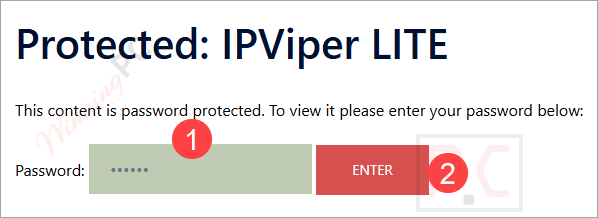
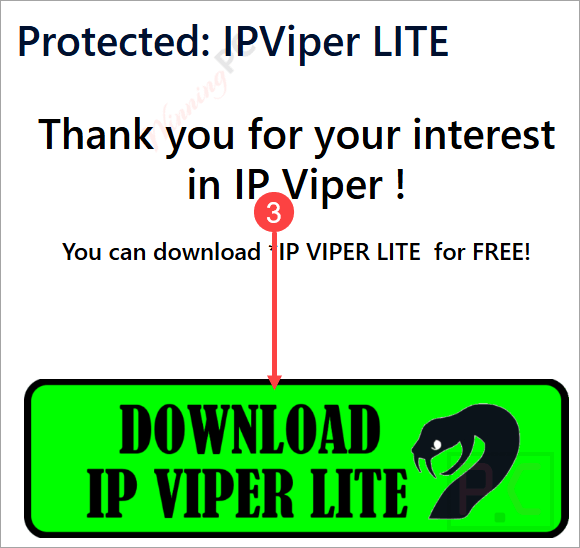
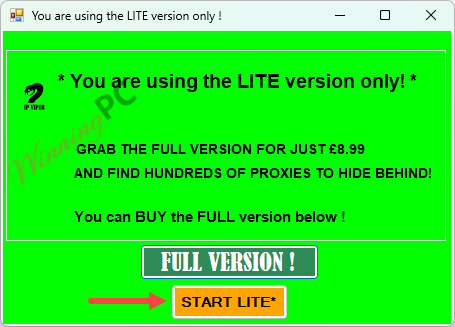
Extract the downloaded file and run the IPViper.exe file to launch the program. Click on the “START LITE” button to get started:
You will see the Real IP and the current IP address (Fake IP). Click on the “Click for Proxies” button to get the proxy list:
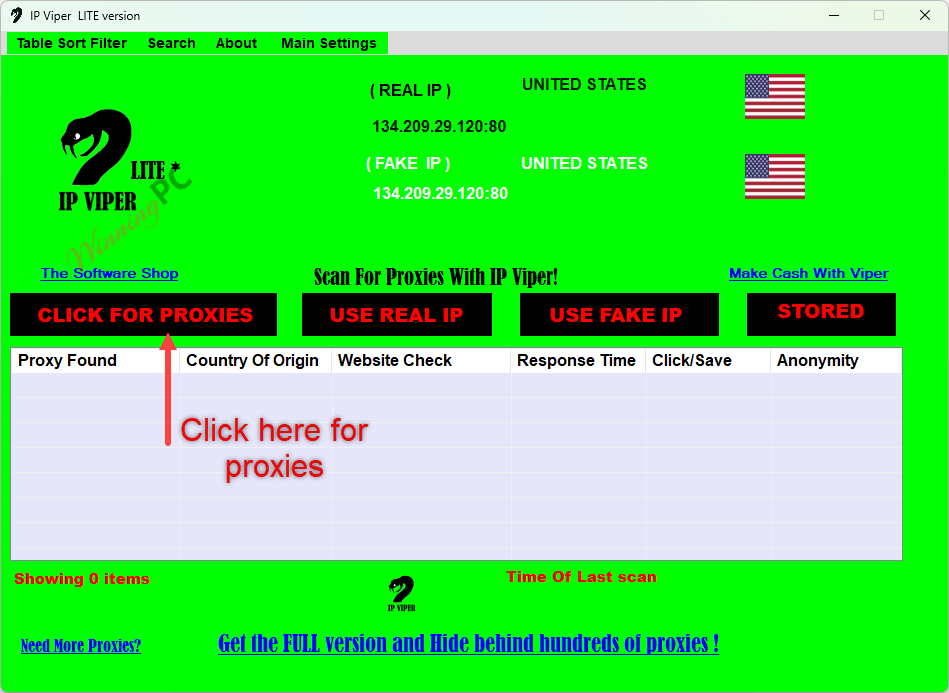
From the list, choose a proxy that you want to use, and click “Use Fake IP”
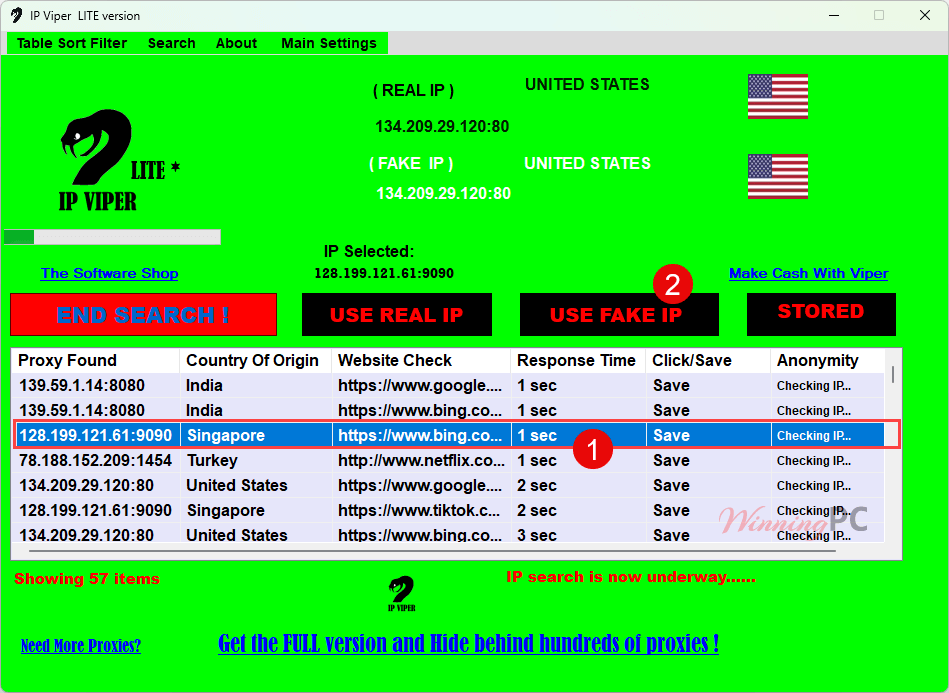
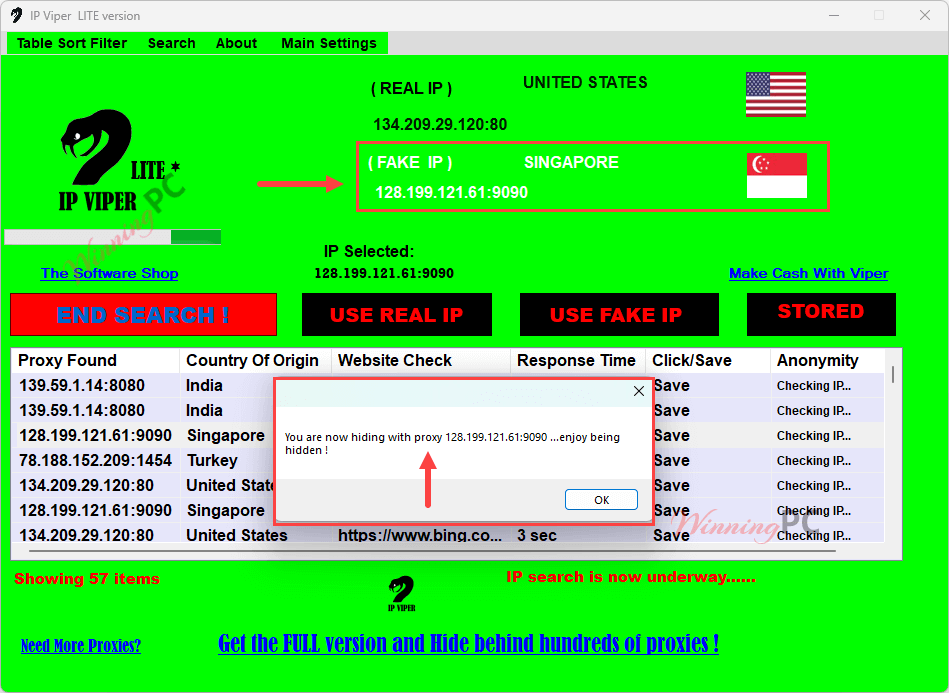
“You are now hiding…” – you can check the Fake IP value to confirm your location now! When you want to stop hiding, simply click the “Use Real IP” button to return to your real IP address.
Please check internet connection or try again later or contact us,
thanks.” If you encounter this error while starting the program, please disable your VPN, Antivirus, and Firewall.
Main Features
- Proxy Management and Customization: To mask your IP address, IPViper LITE lets you choose the most suitable proxy server based on criteria such as location or speed. You can select from a list of proxies automatically found by IP Viper or manually enter one or multiple IP addresses to use.
- Website-Specific Proxy Testing: You can specify particular websites you plan to access, and IP Viper will test the available proxies against these sites to verify their reliability and compatibility, guaranteeing that the selected proxies provide a smooth and dependable browsing experience.
- Search and Scan Functionality: IPViper LITE provides a search tab that allows you to quickly switch between different proxy servers (switch between newly scanned proxy results and previously saved proxies), facilitating seamless web browsing and access to region-restricted content.
- Display Filtering: You can sort and filter proxy scan results according to any order of priority you prefer, which is based on criteria such as proxy location or speed/response time.
Technical Details
| Language Support | English, Français, Italian, Spanish, Swedish, and more… |
| Money Back Guarantee | 30-Day |
| Operating System | Vista, or Windows 7, 8,8.1,10,11 |
| Shipping | Register code will be sent to your email in minutes |
| Subscription | Lifetime |
| Support Services |







This so-called software is a real mess. All DNS are American, Vietnamese, or otherwise. It’s impossible to establish a connection, resulting in a restore made before installation.
All things considered, it’s better to use a VPN, which has every chance of working better.
It will find a variety of IP’s from around the world and its important to remember that all proxies are not suitable for all websites, some work better with some sites, others perhaps not so good.
The purpose of the scan is to match up those proxies that connect well with specific sites the user specifies in the settings, so if you want to use youtube with an anon proxy then try those whose scan times are 0-2 secs in the results table for youtube, via the filters.
This is what is showing on my Pc whenever i tried to run the Can’t generate a license for your computer at this time exe
Please check your internet connection or try again later or contact us,
thanks
If unable to connect then its usually something blocking the app, perhaps firewall, AV program or something else local to that machine ie, software/hardware.Try creating an exception via your AV to see if that allows the program through.
I have deactivated my AV and it still shows the same thing. Note that I am using Windows 10
W10 should not present this issue as lots of users are connecting ok with W10, so it has to be something else local to your machine/set up.Its difficult to advise as everyones software/hardware combinations are different and sometimes gives a conflict.Do you have another pc to try it on?
First want to say it’s good to see the TK reviews. TK’s been around for a bit writing reviews and they’re always appreciated. Just wanted to add that I’ve tried several of the Ip’s via the app and one or two out of about 12-15 so far haven’t had encryption issues. If you decide to run it, you may want to be sure and utilize OpenVPN or another for your encryption, especially if you’re exchanging personal info. While this light version is free, there’s a lot of others that are as good or better for free as well that don’t really make this a must have. Psiphon is one that comes to mind. I just lightly tested Viper and wasn’t unimpressed but wasn’t exactly impressed either.
Its an IP hider rather than VPN, so traffic is not encrypted as it uses publicly available IP’S, so fine for general surfing but not for sensitive data, as explained in the software license agreement.
even with setting .NET requirement to 4.6.2 the program fails to access the network under Vista so it can’t be made to work. Tried it on one proxy and firefox still used local IP number when accessing GRC.COM shields up so that was a fail, and in default browser chrome based MSEdge I was unable to make any internet connection on some of the proxies. In edge settings using open systems proxy settings did not display any active proxy setting and use proxy was OFF. So for me and only 25 proxies were found not 50 and some of those were duplicates and non-functional when trying to use them. Too unreliable to use in earnest and does NOT use systems proxy user interface accessible settings so not kind to the system.
Works best with firefox or google chrome and some proxies found will be duplicate because they are tested against more than one website as default, so a specific IP will show more than once in the table.It is restricted to limited proxies in the free version, though a most recent scan found around 90 proxies.Thats why there is a paid version and free version.
requires .NET 4.8 so will not work under Vista or XP, hacking the file IPViper.exe.config to specify a lower version of .NET *may* work under Vista or even XP
Pros: simple to use
Cons: DNS lookup still uses locally configured DNS servers so will leak browsing habits and some out of area servers may still blocked due to local court orders. Proxies properly configured do divulge originating IP so these must be incorrectly configured on purpose and could result in certain accesses being blocked by others users behavior over same proxy IP.