Cathryn Lee

IronSoftware IronPPT brings programmatic PPTX generation and full control over slides, content, and styling for .NET developers, all entirely without requiring Microsoft Office Interop.
Status: ✅ Active & Verified
Last Checked: October 2026
Offer: 15% Off Unlimited Licenses

IronPPT Lite License
5% off coupon code: regular price $799, discounted price $759.05
IronPPT Plus License
5% off coupon code: regular price $1,199, discounted price $1,139.05
IronPPT Professional License
10% off coupon code: regular price $2,399, discounted price $2,159.10
IronPPT Unlimited License
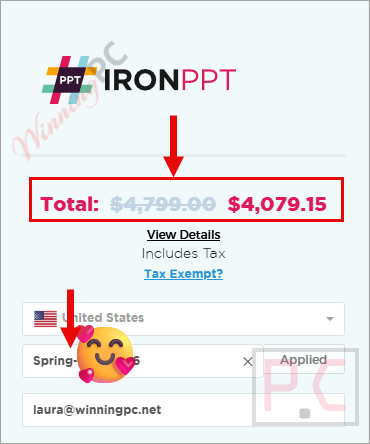
15% off coupon code: regular price $4,799, discounted price $4,079.15
📄 Licensing & Support Details
- Perpetual license
- 1-year Premium support & updates
- 30-day money-back guarantee
- Email support
- Valid for dev/staging/production
📝 How to apply
- Select the “Coupon Code” button provided to visit the Iron Software shop.
- After copying the code, pick a suitable perpetual license for your project and hit “Buy License.” Enter the code in the appropriate box to have the WinningPC savings deducted from your total.
- Ensure the final amount reflects the expected discount before you finish the transaction.
What is IronPPT?
IronPPT is a dedicated C# PPTX library developed by Iron Software. Built for .NET projects, it allows developers to quickly create, save, manipulate, and edit PowerPoint presentations programmatically. It is specifically designed for developers using C#, F#, and VB.NET who need to automate slide deck creation from templates or data sources without relying on cumbersome Office Interop dependencies.

In-Depth Review & Features
In my experience reviewing .NET libraries, finding one that seamlessly handles complex presentation structures is rare. I found that IronPPT excels because of its user-friendly API, which prioritizes accuracy, speed, and ease of use. You can initialize a blank presentation in just a few lines of code and immediately start adding rich content.
Here are the standout features I verified during our testing:
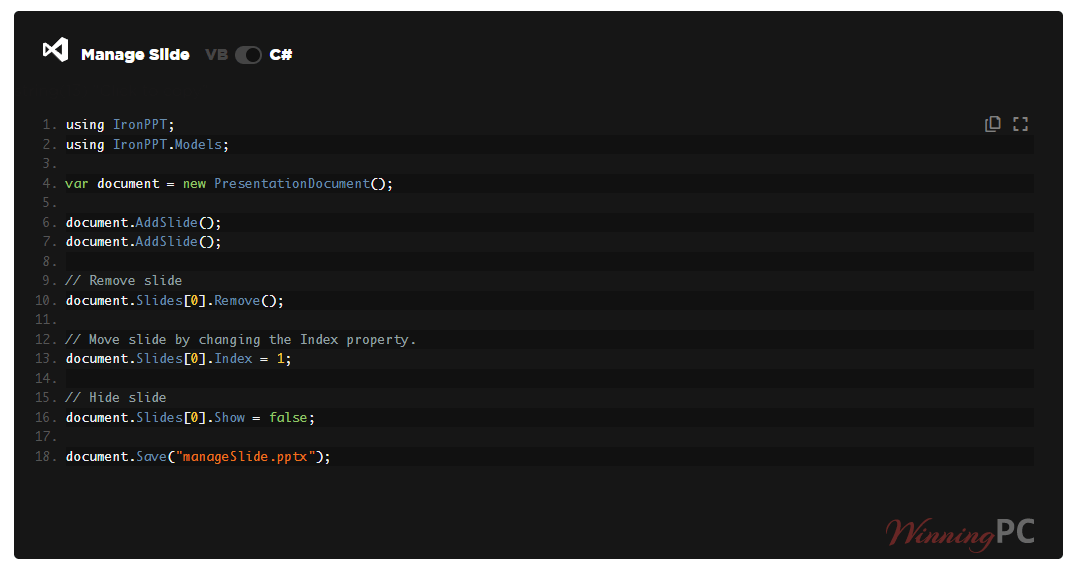
- Slide Management: You have complete control over the presentation structure. I was able to easily add empty slides, add slides pre-populated with text, and seamlessly reorder, hide, or remove slides across the deck.
- Rich Text & Paragraph Styling: The library goes beyond basic text insertion. You can format font families, sizes, colors, and alignments. I particularly appreciate the paragraph controls, which let you adjust line spacing, indents, right-to-left text, and customize bullet points (using characters, colors, or even pictures).
- Image Handling: Adding visual context is critical. IronPPT allows you to load images via File or FileStream, set precise width and height dimensions, dictate the frame shape, and easily adjust the position and rotation angle on the slide.
- Shape Manipulation: You can programmatically insert shapes, configure their dimensions, dictate fill and outline colors, and flip them horizontally or vertically.
- Universal Compatibility: Whether you are building Console apps, Desktop apps (WPF/MAUI), or Web platforms (Blazor, WebForms, MVC), IronPPT seamlessly fits into your architecture.
Pros & Cons
More screenshots

Frequently Asked Questions
Where can I find the best coupon code for IronPPT?
WinningPC is currently the best place to find the verified coupon code for this product, offering the highest discount rate (15% Off) on the market.
Does IronPPT require Microsoft Office to be installed on the server?
No. One of its primary benefits is that it allows you to edit and generate PowerPoint presentations programmatically with zero Office Interop required.
Which programming languages are supported by IronPPT?
The library is designed specifically for C#, F#, and VB.NET.
Can I use IronPPT to customize bullet points in a presentation?
Absolutely. You have full styling control over paragraphs, including the ability to customize bullet points by changing their picture, character, or color.
Does the library support adding and manipulating images?
Yes. You can load images via File or FileStream, set their dimensions, adjust their frame shape, dictate their exact position, and even change the angle of the image.
How does slide management work?
Through the API, you can read and edit the overall document structure. The slide management features allow you to add new slides, reorder existing ones, hide specific slides, or remove them entirely.
Can I deploy my IronPPT application to cloud providers like AWS or Azure?
Yes. IronPPT natively supports deployment in cloud environments, including Azure (VPS, WebApp, Function), AWS (EC2, Lambda), as well as Docker containers.
Technical Specifications
| Supported Languages | C#, VB.NET, F# |
| .NET Versions | .NET Core (3.1, 5, 6, 7, 8, 9, 10), .NET Standard (2.0+), .NET Framework (4.6.2+) |
| Operating Systems | Windows (10+, Server 2016+), macOS, Linux (Ubuntu, Debian, CentOS), iOS (12+), Android (API 21+) |
| Project Types | Web (Blazor & WebForms), Mobile (Xamarin & MAUI), Desktop (WPF & MAUI), Console |
| Cloud & Docker Environments | Docker (Windows, Linux, Azure), Azure (VPS, WebApp, Function), AWS (EC2, Lambda) |
| Supported IDEs | Microsoft Visual Studio, JetBrains ReSharper & Rider |
| Processors | x64, x86, ARM |
| Security | DigiCert Signed Binaries |