Cathryn Lee

Most karaoke software is either overpriced or produces grainy videos that look like they belong in 1995. If you’ve tried to turn a simple MIDI or MP3 into a high-quality video lately, you know the struggle of syncing lyrics manually. Kanto Video Karaoke Creator solves this by automating the conversion, but the retail price is a bit steep for casual singers.
Status: ✅ Active & Verified
Last Checked: October 2026
Offer: 30% Off

Kanto Video Karaoke Creator Professional
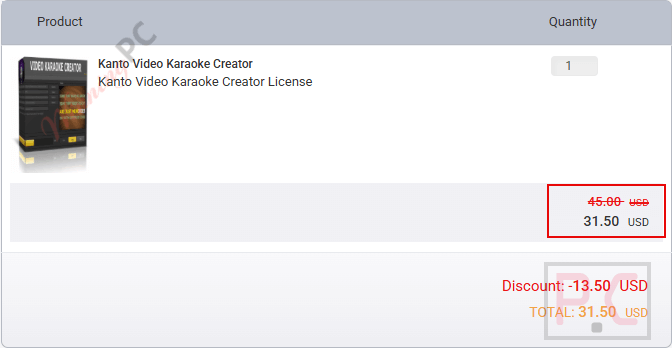
30% Off: regular price $45, discounted price $31.50
Price Comparison Table
Stop paying full retail. Here is how the WinningPC discount stacks up against the official store price:
| License Type | Official Price | WinningPC Price | You Save |
| Full License (Lifetime) | $45 | $31.50 | $13.50 (30%) |
Redemption Guide (Step-by-Step)
- Click the Link: Use our exclusive activation link to visit the official Kanto Karaoke store.
- Verify the Price: The 30% discount is usually auto-applied. If not, look for the “Coupon Code” box.
- Check the Screenshot: Compare your screen to the image below to ensure the price has dropped from $45 to $31.50.
- Complete Purchase: Finalize your payment and check your email for the license key.
What is Kanto Video Karaoke Creator?
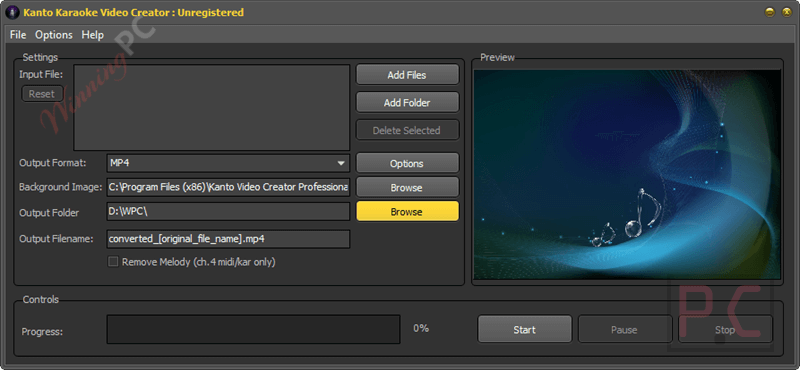
Kanto Video Karaoke Creator is a specialized tool designed to transform standard karaoke files (like MIDI, KAR, or MP3+G) into high-quality video formats. Unlike “lyric makers” that require you to type everything from scratch, this software focuses on conversion. It extracts existing synchronized lyrics from your source files and generates a video file (MP4, AVI, MKV) that you can play on any TV, tablet, or smartphone. Kanto Video Karaoke Creator is built for karaoke enthusiasts who want to modernize their collection or performers who need 4K-ready visuals for their shows.
In-Depth Review & Features
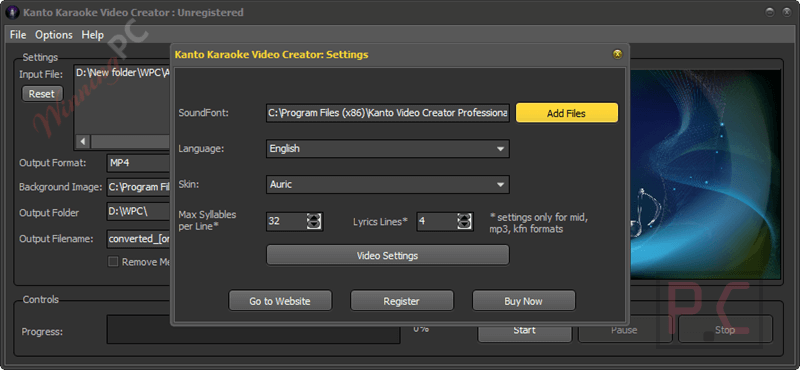
The software stands out because it treats audio quality as important as video quality. By using internal soundfonts, it makes thin-sounding MIDI files sound like rich MP3 tracks during the conversion process.
- Multi-Format Support: Convert MIDI, KAR, MP3, CDG+MP3, and KFN files instantly.
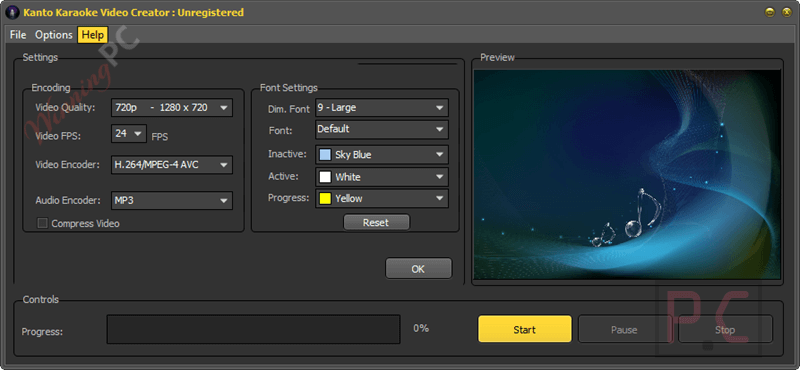
- HD & 4K Export: No resolution caps. You can export in 1080p or 4K for professional displays.
- Background Customization: Import your own images (JPG, BMP, PNG) to serve as the background for the scrolling lyrics.
- Lead Vocal Removal: Includes a feature to strip the melody channel from MIDI/KAR files so it doesn’t clash with your live singing.
- Encoding Control: Choose between H.264/MPEG AAC (optimized for Apple/Mac) or standard AVI/MPG formats.
Pros & Cons
More Kanto Video Karaoke Creator Screenshots!
Frequently Asked Questions
Is this the best coupon for Kanto Video Karaoke Creator?
Yes. WinningPC currently offers a 30% discount, which is the highest verified rate available on the market.
What is the difference between this and Lyric Video Creator?
Kanto Video Karaoke Creator is for converting existing files (like MIDI/KAR) that already have lyrics. Lyric Video Creator is for building a video from scratch where no lyrics exist.
Does it work on Mac?
The software is Windows-native, but the output files (MP4/AAC) are specifically optimized to play perfectly on Mac and Apple devices.
Can I use my own photos as backgrounds?
Yes, you can upload any JPG, PNG, or BMP file to use as the backdrop for your karaoke videos.
Will this remove vocals from an MP3?
While it has options to remove melody channels from MIDI files, removing professional vocals from a standard MP3 is significantly harder and results may vary. It is best used with dedicated karaoke files.
Technical Specifications
| Operating System | Windows 11, 10, 8.1, 8, 7, Vista, and XP. |
| Output Formats | MP4, MKV, MPG, AVI, M2TS. |
| Input Formats | MIDI, KAR, MP3, CDG+MP3, KFN. |
| Key Features | Custom Fonts, Soundfont Support, Background Image support. |