
 Laura Marano

Keeprix All-in-One Downloader is a video downloader designed to simplify the process of downloading videos from a wide range of streaming platforms. It supports downloading videos from over 1,000 websites, including Netflix, Amazon Prime Video, Disney+, Hulu, Max, Paramount+, YouTube, and TikTok, and also allows users to download full sports event videos from the Apple TV MLS channel for offline viewing. Engineered for speed, simplicity, and cross-platform compatibility, Keeprix Downloader lets users download high-quality videos up to 4K in MP4 or MKV formats for offline viewing. Ideal for travelers and content creators, it helps bypass DRM restrictions, retain multi-language subtitles, and enjoy ad-free playback without an internet connection.
Keeprix Downloader Coupon Codes Oct 2026 (100% Working)
Keeprix All-in-One Downloader (1-Month Subscription)
83% Off coupon code, regular price $239.93, discounted price $39.99
Keeprix All-in-One Downloader (1-Year Subscription)
79% Off coupon code, regular price $379.93, discounted price $79.99
Keeprix All-in-One Downloader (Lifetime Subscription)
78% Off coupon code, regular price $589.93, discounted price $127.99
Keeprix All-in-One Downloader License Code for Free
WinningPC has partnered with Keeprix to give away a 6-month license for Keeprix All-in-One Downloader for free. Please enter your email address on the giveaway form below to get your free license code.
- Product name: Keeprix All-in-One Downloader
- Website: https://www.keeprix.com/
- License type: 6-month
- Platform: Windows, Mac
- Download: keeprix-vd-en-setup.exe
- License code – last updated: Jan 20, 2026
The giveaway has ended!
Install the software on your computer. Please copy and paste your license code to activate the software with full functions.
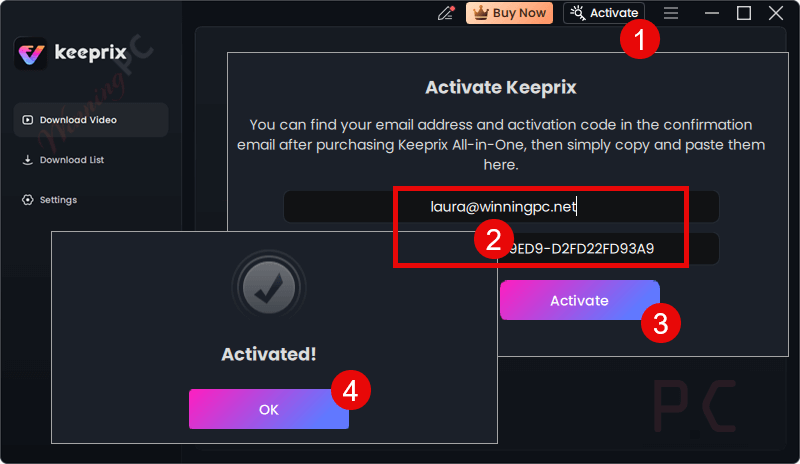
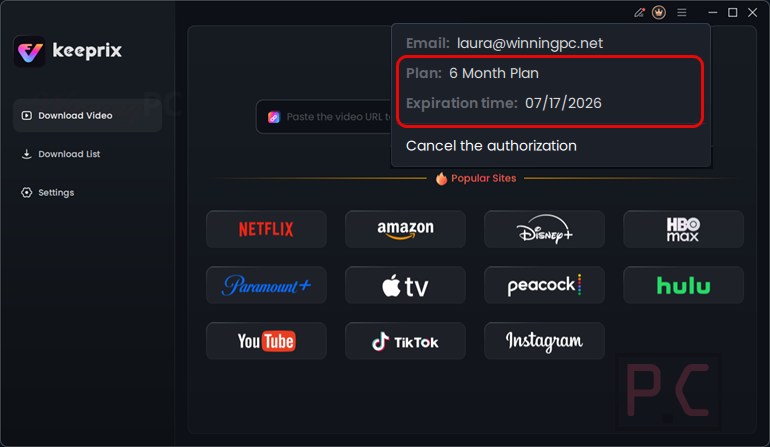
Got it for 6-month free with full functions!
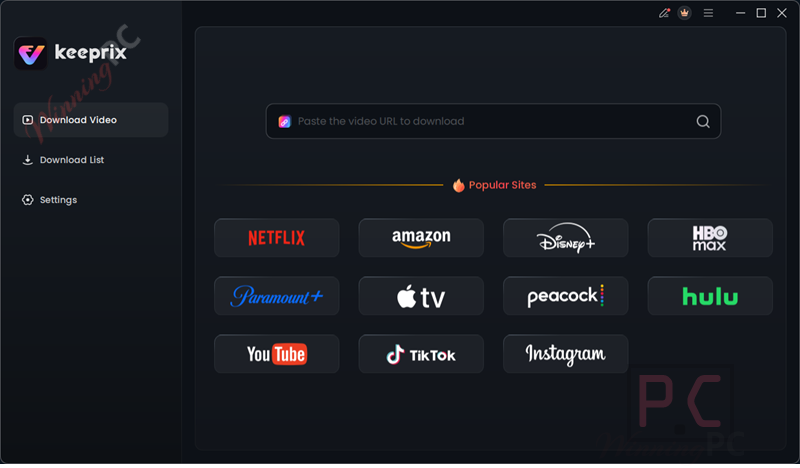
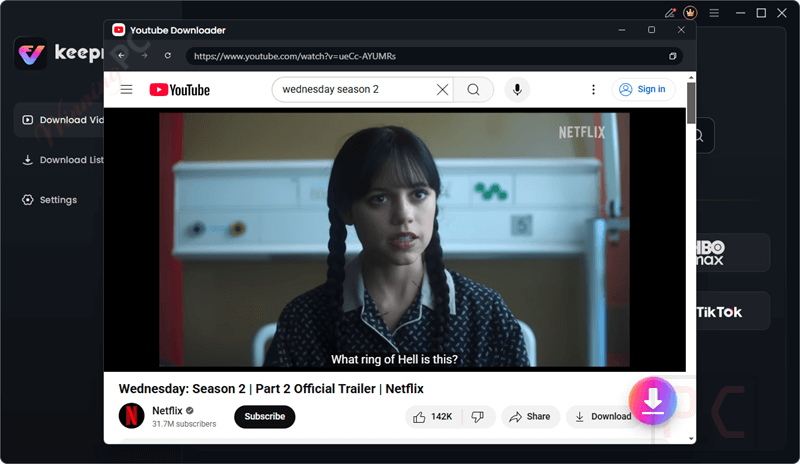
Keeprix All-in-One Downloader main screenshot
Youtube Downloader
Main Features
- Streaming Video Downloader: Download movies, TV shows, documentaries, and exclusive content from 1,000+ websites, including Netflix, Amazon Prime Video, Disney+, Hulu, Max, and Paramount+, up to 4K quality, with multilingual subtitles and audio tracks for convenient offline viewing.
- YouTube and TikTok Downloader: Save YouTube videos, playlists, channels, and live streams, as well as TikTok’s engaging short-form videos, in their original or up to 4K quality, without a watermark.
- High-Resolution Downloads: Supports downloading videos in multiple resolutions, including 4K Ultra HD and 1080p, delivering crisp and clear video output for an enhanced viewing experience.
- Subtitle and Audio Retention: Keeprix automatically detects and downloads multi-language subtitles and multiple audio tracks from videos. You can choose to save them as separate files or embed them directly into the video.
- Batch Download Capability: Enables simultaneous downloads of multiple videos or entire series, streamlining the process for managing large content collections.
- Efficient Content Search: Features a built-in browser with quick search by name or direct URL pasting, making it easy to locate and download your favorite videos from supported platforms.
Frequently asked questions
What download restrictions does Keeprix Downloader remove for streaming videos?
Keeprix removes DRM protection, download limits/caps, geo-blocking, ads, expiration timers, and device/app bindings, enabling unlimited, ad-free, permanent offline downloads in MP4/MKV up to 4K from platforms like Netflix, Amazon Prime Video, Disney+, Hulu, Max, and Paramount+.
Can I download videos in 4K resolution?
Yes, Keeprix supports downloading videos in multiple resolutions, including 4K Ultra HD and 1080p, depending on the source platform’s availability, ensuring a high-quality offline viewing experience.
Is Keeprix Downloader compatible with both Windows and Mac?
Absolutely! Keeprix All-in-One Downloader is compatible with both Windows and Mac operating systems.
How does Keeprix Downloader work?
After installing the software on Windows or Mac, use the built-in browser to search for content by name or URL, select your preferred resolution (up to 4K), and download videos with multi-language subtitles and audio tracks.
Do I need active subscriptions to the supported platforms?
Yes, you need valid account credentials and active subscriptions (where required) for the platforms you wish to download from, as Keeprix accesses content through your account.
Technical Details
| Language Support | English, French, German, Japanese, Spanish, Italian, Portuguese, Turkish |
| Money Back Guarantee | 60-Day |
| Operating System | Windows 10 or later macOS 11 or later |
| Shipping | Register code will be sent to your email in minutes |
| Subscription | 1-Month, 1-Year, Lifetime |
| Support Services | Email, Chat |





Note the information on this giveaway is incomplete it is not supported under just any windows system but ONLY Windows 10 or above! and the installer provided seems to be a downloader not the final installer… also a suggestion auto-update yt-dlp.exe the installed version 2025.08.20.0 is already behind the current release version, also support uhd in settings and not just old fhd, i hope it does not re-encode with the selected lossy codec even if the download is already in mp4 h264 specified in settings as that will just degrade the video further and waste time and resources.
I did the following from an admin command prompt:
D:\Program Files (x86)\Keeprix\tools>yt-dlp -U
Current version: stable@2025.08.20 from yt-dlp/yt-dlp
Latest version: stable@2025.09.05 from yt-dlp/yt-dlp
Current Build Hash: 520488b40ce864d49caf7ed0298a5ff1d080476e5e19fec37a4995da6d3b76f9
Updating to stable@2025.09.05 from yt-dlp/yt-dlp …
Updated yt-dlp to stable@2025.09.05 from yt-dlp/yt-dlp
The install size of this is 1.12GBytes! The good thing is it deletes the 400MByte plus 7z archive of the real installer after installation and it is downloader to the specified install folder not the systems temp folder so does not hurt the system SSD in any significant way. And the developer uses google analytics right from the initial launch of the installer/downloader.
There is ZERO youtube download functionality if one has not registered so one must assume that when the 6 month giveaway term has expired there will be zero further download functionality unless you pay or maybe get another giveaway trial license.
Uninstalling.
Hey, really appreciate you taking the time to dig this deep and share all these details — this kind of feedback really helps us improve.
First, an important clarification: Keeprix Downloader only supports Windows 10 and later and macOS 11 and later. Unfortunately, earlier systems aren’t supported, and we’ll make sure to make this clearer in future giveaways.
Regarding your other notes: We’ll pass them on to the product team in detail, as feedback like this really helps shape our roadmap.
Thanks again for testing it so thoroughly and sharing the experience.
You could auto-update yt-dlp.exe using an event installed at install time to run the elevated update command when the program is not in use maybe once a week or optionally manually from within the program or at program launch. And avoid such frequent need to refresh the version number of the program just to install a newer yt-dlp.exe
I meant task in task scheduler, not event.
I would have considered trying this if it was a lifetime no updates giveaway… would have still had similar promotional effect as all media downloaders NEED regular updating as sites adjust their servers and protocols to try and block these unathorised content downloaders.
Thanks for your comment! Totally understand your point — media downloaders do rely heavily on updates due to constant changes in site protocols.
That’s why this 6-month license with free updates is actually quite valuable, as it ensures the software stays functional during that period. While it’s not a lifetime deal, it still gives users a good window to try the full features with active support.
Appreciate your feedback! 😊
Technically because this uses the 3rd party yt-dlp.exe to handle downloads and that 3rd party tool includes self-update functionality, via command line switch, a lifetime no updates giveaway is potentially more useful than a 6 month including free updates as most updates of this will simply be refreshing the bundled yt-dlp.exe with a more current one that others have fixed and a recompile of the main executable with a new minor version number but no real changes to the code itself, such updates one can effectively do ones self like I did in my other comment!