


Leawo Tunes Cleaner is free right now through an official giveaway – claim a 1-year license (worth $39.99) at no cost, ✅ verified by Chris. Just register on the developer’s giveaway page below to get your key. Prefer the latest version with updates? Use code SUN**50 for 50% off on a lifetime license ($19.99). Works on Windows & macOS.
Leawo Tunes Cleaner Giveaway
Leawo Tunes Cleaner
Clean up iTunes and other music libraries through one-click auto duplicate song removal, manually adding/editing music tags, etc.
- Product
- Leawo Tunes Cleaner
- Product website
- leawo.org
- License
- 1-Year
- Platform
- Windows 7, 8, 8.1, 10, 11
- Usage
- Non-commercial only
- Updates
- No future upgrades
- Support
- No support
- Updated
- 2026-07-07
Continue on leawo.org
Share to reveal the official giveaway page, then register there to receive your license.
This giveaway ended on .
50% Off Leawo Tunes Cleaner 1-Year License
How to Get The Leawo Tunes Cleaner License Key Free?
- Unlock the giveaway link on this page. Click the button below to reveal Leawo’s official giveaway registration page.
- Choose your operating system. On Leawo’s page, select Windows or macOS before filling in your details.
- Enter your name and email address, then click “Get It Now” to submit your request.
- Check your inbox for the license key and download link sent by Leawo.
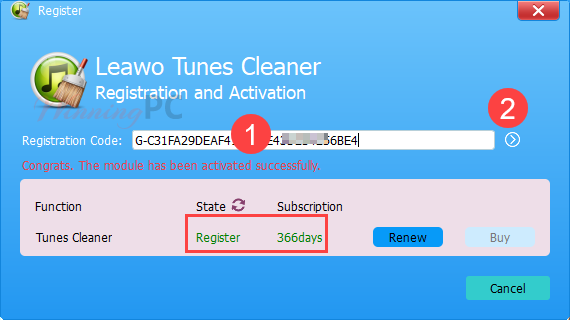
- Install Leawo Tunes Cleaner and click “Register” in the software, enter your key, and activate your 1-Year license.


Leawo Tunes Cleaner Coupons & Pricing
Leawo Tunes Cleaner
2 plans · best save 50%
1 License for 1 PC ★ Best Deal
All Features for 1 Year | Unlimited Free Upgrades
1 License for 1 PC
All Features for Lifetime | Unlimited Free Upgrades
Leawo Tunes Cleaner for Mac
2 plans · best save 50%1 License for 1 Mac ★ Best Deal
All Features for 1 Year | Unlimited Free Upgrades
1 License for 1 Mac
All Features for Lifetime | Unlimited Free Upgrades
Hands-on with Leawo Tunes Cleaner
Leawo Tunes Cleaner sits in a specific niche: it’s not a converter or a sync tool. Its whole job is organizing your music library. The duplicate finder is the standout feature, especially in Deep Scan mode, which uses acoustic fingerprinting rather than just comparing filenames or titles. That matters for anyone with a large collection of ripped CDs or downloaded tracks where the same song may have different filenames from different sources. The tag editor is genuinely useful for fixing incomplete metadata in bulk. One real caveat worth knowing before you install: the documented macOS compatibility stops at Big Sur (11), which is three major versions behind the current macOS. If you’re on a recent Mac, test it first.

Key features
- iTunes library cleanup: scans for missing tags, incomplete metadata, and unrecognizable files, then fixes them in bulk or lets you edit each one manually.
- Duplicate removal with two modes: Quick Scan matches by song title, artist, album, file size, and duration; Deep Scan uses acoustic fingerprinting for more reliable detection across messy or large libraries.
- Music tag editor: manually add or correct artist, album, cover art, song title, year, and more for any track.
- Local folder support: works on standalone MP3 folders and other local music libraries, not just iTunes.
- Save-and-resume projects: unfixed files can be saved and returned to later, useful when cleaning a large library in stages.
Pros & Cons
Free License or Paid: What the Giveaway Key Doesn’t Include
| Giveaway (1-Year) | Paid License | |
|---|---|---|
| Cost | Free | From $19.99/yr (code SUN**50) |
| Duration | 1 year from activation | 1-Year or Lifetime |
| Commercial use | No – personal only | No – personal license (1 PC) |
| Software updates | No | Unlimited Free Upgrades |
| Tech support | No | Free English Technical Support |
| Refund | N/A (free) | 5 Days (1-Year), 14 Days (Lifetime) |
| Key delivery | Via email after registration | Instant via email after purchase |
System Requirements & Details
| Operating System | Windows 7, 8, 8.1, 10, 11 macOS 10.10/10.11…/11 |
| Processor | Win: 1GHz Intel/AMD or above macOS: 1GHz Intel, Apple Silicon (M1/M2/M3/M4) support |
| RAM | 512MB RAM (1024MB or above recommended) |
| Others | The latest iTunes |





Network busy, please try again later!