
 Laura Marano

MacBooster is a Mac maintenance tool that helps clean junk files, free up storage space, and improve system performance. It can remove various types of unnecessary files, manage large and old files, find duplicate files, and fix disk permission issues. It also includes security features to detect and remove malware, viruses, and other threats, helping keep Macs secure and organized.
MacBooster PRO
Your one-stop Mac maintenance tool to clean up 20 types of junk files and remove Mac malware and virus to protect your Mac.
- Product
- MacBooster PRO 8.x
- Product website
- macbooster.net
- License
- 3-Month
- Platform
- OS X 10.9 or later(compatible with macOS Big Sur)
- Installer
- MacBooster_8.pkg
- Usage
- Non-commercial use
- Updates
- Free update for three months
- Support
- No free technical support
Continue on macbooster.net
Share to reveal your free license code, then activate it inside the app.
The giveaway may have ended, but you can still give it a try!
97% Off MacBooster 8 Pro (one year subscription/5 Macs)

IObit St.Patrick Sale 2026: 90% OFF + a Lucky Gift
Catch the St. Patrick’s Day magic with our lucky steal 90% OFF plus a special Lucky Gift! Act quick, these rare discounts vanish fast!
MacBooster 8
3 plans · best save 85%
MacBooster 8 Pro
4 plans · best save 97%
How to Get the MacBooster License Key for Free?
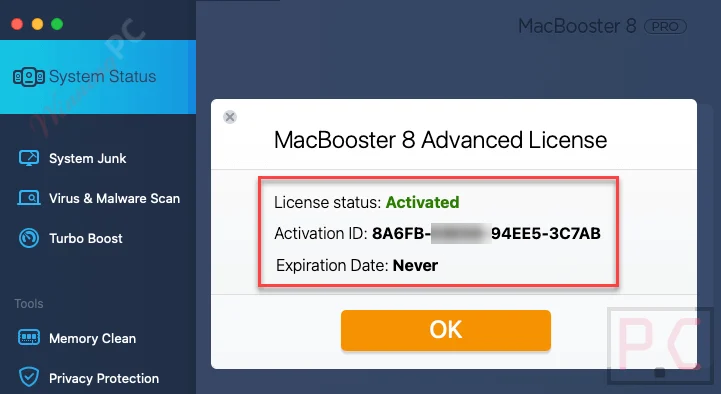
Download and install MacBooster on your Mac using the download link, then activate it to the Pro version with a free license code above.

Now enjoy MacBooster Pro 8 for 3-month full functions:
In-Depth Review & Features

Key Features
- Deep System Cleanup: Scans and removes over 20 types of system junk, including large, old, and duplicated files.
- App Uninstaller: Wipes all leftover files associated with an application instead of just dragging it to the trash bin.
- Photo Sweeper: Identifies and cleans up duplicated or highly similar images in your photo library.
- Memory Clean: Locates apps consuming high amounts of RAM and frees up inactive memory to speed up operation.
- Turbo Boost: Fixes disk permission issues and clears caches produced by third-party media apps like iTunes.
- Startup Optimization: Analyzes your macOS to disable third-party login items that drag down CPU and RAM during boot.
- MacBooster Mini: A menu bar tool that displays memory, network, and firewall status, allowing one-click cache clearing.
- Security Suite: Provides real-time protection to block and remove adware, spyware, and viruses.
- Privacy Shield: Detects system risks and clears malicious tracking cookies from your browsers.
Pros & Cons
More MacBooster screenshots!
Turbo Boost

Memory Clean

Frequently Asked Questions
What is MacBooster?
MacBooster is a comprehensive Mac maintenance tool designed to clean up junk files, optimize system performance, and provide security protection.
Can MacBooster improve my Mac’s performance?
Yes, it optimizes system performance by cleaning junk files, managing startup items, and freeing up RAM.
Does MacBooster offer virus and malware protection?
Yes, MacBooster provides full security protection against viruses, malware, spyware, and adware.
Is there a free trial available for MacBooster?
Yes, a free trial is available to test the software’s capabilities before purchasing.
Is there a money-back guarantee for MacBooster?
Yes, there is a 30-day money-back guarantee if you are not satisfied with the software.
Is there a discount available for MacBooster?
Yes, you can use the coupon code UPS***T45 on WinningPC to save up to 97% on your purchase.
Can I receive a free license for MacBooster?
Yes, you can visit WinningPC and join the giveaway to receive a free six-month license key. It’s limited-time offer!
System Requirements & Details
| Feature | Specifications |
|---|---|
| Operating System | OS 11.5 or later |
| Supported Input | Junk files, duplicate files, large files, photos, applications, malware threats |
| Supported Output | Cleaned storage, optimized performance, malware removal, privacy protection reports. |



a bit danger
https://www.virustotal.com/gui/file/d56f3c7057cd8ee73018cbfce974cee40b97446c3e103be5713eb4a42a591570
Thanks for sharing. To keep your computer safe, let’s skip this giveaway.
MacBooster is an easy-to-use yet powerful system utility for macOS users. Like Windows PCs, Mac computers experience poor reaction times, overloaded hard drives, trouble removing software, and other system problems. Users can easily fix these problems with MacBooster for Mac. It eliminates unnecessary files from the system, finds and removes malware and viruses, locates large or duplicated files that use a lot of hard drive space, and assists you in uninstalling troublesome unwanted applications.
license limited, please update new serial