On this page
Macrorit Data Wiper Unlimited Coupons & Pricing
Macrorit Data Wiper Unlimited Edition (5 computers)
1 License for Many Computers | Free lifetime upgrade | Premium support
Macrorit Data Wiper Unlimited Edition (30 computers)
1 License for Many Computers | Free lifetime upgrade | Premium support
Macrorit Data Wiper Unlimited Edition (Unlimited computers)
1 License for Many Computers | Free lifetime upgrade | Premium support
You may also like:
Macrorit Data Wiper Pro for Home Users
1 License for 1 Computer | Free lifetime upgrade service
Macrorit Data Wiper Pro for Business Users
1 License for 1 Computer | Free lifetime upgrade service
How to Use the Macrorit Data Wiper Unlimited Coupon Code
In the Coupons & Pricing box above, choose the plan that matches how many computers you need to cover: 5, 30 or Unlimited.
Click the COPY button next to that plan. Macrorit’s checkout opens with the coupon already applied, so there’s nothing to paste.
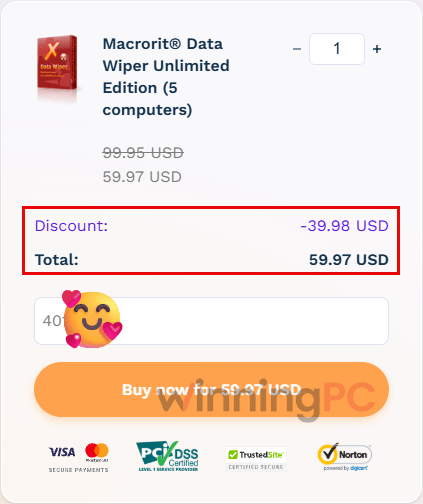
Check the order summary before paying. Before local tax/VAT, the 5-computer plan should show $59.97, the 30-computer plan $149.97, and the unlimited plan $239.97.
Complete the payment, then activate Macrorit Data Wiper Unlimited with the license you receive from Macrorit.
Is the Macrorit Data Wiper coupon legit?
Yes. The code is an official Macrorit discount, and your license comes straight from the publisher’s own store.
No crack or keygen
You install Macrorit’s official build and activate it with a genuine license. That matters more than usual here, because cracked “Unlimited” copies circulate on download sites, and a tampered disk-wiping tool running with admin rights is a risk you don’t want.
Official authorized source
The discount works on Macrorit’s own checkout, not through a reseller or grey-market key shop.
Secure online payment
Payment happens on the publisher’s encrypted checkout page. Your card details never pass through WinningPC.
30-day money-back
Covered by Macrorit’s 30-day money-back guarantee for unresolved technical issues, duplicate orders, or delivery problems. Change-of-mind refunds aren’t accepted, so test the free edition first.
How well does Macrorit Data Wiper Unlimited work?
The real reason to pay for Macrorit Data Wiper Unlimited edition is the system-partition wipe. The free version won’t touch the drive Windows is running from, and the usual workaround is building a boot USB for every machine. Unlimited lets you wipe the system partition while Windows is still up, which saves real time when you’re clearing a row of retired office PCs.
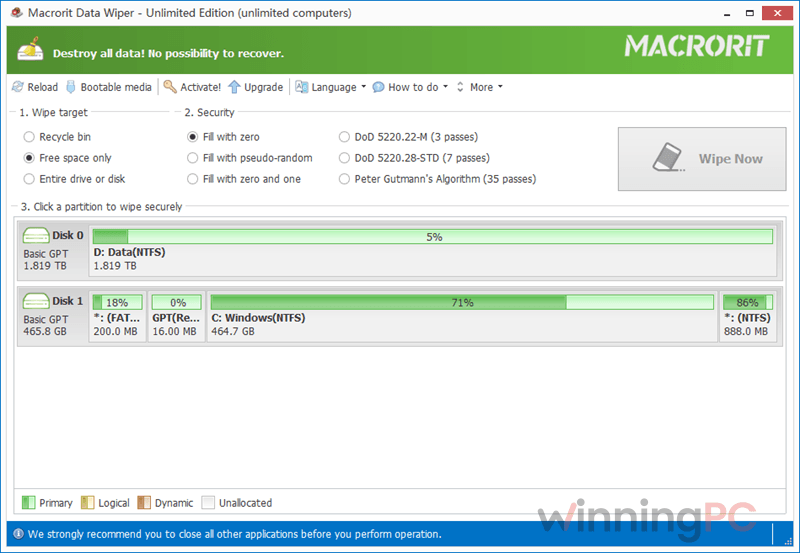
Six wiping schemes cover everything from a fast single pass to DoD 5220.22-M, and you can run several disks at once. The weak spot is paperwork. Macrorit confirms the software doesn’t produce an erasure certificate, so you get operation logs but nothing formal to hand an auditor.
Key features
- Wipe the system partition with Windows running, or build bootable CD/USB media in the app if you prefer the classic route.
- Four ways to erase: the entire disk, a single partition, free space only (keeps Windows intact), or the Recycle Bin with no file-size or file-count cap.
- Works on internal HDDs and SSDs plus USB flash drives, memory sticks and micro SD/TF cards.
- Six wiping methods, including DoD 5220.22-M, with multi-disk wiping and a log viewer to review what ran.
- Portable 32-bit and 64-bit editions, commercial-use rights, free lifetime upgrades and premium support.
What we think
Which Macrorit Data Wiper Unlimited Plan Should You Buy?
| Plan | Price with code | Computers covered | Cost per computer | Best for |
|---|---|---|---|---|
| 5 computers | $59.97 | 5 | about $12.00 | A small office, a family’s PCs, or a home lab |
| 30 computers | $149.97 | 30 | about $5.00 | Small and mid-size businesses with one IT person |
| Unlimited computers | $239.97 | Unlimited (one company) | about $4.00 at 60 PCs, falling as you add more | Larger companies and IT service providers |
Questions people ask about Macrorit Data Wiper Unlimited
Is the Macrorit Data Wiper coupon really up to 54% off?
Compared with Macrorit’s list prices, the code saves up to 54% on Unlimited 5-computer ($129.95 list, $99.95 store price, $59.97 at checkout). The 30-computer ($149.97), unlimited-computer ($239.97), and Pro for Business ($23.97) plans get a flat 40% off.
Is it a one-time payment or a subscription?
One-time. Macrorit sells it as perpetual software, and the Unlimited Edition includes free lifetime upgrades, so new versions don’t cost extra.
What can’t the free version of Macrorit Data Wiper do?
The free edition can’t wipe the system partition or free space, and it’s licensed for home use only. Its Recycle Bin wipe also stops at 100 MB or 5 files. Unlimited removes all of those limits and adds commercial use.
Do I need a bootable USB to wipe my Windows drive?
No. Macrorit Data Wiper Unlimited wipes the system partition while Windows is running. You can still create bootable CD or USB media from the app if a machine won’t boot or you’d rather wipe from outside Windows.
Does Macrorit Data Wiper work on SSDs?
Yes, it can wipe SSDs, but there’s a catch worth knowing. SSDs spread writes across spare cells the operating system can’t see, so an overwrite may not reach every copy of old data. For an SSD you’re selling or recycling, also run the manufacturer’s Secure Erase utility (Samsung Magician, Crucial Storage Executive and similar tools include one).
Do I need multiple overwrite passes?
Usually not. Macrorit’s own notes say a single overwrite is enough to clear most modern hard drives (ATA drives made after 2001 and larger than 15 GB). Multi-pass methods like DoD 5220.22-M are there if your company policy requires them, but they take noticeably longer.
Can I use Macrorit Data Wiper Unlimited for commercial or client work?
Yes. Every Unlimited plan permits commercial use, which is why IT pros and technical service providers buy it. How many computers you can run it on depends on your plan: 5, 30 or unlimited within one company.
Can it wipe CDs or DVDs?
No. Optical discs such as CDs, DVDs and magneto-optic disks can’t be sanitized by overwriting. Macrorit itself recommends physically destroying them.
System Requirements & Details
| Field | Value |
|---|---|
| Operating system | Windows 11, 10, 8, 7, Vista and XP (32-bit and 64-bit) |
| Windows Server | Server 2025, 2022, 2019, 2016, 2012, 2008 and 2003 |
| Processor / RAM / disk | Not specified |
| Supported file systems | FAT16, FAT32, NTFS, Ext2/3/4, ReFS, Apple HFS+ |
| Supported storage | HDD, SSD, USB flash drives, memory sticks, micro SD / TF cards |
| Not supported | Optical media (CD, DVD, MO disks) |
| Editions included | Installer plus portable 32-bit and 64-bit builds; bootable media creator |
| Latest version | 8.6.0 (updated Nov 2, 2026) |