Laura Marano
Magic Browser Recovery retrieves deleted browsing data from web browsers on a computer. It scans the system and displays removed or cleaned history records, including activity from private or incognito sessions. The program lists user activity such as search queries, visited websites, viewed emails, and social network visits by time. It can also extract saved login credentials, passwords, and autofill form data when available. In addition, Magic Browser Recovery shows download history with details like website source, file name, file size, and download start time.
Magic Browser Recovery Coupon Code (100% Working)
Key Features and Screenshots
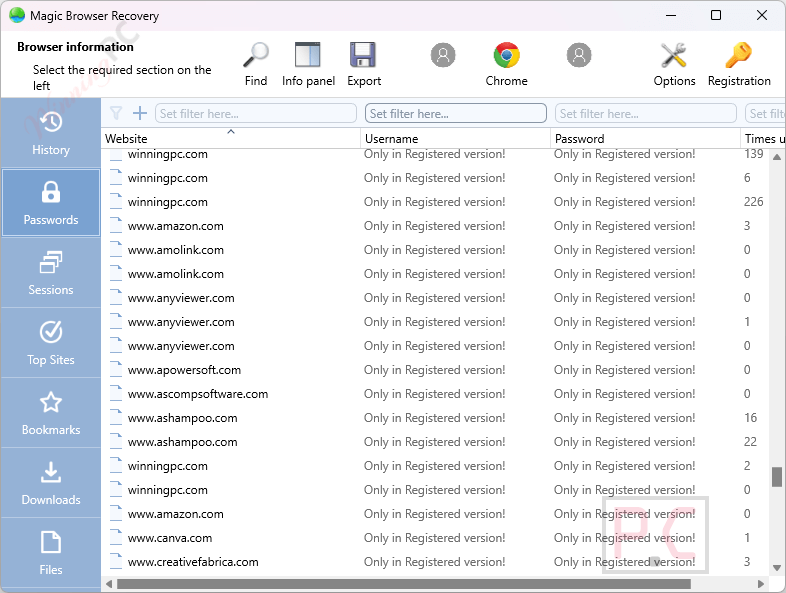
- Recover Deleted Data: Recover cleared or deleted browsing history from Chrome, Firefox, Edge, Opera, and more, even if the browser was uninstalled, the user account was deleted, or the hard disk was damaged.
- Access Cleared Browser Histories: Retrieves data from all browsers ever used on the computer, even if the browser or user account has been deleted.
- Recover Private & Incognito Sessions: Extract traces of web activity from private browsing and incognito sessions.
- Save Deleted Files: Recovers lost browser files that standard tools can’t detect, enabling normal operation to be restored.
- Advanced Disk Scanning: Low-level hard drive analysis scans both allocated and unallocated disk space and finds browser-related data to locate deleted or corrupted browsers.
- Data Types Recovered: Browsing history and frequently visited sites, saved bookmarks and download lists, autofill data (addresses, names, phone numbers, saved logins and passwords for websites).
- Filtering & Sorting: Advanced filters to filter history by time, site category, and specific URLs, and sorting options for quick data access.
- Online Activity Analysis: Shows visited websites, search queries, translations, emails sent/received, social media activity, and more.
- Track Social Network Activities: Tracks how long users spent on each website or web page.
- Export & Reporting: Export recovered data to Excel, HTML, or PDF using an export wizard.
How to Use (Step-by-Step Guide)
Step 1. Download, Install & Launch the Software
Download and install Magic Browser Recovery on your Windows PC. Open the program. It will automatically detect all available drives on your system.
Step 2. Analyze System
Open the browser history recovery software and analyze your system.

Step 3. Select User
Select the computer user whose web browsing history you want to recover.

Step 4. Choose Browser
Choose a web browser (e.g., Chrome, Firefox, or Edge) and wait for the program to finish analyzing it.

Step 5. View and Filter Results
Browse through recovered history: visited websites, timestamps, passwords, bookmarks, and more. Use filters to view specific content like social media, search terms, or gambling websites.
Step 6. Export Data
See the needed information or save it in a convenient format.

Frequently Asked Questions
Can it recover the history deleted in Incognito mode?
Yes. The software uses low-level drive analysis to recover browsing data even from incognito sessions.
Which browsers does it support?
It supports Google Chrome, Mozilla Firefox, Microsoft Edge, Opera, and other Chromium-based browsers.
Does it work on SSD drives?
Partially. Due to the TRIM function on SSDs, some deleted data may be unrecoverable, but it will still attempt to extract all available data.
How long does a typical scan take?
Scan duration depends on your hard drive size and condition. A deep scan may take from several minutes to an hour.
Is there a preview before exporting the data?
Yes. You can view and filter recovered history before choosing to export or save it.
How can I get the best discount for Magic Browser Recovery?
You can visit WinningPC.com and use the Magic Browser Recovery coupon to unlock the best available discount for your license.
Why Choose WinningPC
- Why Trust? We are committed to providing 100% valid and verified coupon codes, so you can always shop with confidence.
- Found an Invalid Coupon or a Better Deal? If you encounter an invalid code or a better offer, please let us know. Our team updates all discount information regularly to ensure accuracy.
- Official Authorization: We only share authentic discounts from trusted software developers.
- No Fake Discounts: Unlike some sites, we never use misleading deals. The final price you see is the true discounted price.
- Secure Purchases: All transactions are processed on the official vendor’s website, ensuring authenticity and data protection.
- Extra Support: If you face order or vendor issues, contact us. We’ll liaise with the vendor to help resolve your problem quickly.
Technical Details
| Language Support | English, اللغة العربية, 中文, Deutsch, Español, Français, Italiano, 日本語, Nederlands, Polski, Русский, Українська |
| Money Back Guarantee | 30-day-back |
| Operating System | Windows, macOS, Linux |
| Shipping | The registration code will be sent to your email in minutes |
| Subscription | Lifetime |
| Support Services | Phone, Tickets |