Cathryn Lee
MobiKin Eraser for Android is a dedicated Android data wiping tool designed to permanently erase personal information from phones and tablets. It can remove contacts, messages, photos, videos, apps, accounts, passwords, browsing history, and other sensitive data while making them unrecoverable.
MobiKin Eraser for Android Giveaway
Permanently erase all data on Android Devices, covering photos, contacts, messages, call logs, and private information.
- Product
- MobiKin Eraser for Android
- Website
- mobikin.com
- License
- 1-Year
- Platform
- Windows 11/10/8/7
- Installer
- mobikin-eraser-for-android.exe
- Support
- No technical support
- Updates
- No free upgrades
- Usage
- Non-commercial use only
- Updated
- 2026-06-19
Get your unique code by email
License key delivered free to your inbox within minutes.
Protected by Cloudflare Turnstile · Email quality checked by Reoon
This giveaway has ended, but you can still get a limited-time discount from the official offer page.
MobiKin Eraser for Android Coupon Codes (100% Working)
MobiKin Eraser for Android
6 plans · best save 72%
MobiKin Eraser for Android (Mac)
6 plans · best save 72%
You may also like

MobiKin Android Toolkit - Lifetime (Windows)
One-time payment, lifetime, free upgrades included
MobiKin Android Toolkit - Lifetime (Mac)
One-time payment, lifetime, free upgrades included
📄 Licensing & Support Details
- 1-Year License and Lifetime License
- The license code will be sent to you automatically within minutes.
- 7-day money-back guarantee.
- 100% secure during the ordering.
- Free technical support service.
📝 How to apply
- To take advantage of this offer, select the “Copy” button within the coupon area provided.
- The discount will be applied instantly, and you’ll be sent to the payment page to purchase the software at the most competitive rate.
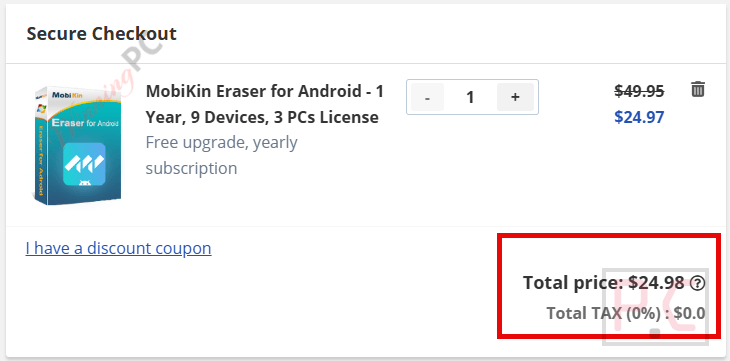
Guide: MobiKin Eraser for Android License Key Free
Please enter your email address in the available giveaway form to receive your free license code.
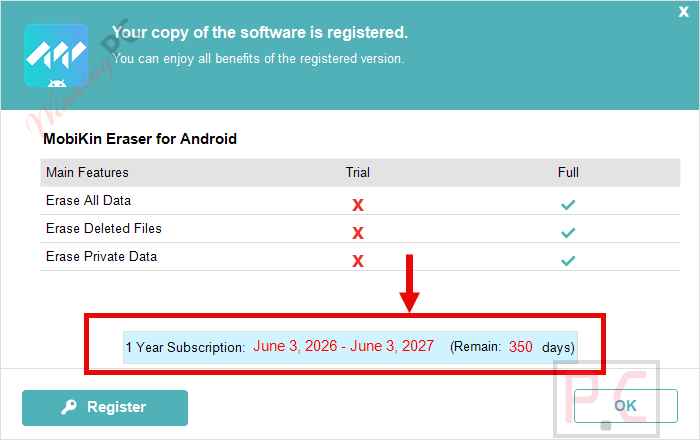
Download and install the software on your computer. Open the software and click on the “Register” button on the main screen. Enter the MobiKin Eraser for Android registration code above to activate it:

Enjoy it for 1-year free:
In-Depth Review & Features

Main Features
- Complete Data Erasure: Wipes sensitive items including contacts, call logs, messages, photos, videos, music, and installed apps.
- Deleted File Overwriting: Scans for and permanently overwrites previously deleted files to block any future recovery attempts.
- Privacy Cleanup: Clears out account logins, transaction records, search histories, and financial data.
- Three Security Levels: Choose between Low (rapid overwrite), Medium (standard single overwrite), and High (three-pass overwrite for maximum security).
- Simple Operation: Connect your phone via USB or Wi-Fi, select an erasing level, and hit start.
- Military-Grade Standards: Employs rigorous data sanitization methods to guarantee absolute privacy.
Pros & Cons
More MobiKin Eraser for Android Screenshots:

Frequently Asked Questions
Where is the best place to find working promo codes for MobiKin Eraser for Android?
If you are looking for active discounts, WinningPC is the top source to find verified deals and coupons for this software, right alongside official promotional campaigns from MobiKin.
Why do I need a specialized eraser instead of just using the factory reset on my phone?
A factory reset essentially just deletes the “map” to your files, leaving the actual data hidden but intact on the storage drive—which is why it can be recovered. This software actively overwrites that storage space with random data so your original files no longer exist.
What is the difference between the three erasing levels?
The Low level provides a fast single pass to quickly wipe your phone. The Medium level is the standard option to ensure complete unrecoverability. The High level overwrites your storage three separate times, offering military-spec data sanitization.
Can I selectively erase just my photos, or does it wipe everything?
This tool is designed to give your device a completely clean slate. It wipes the entire phone, including all files, settings, and hidden data.
What exactly counts as “private data” in this software?
Private data includes items that could lead to identity theft, such as your saved passwords, logged-in accounts, financial apps, transaction records, and web browsing history.
Will this work on my specific phone brand?
It is widely compatible with nearly all major Android manufacturers, including Samsung, Xiaomi, Redmi, OPPO, vivo, and OnePlus.
Can anyone retrieve my data after I use the High level erasure?
No. Once the software overwrites your storage three times on the High setting, your files are completely impervious to any data recovery software on the market.
System Requirements & Details
| Feature | Specifications |
|---|---|
| Language Support | English, Français, Italian, Spanish, Swedish, and more… |
| Operating System | Windows 11 / 10 / 8 / 7 |
| Processor | 750MHz Intel or AMD |
| RAM & Storage | 512MB RAM or above, 1GB hard disk space or more |
| Supported Input | Android phones and tablets running Android 6 or later, USB or Wi-Fi connection |
| Supported Output | Permanently erased Android device data |
| Supported Android Version | Android 6 and above (including Android 16) |
| Supported Brands | Samsung, Xiaomi, Redmi, OPPO, vivo, OnePlus, and more |