
 WinningPC

MSTech Office Home is an alternative to MS Office, with all tools you need to compose your documents, create your tables, charts, graphs and calculations, and read your PDF files. This software includes MSTech Words, MSTech Spreadsheet and MSTech PDF Reader.
Top Office Software Coupon Code Oct 2026 (100% Working)

WPS Office Special Sale: Up To 70% Off WPS Pro
Unlock the full power of WPS Pro — now at a special price!

WPS AI - 1 Year Plan
50% discount code: regular price $239.88, discounted price $119.88
WPS Pro - 1 Year Plan
50% discount code: regular price $71.88, discounted price $35.99
WPS AI + WPS Pro - 1 Year Plan
58% discount code: regular price $311.76, discounted price $129.99
MSTech Office Home Free License Key
- Product name: MSTech Office Home 1.3.0.9
- Website: https://mstech-co.com/
- License type: lifetime
- Platform: Windows
- Giveaway link: n/a
- Download:
Installer + license –> MSTech_Office_Home_1.3.0.9.zip (updated: Dec 06, 2020)
Installer + license –> MSTech_Office_Home_1.0.zip (updated: May 14, 2020)
How to get the license key?
Download the above zip file, install MSTech Office Home on your computer then activate it by the following license code. (You need to enter your name, email, license code then activate the online method)
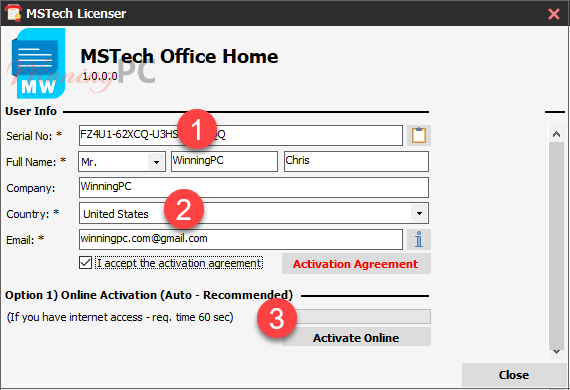
Enjoy it for free:

Word screenshot

PDF screenshot:

Excel screenshot

Key Features
- Font and Paragraph Styles
- Tables, Pictures, Bookmark, Hyperlink
- Header & Footer
- Page Numbers & Table of Contents
- Page Layouts (Column, Break, Size, Orientation, etc.)
- Cell Format & Styles
- Formulas and Calculations
- Images, Insert & Modify Charts
- Review & Comments
- Sheet & Workbook Protection
- Support Password Protected PDFs
- Ability to Search in PDFs
Technical Details
| Language Support | English, Français, Italian, Spanish, Swedish, and more… |
| Money Back Guarantee | 30-Days |
| Operating System | Windows |
| Shipping | Instant Delivery by Email |
| Subscription | 1-Month, 1-Year, 6-Months, Lifetime |
| Support Services | Tickets |





There is no chance to activate online – there is no Internet connection. But I have! The firewall is disabled. There is also no response to the request by e-mail.
I activated this program through the online method (option 1). You have to wait for the program during activation, it takes some minutes to complete. OR choose option 2 (offline activation).