Laura Marano
MuleRun is a highly versatile AI agent platform designed to automatically build fully functional websites, web applications, and browser games. Beyond software development, it offers an extensive suite of AI tools to generate professional research reports, analyze market gaps, and create polished slide decks for both academic and business needs.
- Status: ✅ Active & Verified
- Last checked: October 2026
- Offer: Up to 60% Off
- Note: No promo code required for this official deal.
Mulerun
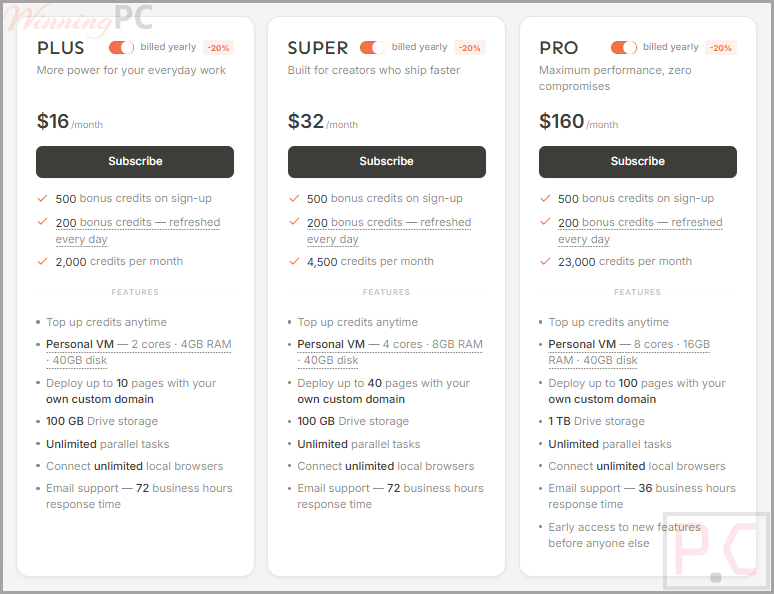
6 plans · best save 60%For Monthly:

Plus - Monthly
2,000 credits per month | Deploy up to 10 pages with your own custom domain
Super - Monthly
4,500 credits per month | Deploy up to 40 pages with your own custom domain
Pro - Monthly
23,000 credits per month | Deploy up to 100 pages with your own custom domain
For Yearly:
Plus - Yearly ★ Best Deal
2,000 credits per month | Deploy up to 10 pages with your own custom domain
Super - Yearly
4,500 credits per month | Deploy up to 40 pages with your own custom domain
Pro - Yearly
23,000 credits per month | Deploy up to 100 pages with your own custom domain
📄 Licensing & Support Details
- License type: Subscription (Monthly and Yearly plans available).
- Support terms: Email support (36~72 business hours response time).
📝 How to apply
Click the ‘Copy Code’ button in the coupon box above. The code will be copied, and you will be redirected to the checkout page, where you can apply it to secure your discounted price.
MuleRun: In-Depth Review & Features
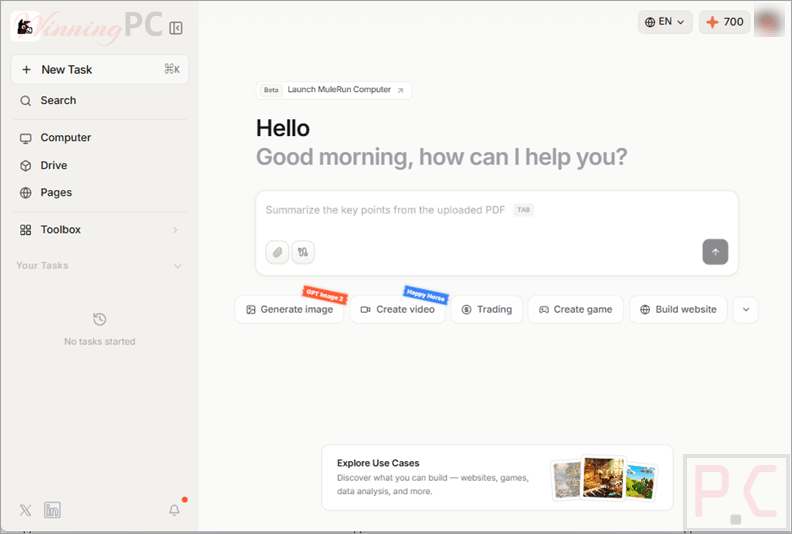
Key Features
- Web & App Creation: Build interactive tools like educational flashcards, tax estimators, off-peak marketplaces, and restaurant scheduling dashboards.
- Automated Documents: Generate research reports, SEO audits, YouTube video summaries, and positioning gap analyses.
- Slide Deck Design: Automatically create visually complete presentations for travel destinations, academic lectures, and brand announcements.
- Playable Browser Games: Develop and play AI-built games ranging from text adventures and tile-matching puzzles to multiplayer Texas Hold’em.
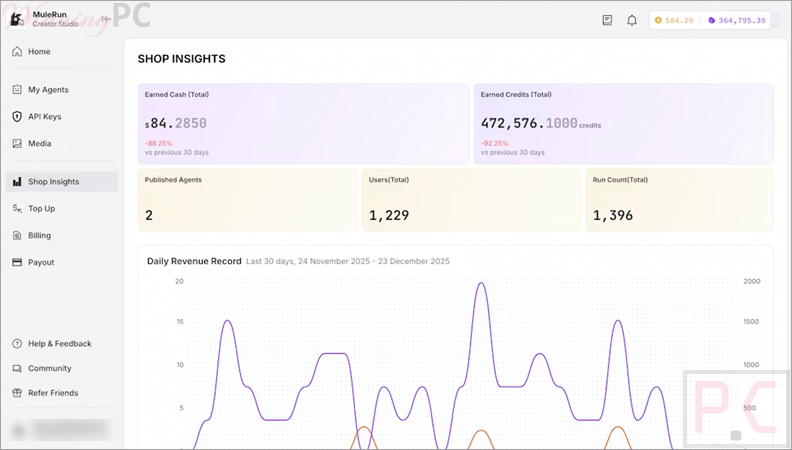
- n8n Integration: Import n8n JSON workflows directly into the Creator Studio to build and publish custom agents.
Pros & Cons
More screenshots
Frequently Asked Questions
Where can I find a coupon code or deal for MuleRun?
The latest and best deals can be found on WinningPC, alongside the official software website or the developer’s social media channels.
What is the best discount currently available for MuleRun?
The best current discount is 60% OFF on all Yearly plans (Plus, Super, and Pro), available directly on WinningPC.
Which workflows can I import into MuleRun?
Currently, the platform only supports importing n8n workflows. Support for Dify and ComfyUI is planned for the future, but there are no plans to support Coze.
How do I publish my own n8n Agent?
You need to apply to become a Creator first. Once approved, you can import your n8n Agent code into the Creator Studio, configure it, and submit it for a final review before it goes live on the Explore page.
Why is my n8n Agent failing to import into the Creator Studio?
Errors usually happen if your n8n JSON doesn’t meet the platform’s technical specifications, uses unsupported credentials, or has broken code logic. You should debug the workflow inside n8n and try importing it again.
What types of credentials does the platform support?
Right now, MuleRun supports two main types of credentials for your integrations: API Key and OAuth.
My n8n image node returns Base64, but the platform requires a URL. What should I do?
You have two options: either configure your n8n node to output a URL directly instead of Base64, or upload the Base64 image to an object storage service (like Supabase or AWS S3) and use the public URL it generates.
System Requirements & Details
| Feature | Specifications |
|---|---|
| Operating System | Web-browser-based. |
| Supported Input | n8n JSON workflows, PDFs, DOCX, Images, YouTube links. |
| Supported Output | HTML webapps, PPTX presentations, Markdown URLs, Browser games. |