On this page
n.Player Coupons & Pricing
How to Use the n.Player Coupon Code
- Decide on your edition first. Standard if you review and verify files; Pro if you also repair, remux, normalize or trim them.
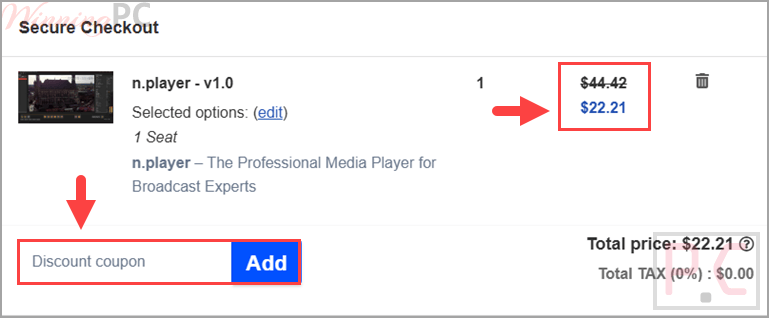
- Click the Copy Code button on this page. The code copies to your clipboard automatically and nablet’s checkout opens in a new tab.
- Paste WINNINGP*** into the coupon field on the checkout page.
- Confirm the discounted total before you pay: $37.64 for Standard, $385.10 for Pro.
- Complete the order. nablet sends your activation code by email. In n.Player, go to Help → License Manager, enter the code, set a password linked to your email, and click Activate License.
Is this n.Player deal safe to use?
Yes. Everything here runs through nablet’s own sales channel, and nothing in the process involves a patched or repackaged build.
A real license, not a crack
You download n.Player from the form on nablet’s own product page and activate it with a genuine code in Help → License Manager. No patcher, no keygen, no modified installer.
Official publisher checkout
The buy links go to nablet’s own 2Checkout order pages for Standard and Pro, not a grey-market key reseller.
Payment stays off our site
Card details are entered on the encrypted checkout page. WinningPC never sees or stores them.
Published refund policy
nablet publishes refund terms at nablet.com/refund-policy. The product page itself does not state a window, so read that page before you buy if a refund matters to you.
n.Player Review & Features
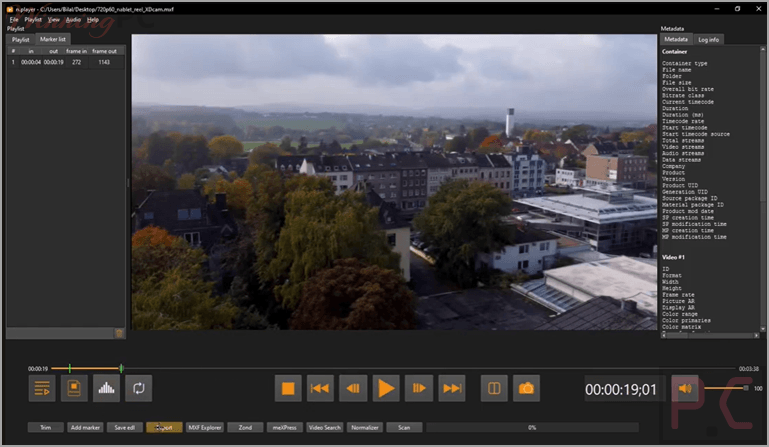
n.Player is built for professionals who need to inspect media files, not just play them. It can analyze MXF structures, metadata, and essence containers to help identify file issues that ordinary media players cannot detect. Built-in tools such as black-frame detection also speed up quality control by automatically locating potential problems in video streams. While its interface is functional rather than modern, the software focuses on accurate analysis and integrates with advanced external tools for deeper inspection when needed.
Screenshots
Key features
- Native production playback: MXF OP-Atom and OP1a, XDCAM HD/EX, XAVC and XAVC-I, ProRes, DNxHD/DNxHR, AVC-Intra and DVCPRO HD open directly, so nothing has to be transcoded to a proxy just to look at it.
- Container inspection built in: MXF Explorer and MP4 Explorer expose tracks, descriptors, atoms and essence containers; Ctrl+E opens whichever one matches the file you are on.
- Frame-accurate review: Step a frame at a time with LTC/VITC timecode readout, an optional burn-in overlay, and playback speeds from 0.25x to 4.0x.
- Synchronized side-by-side: Two files in split-screen with separate transport keys (Shift for the left player, Ctrl for the right) for grade, effects and version checks.
- QC extras: CEA-608 and CEA-708 captions including services 1 to 63, black-frame reporting, plus EBU R128 MXF normalizing and Smart Renderer trimming on Pro.
What we think
Which n.Player Plan Should You Buy?
n.Player vs vs Alternatives
| Tool | Price | Plays MXF/ProRes/DNxHD natively | Container inspection | Best for |
|---|---|---|---|---|
| n.Player Standard (our pick) | $22.21 with code | Yes | Yes, MXF and MP4 Explorer | Windows editors and QC operators who need to look inside files. |
| n.Player Pro | $227.21 with code | Yes | Yes | Teams that also repair, remux, normalize, and trim. |
| VLC | Free | Partly. ProRes and some MXF play; XAVC-I and AVC-Intra are unreliable | No | Casual playback when the file happens to open. |
| MediaInfo | Free | No playback at all | Metadata report only, no essence view | Reading technical metadata when you do not need to watch the file. |
| FFmpeg / ffprobe | Free | Yes, via ffplay | Yes, down to stream and packet level, command line only | Engineers comfortable in a terminal |
| Telestream Switch | Tiered, from roughly $10 for the entry tier up to four figures for Pro | Yes | Yes, plus loudness and caption QC | Cross-platform facilities. It has a macOS build; n.Player does not. |
Frequently Asked Questions
Does the coupon work on both n.Player editions?
Yes. WINNINGP*** takes 15% off Standard and Pro alike, bringing Standard to $37.64 and Pro to $385.10. Apply it in the coupon field at nablet’s checkout for whichever edition you selected.
Can I try n.Player before buying?
Yes. Open Help → License Manager and click Request Eval Code to get a trial code from nablet. The installer itself comes from the download form on nablet’s product page; the link opens automatically once you submit it.
Does n.Player run on macOS?
No. n.Player is Windows 10 and Windows 11 only. nablet states that other operating systems are planned, but has not published a date, so a Mac-based suite needs a different tool for now.
Do I need the Pro edition to trim or transcode?
Yes. Smart Renderer trimming, file remuxing and repair, professional MXF processing, EBU R128 normalizing and transcoding are all Pro-only. Standard covers playback, side-by-side comparison, audio metering and MP4/MXF analysis. If you only review and validate files, Standard is the edition you want.
How do I activate n.Player on a machine with no internet?
Use offline activation. In License Manager, set your activation code, password and email address, then click Create Offline License File and send the generated file to support@nablet.com. nablet replies with an activated license file. Back in License Manager, press Install activated License File and select it.
Does it display closed captions?
Yes. It supports CEA-608 and CEA-708, including services 1 through 63, which covers most broadcast delivery specs. Captions render during playback so you can check timing against the timecode readout.
System Requirements & Details
| Feature | Specifications |
|---|---|
| Operating System | Windows 10, Windows 11. Other platforms planned, no date announced |
| Supported containers (input) | MXF, MP4, MOV, TS, AVI, MKV |
| Supported codecs (input) | AVC (H.264), XAVC, AVC-Intra, HEVC (H.265), MPEG-2, XDCAM |
| Professional formats highlighted by nablet | MXF, MOV, ProRes, XAVC, DNxHD, AVC-Intra |
| Closed captions | CEA-608 and CEA-708, services 1 to 63 |
| Output/export | Frame exports as PNG (Ctrl+Shift+S); EDL export from the trim marker list; segment export via Smart Renderer without re-encoding (Pro); full transcoding via mediaEngine Express, installed separately (Pro) |
| Other requirements | Internet connection for standard activation, with offline activation available by email. MXF Explorer, MP4 Explorer, Zond 265 and mediaEngine Express are separate executables you point n.Player to under File → Settings |