
On this page
O&O Defrag Professional Giveaway
| Product | O&O Defrag Professional |
| Publisher | O&O Software |
| Original price | $49.95 (1-PC license) |
| Giveaway price | Free |
| License | Lifetime (version 30 only) |
| Platform | Windows 11, Windows 10 |
| Installer | OOD30Professional64Enu.exe |
| Use | Home use only (non-commercial) |
| Updates | No free updates |
| Support | No free tech support |
| Reinstall after offer ends | Yes |
| Verified | Oct 2026 by Laura |
O&O Defrag Professional Coupons & Deals
O&O Defrag Pro
2 plans · best save 50%
For 1 PC
Your gift: O&O Syspectr for 1 year worth US$ 20.00! Full version with no time-limit, electronic delivery
For 5 PCs ★ Best Deal
Your gift: O&O Syspectr for 1 year worth US$ 100.00! Full version with no time-limit, electronic delivery.
You may also like

O&O PowerPack (Bundle)
Full version with no time-limit, electronic delivery. This pack contains O&O Defrag Pro, O&O DiskImage Premium, O&O SafeErase Pro and O&O AutoBackup Pro
Is this O&O Defrag giveaway safe and legit?
Yes. This is a promotion run directly by O&O Software, the German developer that has been shipping disk optimization tools for Windows since the late 1990s.
No crack or keygen
You receive a genuine activation key issued by O&O Software itself. The installer is the publisher’s official build – nothing is patched, repackaged, or modified.
Official publisher giveaway
Registration happens on O&O Software’s own website, not through a key reseller, grey-market broker, or third party.
Secure HTTPS checkout
If you later purchase a paid plan, payment is processed on O&O Software’s encrypted store. Your payment details never touch WinningPC.
30-day money-back guarantee
This applies to paid purchases. The giveaway key is free, so there is no financial risk in claiming it.
How to claim your free O&O Defrag Professional license
- Click the “Claim the free lifetime license” button to go to O&O Software’s official giveaway page.
- Enter your email address in the registration field and press “Request free license.”
- Check your inbox for a confirmation email from O&O Software and click the verification link inside.
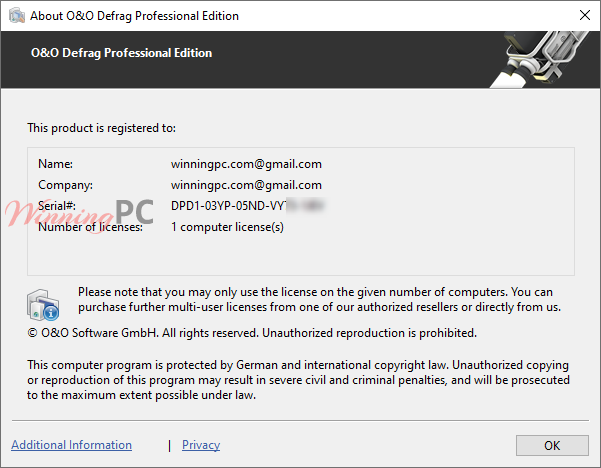
- A second email will arrive with your O&O Defrag Professional activation key and a download link for version 30.
- Download and install O&O Defrag 30 using the link provided by O&O Software.
- Copy your license key and paste it into the activation prompt inside the app. Your Lifetime license for v30 is now active.

What O&O Defrag Professional actually does
O&O Defrag Professional goes well beyond the “Optimize” button built into Windows. The standout capability is boot-time defragmentation: it can optimize locked system files before Windows starts, something the built-in tool simply cannot access during a live session. The SSD-specific routines are genuinely thoughtful – rather than running generic defrag passes that add unnecessary write cycles, the software uses optimization methods tuned to flash storage.

The interface gives you two modes: a simplified one-click view for everyday use, and a full expert panel with per-drive scheduling, fragmentation thresholds, and multiple strategy options when you want that level of control.
Key features
- Defragments HDDs and SSDs using drive-type-specific optimization methods.
- Boot-time defragmentation for locked system files that cannot be accessed during normal Windows operation.
- O&O DiskCleaner to remove temp files, internet cache, and other accumulated storage waste.
- Automated background optimization with customizable schedules and fragmentation-threshold triggers.
- Drive health check that scans for file system inconsistencies and can attempt repairs.
- Full fragmentation analysis with visual drive status reports per drive.
more screenshots!


What we think
O&O Defrag vs the alternatives
| Tool | Price | HDD defrag | SSD optimization | Boot-time defrag | Auto-schedule | Best for |
|---|---|---|---|---|---|---|
| O&O Defrag Pro (this giveaway, v30) | Free | ✅ | ✅ | ✅ | ✅ | Home users wanting a full optimization suite |
| Windows Disk Defragmenter | Free (built-in) | ✅ | ✅ (TRIM) | ❌ | ✅ (basic) | Anyone who needs nothing extra |
| Auslogics Disk Defrag Pro | $20.07/yr | ✅ | ✅ | ❌ | ✅ | Simple defrag with no extras |
| IObit Smart Defrag | $10.99/yr | ✅ | ✅ | ✅ | ✅ | Users who want boot-time defrag without paying |
Note: if your machine runs only SSDs and you’re on Windows 10/11, the built-in TRIM + Windows Defragmenter handles the basics for free. O&O Defrag adds the most value on HDD or mixed HDD/SSD setups.
Frequently Asked Questions
Is O&O Defrag safe to use on SSDs?
Yes. O&O Defrag uses the Windows file system APIs that Microsoft provides – the same interfaces Windows Explorer uses to move files. Its SSD-specific methods are designed to reduce write cycles rather than add them, so it doesn’t accelerate drive wear the way generic defrag passes might.
What’s the difference between the giveaway version (v30) and the current paid v31?
The giveaway gives you version 30, one release behind the current v31. Version 31 added O&O VisualDisk (a visual monitor of SSD write access), revised boot-time optimization that now works with Bitlocker-encrypted drives in a single click, and native ARM CPU support. None of those features are included in the v30 giveaway key, and the key receives no future updates.
Can I reinstall O&O Defrag after the giveaway period ends?
Yes. The giveaway terms confirm you can reinstall the software after the offer ends. Store your activation key somewhere safe — a password manager or a note in your email — before the giveaway closes.
Is this a one-time payment, or does it auto-renew?
Both the giveaway key and the paid license are one-time purchases. There is no subscription and no auto-renewal charge.
How many computers can I use the giveaway license on?
One. The giveaway license covers a single PC and is restricted to home (non-commercial) use only.
System Requirements & Details
| Field | Value |
|---|---|
| Operating system | Windows 11, Windows 10 |
| Supported drive types | HDD, SSD, NVMe (NTFS-formatted volumes displayed in Windows Disk Management) |
| Supported input formats | N/A – disk optimization tool, not a file converter |
| Supported output formats | N/A |
| Languages | German, English |
| Internet | Required for initial activation/registration |
| ARM CPU support | Not available in giveaway v30 – included in paid v31 only |



Good share, WP. Thanks.
I am using it on my new Dell Inspiron 5457 as it comes with a HDD. Well, new to me. Actually, my friend gave it to me as she is upgrading to a Mac. Heck, it is only a couple of years old and has. 16 GB of RAM.
Now, what does it take for me to get my hands on Unhackme? This is the last piece of software that will make my ‘new’ laptop complete!
I downloaded the O&O Defrag-Profesional version 25 from your give-away promotion. But I ca not find where to input my e-mail to get the registration key. I scrolled all the the way up and down the page with no success.
Will you please assist me on getting the registration key or point the proper link?
my e-mail is tech-99@outlook.com
I just registered a license code for you:
“You will receive an email from us shortly. Please click on the link contained in the email to complete the registration. If you have not received a message, please check your spam folder.”
If you want to try, access this giveaway link: https://www.oo-software.com/de/special/rts916?x-clickref=1011lwBfUqKr
The best defragger for Windows 7-10-11.
Automatic defrag works very well. Low system resources used.
Defrag Professional the last time I used this programme it made my computer run like a pig to which I had to completely to a factory reset. Would not suggest using this.
Thanks for sharing.