

On this page
Claim your free 1-year Pro license
| Field | Value |
|---|---|
| Product | Glary Utilities Pro 6 (build 6.46) |
| Publisher | Glarysoft Ltd. |
| Original price | $39.95 for a 1-year subscription |
| License | 1-Year Pro, non-commercial use only |
| PCs covered | Not specified for the giveaway key (a paid license covers up to 3) |
| Platform | Windows 11, 10, 8.1, 8, 7, Vista, XP (32-bit and 64-bit) |
| Updates | No free version updates |
| Support | No technical support |
| Giveaway window | September 1 to September 3, 2026 (UTC) |
| How to claim | Email registration on Glarysoft’s giveaway page |
Glary Utilities Plans & Coupon Codes (100% Working)

Glary Utilities PRO Technician
Optimization tool for service providers | 1-Year License
Claiming the key, step by step
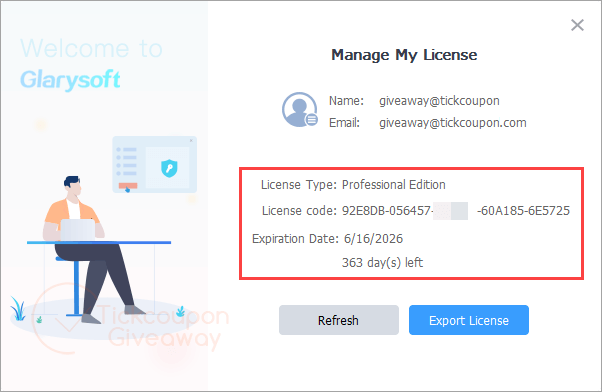
On the Glarysoft giveaway page, please enter your valid Email and check before “I’m not a robot”, click on “Get My Key Now”, and then you can get the license in your mailbox.

Install Glary Utilities Pro and launch it; click on the “Upgrade Now” button, then enter the above license name and code, and choose “Activate Now”:


Got it for 1 year free!
Is this Glary Utilities giveaway safe and legit?
Yes. It’s Glarysoft’s own promotion for WinningPC users, not a key found on a forum.
No crack or keygen
You install the standard build from glarysoft.com and unlock it with a genuine license code. Nothing is patched, repackaged or downloaded from a mirror.
Publisher-run, not a reseller
Both the free key and the discounted licenses go through Glarysoft’s own checkout, so there’s no grey-market key that gets revoked three months later.
What you actually hand over is an email address
That’s the price of the free key. Expect Glarysoft newsletters afterwards; there’s an unsubscribe link, but go in knowing that’s the trade.
90 days to change your mind if you buy
Glarysoft applies a 90-day money-back guarantee to paid licenses. The giveaway key costs nothing, so there’s no risk on that side either.
How well does Glary Utilities Pro work?
Here’s the thing most giveaway pages skip: the free edition already carries most of that toolbox. Pro isn’t a second, bigger app. It adds four things. A Deep Scan that digs further into the registry and system folders, Auto-Care that runs maintenance in the background on a schedule, automatic version updates, and access to Glarysoft’s support desk. So the Pro upgrade is really about automation rather than firepower, and that matters more than it sounds, because these tools only help if they actually get run and most people never run them. The interface is dense but logical once you learn where things live. Restore Center is the underrated part, letting you roll back a cleanup that took something you needed.

Key features
- 1-Click Maintenance. Tick the checks you care about (junk files, registry errors, broken shortcuts, browsing traces) and clear them in one pass, or put the whole thing on a schedule.
- Deep Scan, Pro only. Goes further into the registry and system folders than the standard clean. This is the main technical gap between free and Pro.
- Tracks Eraser, File Shredder and File Encrypter. Wipe browser and app history, destroy files so recovery tools can’t rebuild them, and lock individual files behind encryption.
- File Undelete and Disk Space Analyzer. Recover something you emptied from the Recycle Bin, and see which folders are actually eating the drive.
- Restore Center. Undo a cleanup after the fact. It’s the safety net that makes the registry tools far less nerve-racking.
What we liked, what we didn’t
Screenshots


What the free key doesn’t include
| Paid Pro license | Giveaway key | |
|---|---|---|
| Price | $39.95/year, or $11.98 with [CODE_70] | Free |
| Term | 1 year, renewable | 1 year, no renewal |
| Version updates | Automatic updates to the newest build | None. You stay on the version you install |
| Technical support | Included | None |
| Commercial use | Permitted | Non-commercial only |
| PCs covered | Up to 3 | Not specified |
| Money-back | 90 days | Not applicable |
Free, Pro or Technician: which one do you need?
| Edition | Price with code | PCs covered | Best for |
|---|---|---|---|
| Glary Utilities Free | $0 | 1, non-commercial | Anyone happy to run maintenance by hand |
| Glary Utilities Pro | $11.98/year with [CODE_70] (reg. $39.95) | Up to 3 | A household with two or three PCs |
| Glary Utilities Pro Technician | $84.50/year with [CODE_50] (reg. $169) | Sources disagree: 3 PCs or unlimited | Repair shops and IT service providers |
Is there a cheaper or free option?
| Tool | Regular price | Covers | Strongest at | Best for |
|---|---|---|---|---|
| Glary Utilities Free | $0 | 1 PC, non-commercial | Nearly the same toolset, run manually | Anyone who’ll actually click “scan” |
| Glary Utilities Pro | $39.95/year | 3 PCs | Automation and depth of cleanup | Multi-PC households |
| Wise Care 365 Pro | $39.95/year | 3 PCs | A lighter, clearer interface | People who want fewer options to wade through |
| CCleaner Professional Plus | $64.95/year | 3 devices | Name recognition and a driver updater | People who want the best-known name |
Questions people ask about Glary Utilities Pro
Is the free version of Glary Utilities good enough?
For most people, yes. The free edition carries the large majority of the toolset. Pro adds Deep Scan, scheduled Auto-Care, automatic version updates and support access. If you’re willing to open the app once a month and press scan yourself, the free download does the same cleaning work.
What happens when the 1-year license expires?
The Pro features switch off and the app reverts to the free edition. Nothing you cleaned gets undone and the program keeps working, you just lose Deep Scan, Auto-Care and automatic updates. At that point you can buy a license or carry on for free.
Do I need to uninstall the free version first?
No. Glary Utilities is a single program. Install the standard build, then enter the license code and the email you registered with inside the app to unlock Pro. Glarysoft account holders can sign in at User Center and press “I have verified” once the activation email arrives.
Is registry cleaning actually worth doing?
Less than the marketing implies. On Windows 10 and 11, a tidier registry rarely produces a speed change you can measure. The parts of Glary Utilities that do move the needle are the startup manager, the disk cleaner and the duplicate finder, which free real space and cut boot time you can feel.
What you need to run it
| Field | Value |
|---|---|
| Operating system | Windows 11, 10, 8.1, 8, 7, Vista, XP (32-bit and 64-bit) |
| Processor | Intel Pentium or AMD K5 at 133 MHz minimum; Pentium 3/4 or Athlon at 500 MHz recommended |
| RAM | 32 MB minimum, 128 MB or more recommended |
| Disk space | 20 MB free minimum, 30 MB or more recommended |
| Display | 800×600 at 16-bit minimum, 1024×768 at 32-bit recommended |
| Other requirements | Internet access recommended; a valid email address is required to claim the giveaway key |



Also you need to block CheckUpdste.dll and CrashReport.dll with your firewall.
I agree it is a useful utility cleaner.
Here is how you can use version 5 for free and perpetually.
Version 5 Pro was a free giveaway last year.
First off, configure it and register it offline. You need to configure it NOT TO UPDATE.
Next up, delete all the update and upgrade executables in the program folder.
That way, they will not be able to update your Glary Utilities 5 Pro.
Version 6 is subscription mode mind you. You need to pay for it annually.
To check the system files for error and repair, I don’t like using the feature on Glary Utilities Pro. Instead I prefer to use the Windows system file checker using Command Prompt for admin.
Winkey + R
Type ‘cmd’
ctrl + shift + enter -> Yes
Type -> sfc /scannow -> enter
It is that simple.
I was just looking for Glary Utilities when i found this page really thanks i was using wise care 365 but Glary Utilities GUI and functionality are much better then wise care 3365 i recommend even the free version only you need to figure how to take its cleaning automatically where as pro version has this function build in. Anyway great giveaway & thanks again
As you folks know, all utilities cleaner professional versions have gone subscription mode.
Glary Utilies Pro 5, which was a giveaway, has a perpetual license.
I will show you how you can use this version free and forever.
From the original version 5, activate it offline with the given registration code. Then create a portable version on your usb drive. Now activate your portable version offline with the same registration key.
Unplug your usb drive.
Here’s the catch. Each you want to plug in your usb drive and use Glary Utilities Pro 5 Portable, you have to re-activate it with your registration serial. But the good thing is you can do it offline. You will also have re-configure your settings.
You sure sound like you are in favor of subscription software.
I suggest you go for Auslogic Boostspeed Pro 13 then. That is one hell of an optimizer. Glary Utilites Pro, on the other hand, is mediocre at best.
Anyway, I have ditched it and returned to my old favorite, CCleaner Pro 5.40. That was the last version by Piriform before it was bought out by Avast.
Actually, I prefer to use the latest version to explore all its functions, whether it’s the free or pro version. I’m currently using Glary Utilities, Wise Care 365, and Kerish Doctor. I’ll give Auslogics BoostSpeed Pro a try based on your recommendation. Thank you!