Laura Marano
Radiant Photo is powered by AI to enhance your image, but not the kind that makes fake stuff; it simply improves the pixels you already have. What’s cool is how it instantly knows whether you’re editing a landscape, a portrait, or even shots of birds and pets. It applies the right settings automatically, and honestly, it saves so much time.
On top of that, you get handy extras like automatic face detection, creative color grading, 26 new film looks, plus tools for cropping, straightening, histograms, and clipping warnings. And the best part? You can use it however it fits your workflow. Run Radiant Photo as a standalone editor, or fire it up as a Photoshop plugin.
Radiant Photo Plans & Coupon Code (100% Working)

Radiant Photo 2 Spring Bundle
51% discount promo: regular price $203.0, discounted price $99.0.

Workflow Bundle for Radiant Photo 2
10% discount promo: regular price $317.0, discounted price $285.30
Key Features and Screenshots
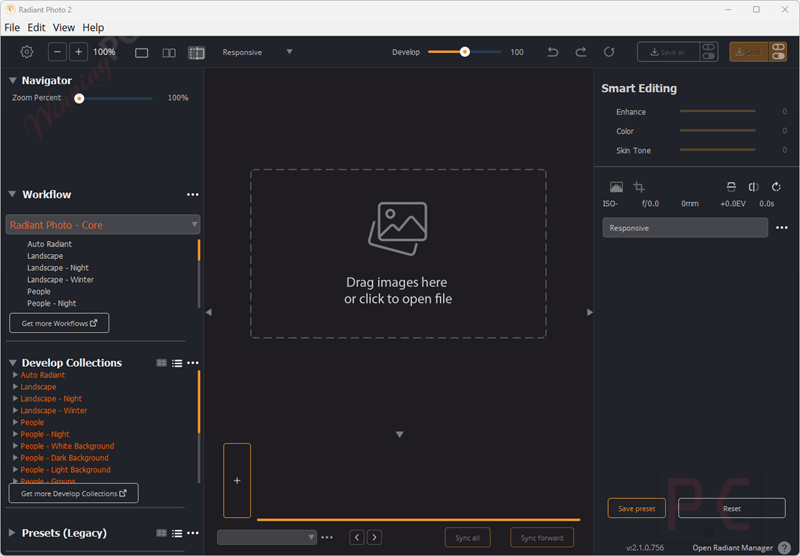
- Intelligent Scene Detection: Automatically detects the scene type (landscape, portrait, bird, pet, etc.) and suggests the most natural corrections and filters, giving you a strong starting point every time.
- Dedicated Specialized Workflows: Optional modules for portraiture, landscape, bird, and pet photography, each trained on thousands of images for precise results.
- Assistive AI: Uses assistive AI to enhance what’s already in your image, not to replace it, which means you get fast performance and complete privacy.
- Per-Pixel Control: Fine-tune colors, tones, and contrast down to the smallest element of your photo, while still enjoying a smooth and responsive editing experience.
- New Portrait Tools: Naturally brightens and enhances faces in portraits, mimicking professional softbox lighting.
- Live Effects: Non-destructive editing with seamless tool integration and the ability to revisit adjustments anytime.
- Advanced Scene and Color Tools: Features selective color adjustments, split color warmth, 26 new film emulations, and creative color grading tools.
- Customizable Workspaces: Task-based layouts that show only relevant tools, with options for users to create personalized editing environments.
- Non-destructive Workflow: Edits are saved in sidecar files, ensuring original files are untouched and changes are reversible
- Smart Batch Export: Export dozens or even hundreds of images at once with consistent quality
- Standalone & Plugin Support: Works as standalone software on Windows/macOS and as plugins for Photoshop, Lightroom, and Corel PaintShop Pro
Radiant Photo Pros and Cons
Conclusion – Is Radiant Photo Worth It?
I think Radiant Photo 2 is a great choice when you want quick, high-quality results without spending hours tweaking every little detail. The assistive AI, smart scene detection, and local processing make it both fast and safe to use. I really like the customizable workspaces and the batch export, since they keep things running smoothly. Still, it’s not as packed with features as some other tools, there’s no layers, masking, or full RAW support, and adding extra workflows can make the price go up.
Review by Laura Marano – tech writer and software reviewer at WinningPC
How to Use Radiant Photo
Step 1. Install & Open: Download, install, and launch Radiant Photo 2 (standalone or plugin).
Step 2. Import Your Photo: Open your image; the software auto-detects the scene.

Step 3. Check Auto Adjustments: Review instant corrections for lighting and color.
Step 4. Refine Edits: Use sliders, film emulations, or workflow modules for fine-tuning.
Step 5. Apply Creative Tools: Try face detection, color grading, or presets.
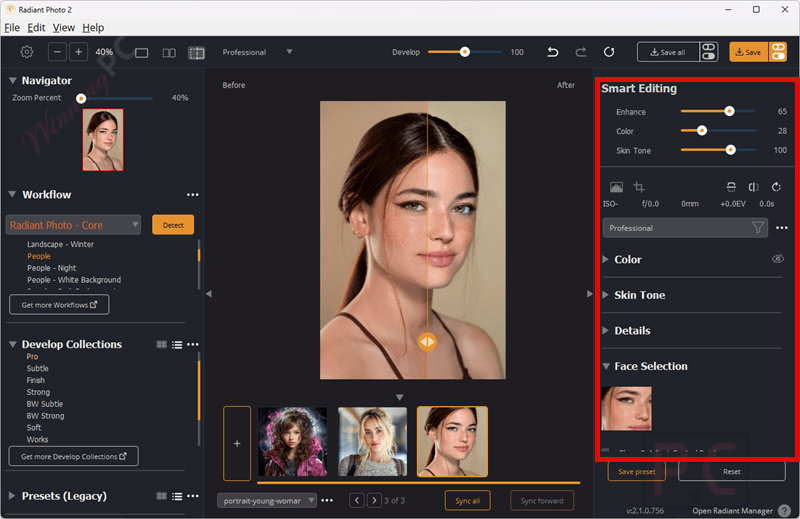
Step 6. Save/Export: Save non-destructively or batch export multiple images.

Frequently Asked Questions
How is Radiant Photo 2 different from version 1?
Version 2 introduces smart scene detection, customizable workflows for specific genres, 26 new film emulations, and improved non-destructive editing with sidecar files.
Does Radiant Photo 2 use Generative AI?
No. Unlike some editing tools, it doesn’t generate or replace parts of your photo. All adjustments happen locally on your device for maximum speed and privacy.
Is it a standalone app or plugin?
Both. You can run Radiant Photo 2 on its own or use it as a plugin inside Photoshop and Lightroom Classic.
Does it support batch editing?
Absolutely. The Smart Batch Export lets you process multiple photos at once with consistent results.
What kind of creative tools are included?
You’ll get advanced color grading, automatic face detection, precise tone controls, and 26 film emulations for different looks.
Technical Details
| Language Support | English, Chinese, French, German, Japanese, Korean, Portuguese, Dutch, and Spanish |
| Money Back Guarantee | 30-Day |
| Operating System | Windows 10 or Windows 11 (64-bit editions) macOS X 10.13 or later |
| Shipping | Register code will be sent to your email in minutes |
| Subscription | Lifetime |
| Support Services | Tickets, Forums |