RonyaSoft CD DVD Label Maker is software for creating CD and DVD labels, covers, and box inserts. It includes 15 built-in templates for different formats such as Slim DVD boxes, Blu-ray covers, and multi-disc sets. You can edit templates with text, images, and clip art, or create your own designs from scratch. The program also supports printing on different label paper formats and direct disc printers. It includes text effects such as shadow, outline, gradient, and arc styles for more customized label designs.
RonyaSoft CD DVD Label Maker
3 plans · best save 20%
Home license ★ Best Deal
One license use for 1 PC | for noncommercial | 30-day money-back guarantee
Business license
One license use for 1 PC | for commercial | 30-day money-back guarantee
Enterprise license
One license use for an unlimited number of PCs | 30-day money-back guarantee
Key Features and Screenshots

- 15 pre-designed templates for CD/DVD labels, case inserts, Blu-ray covers, and paper sleeves.
- The “What You See Is What You Get” editor interface allows you to see exactly how your label will look when printed.
- Custom size support for non-standard disc cases, including origami-style sleeves and multi-disc sets.
- Add and edit text, insert images, rotate elements, and adjust colors, fonts, and layouts.
- Large clipart image gallery and background collection included a CD cover maker to enhance visual appeal.
- Direct-to-disc printing for compatible printers, eliminating the need for adhesive labels.
- Support for popular label stock brands like Avery, Neato, and others.
- Create front/back covers, spines, and booklets for jewel cases, slim cases, and Blu-ray boxes.
- Export designs as images or PDFs for sharing or professional printing.
- Save and reopen projects to continue editing later.
- Print preview to ensure layout accuracy before committing to paper or disc.
How to Use (Step-by-Step Guide)
Step 1. Download and Install the Software
Download the software from the official website, then run the installer and follow the on-screen instructions to install the program on your Windows PC.
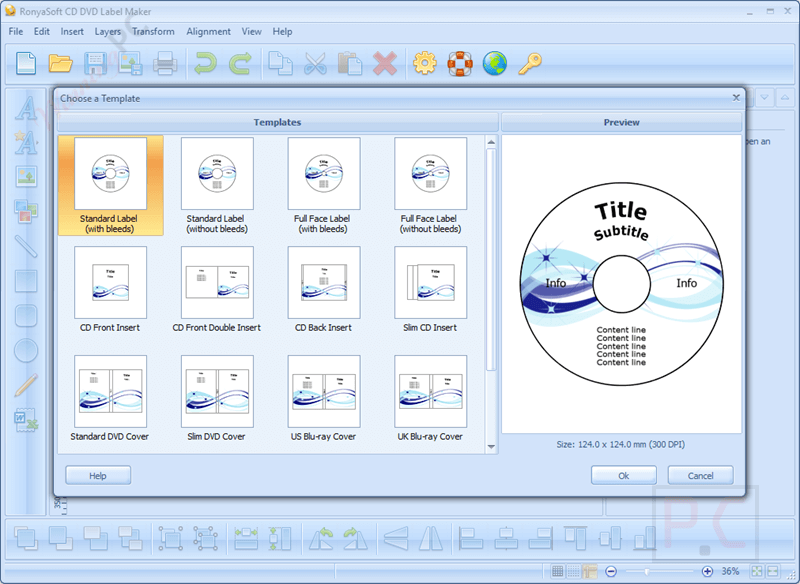
Step 2. Choose a Template
On the home screen, you’ll see a menu of template types: disc labels, case covers, spines, booklets, etc. Click on the type of label or cover you want to create (e.g., Standard CD Label, DVD Case Cover, Slim Case Insert, etc.). A new project window will open with your selected layout.
Step 3. Customize Your Design
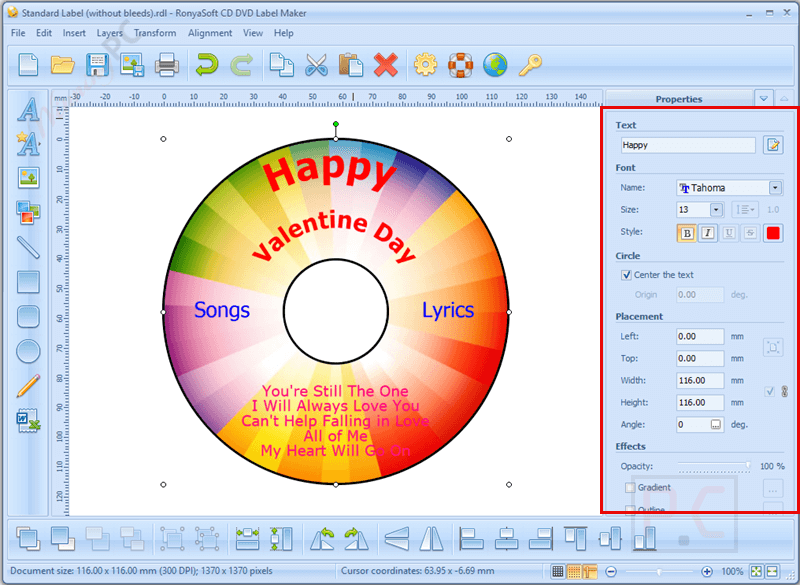
– Add text: Click the “Text” tool to insert song titles, names, or descriptions.
– Insert images: Add your own artwork or photos by importing images (JPG, PNG, BMP, etc.).
– Resize and move elements: Use drag-and-drop to position everything exactly where you want.
– Edit styles: Change fonts, colors, and backgrounds to match your theme.
– Use the toolbar to rotate, align, or layer elements.
Step 4. Preview Your Label or Cover
Click the Preview button to see exactly how your design will look when printed. Make adjustments if anything is misaligned or off-center.
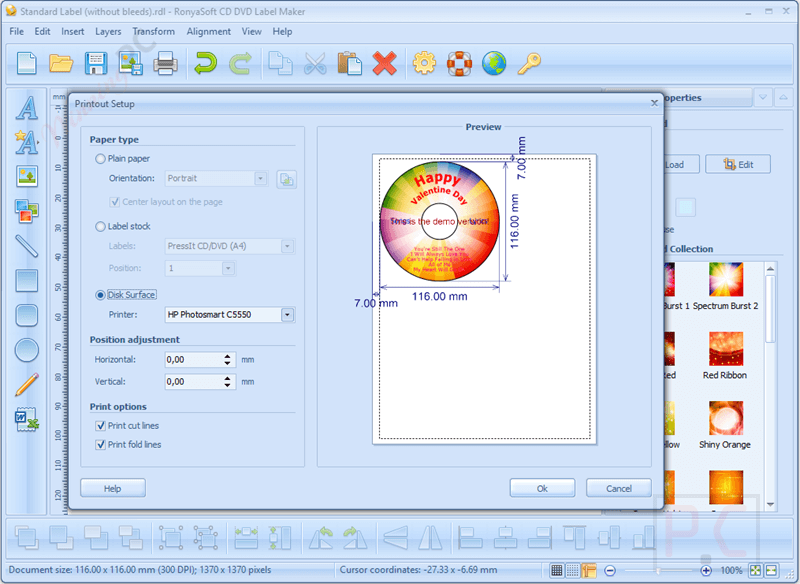
Step 5. Set Up Your Printer
Load compatible label paper or printable discs into your printer. Choose the correct printer settings: Select the printer type (regular or direct-to-disc) and adjust paper size and alignment if needed.
Frequently Asked Questions
Does it come with pre-designed templates?
Yes! RonyaSoft CD DVD Label Maker includes a wide variety of built-in templates for standard and slim jewel cases, mini discs, Blu-ray boxes, and more.
What image formats are supported?
You can import standard image formats, such as JPG, PNG, BMP, and GIF, into your label designs.
Can I use my own photos or artwork?
Yes, you can import your own images from files or scan them directly using a connected scanner.
What brands of label paper does it support?
RonyaSoft CD DVD Label Maker supports major label manufacturers such as Avery, Neato, and PressIt, among others.
Can I change the size or position of elements in the design?
Yes, everything is customizable: text, images, shapes, fonts, sizes, and layout positioning.
How do I apply a discount when purchasing RonyaSoft CD DVD Label Maker?
Use the coupon code COL***NGO at checkout on the official site or on WinningPC to get up to 20% off your purchase.
Why Choose WinningPC
- Why Trust? We are committed to providing 100% valid and verified coupon codes, so you can always shop with confidence.
- Found an Invalid Coupon or a Better Deal? If you encounter an invalid code or a better offer, please let us know. Our team updates all discount information regularly to ensure accuracy.
- Official Authorization: We only share authentic discounts from trusted software developers.
- No Fake Discounts: Unlike some sites, we never use misleading deals. The final price you see is the true discounted price.
- Secure Purchases: All transactions are processed on the official vendor’s website, ensuring authenticity and data protection.
- Extra Support: If you face order or vendor issues, contact us. We’ll liaise with the vendor to help resolve your problem quickly.
Technical Details
| Language Support | English, Français, Italian, Spanish, Swedish, and more… |
| Money Back Guarantee | 30-Day |
| Operating System | Windows XP (32 & 64), Windows Vista (32 & 64), Windows 7 (32 & 64), Windows 8 (32 & 64), Windows 10 (32 & 64) |
| Shipping | Register code will be sent to your email in 5 minutes. |
| Subscription | Lifetime |
| Support Services | Tickets, Phone |