
On this page
SecureDrive PRO Giveaway
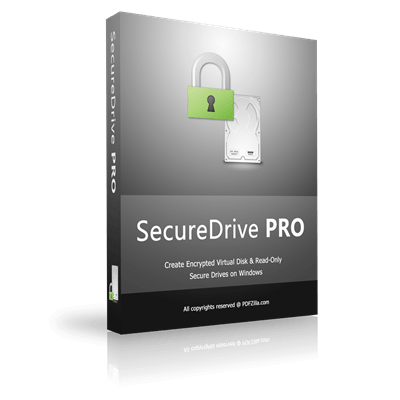
SecureDrive PRO
Create encrypted virtual disk & read-only secure drives on Windows.
- Product
- SecureDrive PRO v1.0
- Website
- pdfzilla.com
- License
- Lifetime
- Platform
- Windows 11/10
- Usage
- Non-commercial only
- Updates
- No future upgrades
- Support
- No support
- Updated
- 2026-08-15
Get your unique code by email
License key delivered free to your inbox within minutes.
This giveaway ended on .
Protected by Cloudflare Turnstile · Email quality checked by Reoon
Upgrade to the lifetime or paid version to enjoy lifetime updates, priority support, and the best available WinningPC discount.
How to Get the SecureDrive PRO License Key for Free
- Enter your email address into the giveaway form above to get a free license key.
- Download the official giveaway installer. Open the installer and follow the on-screen steps to complete the setup.
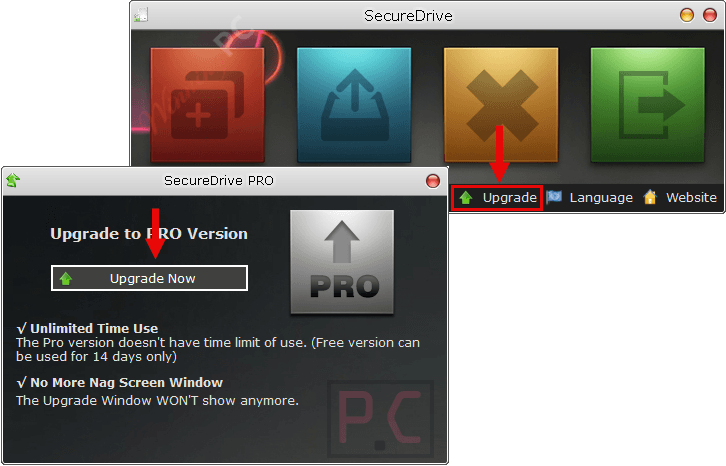
- Launch SecureDrive PRO. Click the Upgrade to Pro button, which is marked with a key icon.
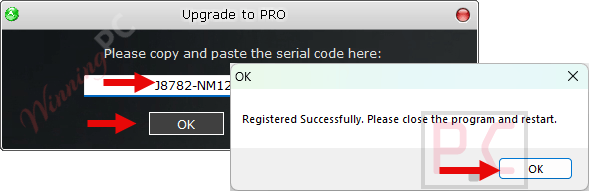
- Enter the provided giveaway key in the activation form and click Submit.
- That’s it – your Lifetime license is active. No email confirmation or social share required.
SecureDrive PRO Coupon Code Nov 2026
SecureDrive PRO
2 plans · best save 23%
Is this SecureDrive PRO giveaway safe and legit?
No crack or keygen
You install the official SecureDrive PRO build and activate it with a genuine Lifetime key. Nothing is patched, modified, or repackaged.
Official authorized source
The giveaway runs through Reezaa’s publisher channel. WinningPC links directly to the official product page; there’s no grey-market reseller involved.
Secure checkout for paid plans
Any purchase goes through Reezaa’s encrypted store. Your payment details never pass through WinningPC.
30-day money-back
Claiming the giveaway costs nothing, so there’s no monetary exposure. Money-back guarantee for paid plans: Not specified by the vendor.
Hands-on with SecureDrive PRO
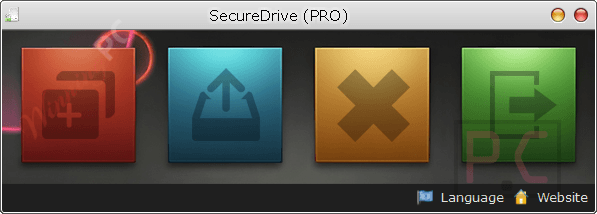
SecureDrive PRO earns its keep through a couple of features that go beyond the basics. The Read-Only mount mode is the standout: mounting a vault read-only means a ransomware process that lands on your machine can’t encrypt your archived files, because the volume appears as a non-writable disk. That’s a concrete, practical benefit rather than just marketing language about “military-grade” anything. Multi-volume support is the other practical win – you can keep a “Work” container and a “Personal” container with separate passwords, which is cleaner than one giant vault you have to decrypt every time you need one file. Being v1.0 software, expect some rough edges, and the lack of support or upgrades on the giveaway license means you’re on your own if something breaks. That said, the feature set is more capable than most utilities at this size.
Key features
- Encrypted virtual volumes: container files mount as standard Windows drive letters; encryption and decryption happen on the fly with minimal CPU overhead.
- Multi-volume support: create independent vaults with separate passwords and storage limits for different categories of data.
- Read-Only mode: mount any volume in a look-but-don’t-touch state, blocking accidental writes and ransomware modifications.
- Flexible session management: choose between keeping the drive mounted in the background or auto-dismounting when you close the app.
- Portable version: run SecureDrive PRO from a USB stick without installing anything on the host machine.
What We Liked, What We Didn’t
SecureDrive PRO vs the Alternatives
| Product | Price | Platform | Approach | Best for |
|---|---|---|---|---|
| SecureDrive PRO | Free (this giveaway) | Windows 10/11 | Encrypted virtual disk (container) | Users who want a simple password-protected virtual drive for sensitive files. |
| Hasleo BitLocker Anywhere | $14.97 Lifetime (Home) | Windows, macOS, Linux | BitLocker disk/volume encryption & management | Encrypting BitLocker volumes and accessing BitLocker drives across multiple operating systems. |
| AxCrypt | $42.30/Premium/Yearly | Windows, macOS, Linux, Android, iOS | File-level encryption | Encrypting individual files, cloud storage, and secure file sharing for personal or business use. |
Common questions about SecureDrive PRO
Can I use the giveaway license for work or client files?
No. The giveaway license is strictly non-commercial. It covers personal use only – protecting private documents, personal photos, or hobby projects. For any professional or business use, you need a commercial license purchased directly from Reezaa.
Does SecureDrive PRO work on Windows 11?
Yes. It supports Windows 10 (version 1809 and later), Windows 11, and Windows Server. You’ll also need .NET Framework 4.0, which ships with modern Windows and typically doesn’t require a separate install.
What happens if I forget the password to an encrypted volume?
There’s no recovery option – by design. The encryption is strong enough that not even the publisher can unlock a volume without the correct password. Before sealing important data, store a backup of your password somewhere secure (a password manager works well).
System Requirements & Details
| Feature | Specifications |
|---|---|
| Operating system | Windows 10 (version 1809 or later), Windows 11, Windows Server |
| .NET Framework | 4.0 or later (required) |
| Install size | 4.7 MB |
| Portable version | Available |
| Supported input formats | .sdd (SecureDriveData — proprietary encrypted container) |
| Supported output formats | .sdd (SecureDriveData) |
| Portable version | Available |




i get only : Invalid Code for the srn