

On this page
Smart Game Booster VIP Giveaway
| Product | Smart Game Booster VIP |
| Publisher | iTop Software |
| Original price | $39.99 (1-Year/1PC) |
| Giveaway price | Free v6 only |
| License | 6-month VIP subscription |
| Platform | Windows 11/10/8/8.1/7 |
| Total licenses | 400 activations – first-come, first-served |
| Installer | smart_game_booster_setup.exe |
| Updates | Free update during your subscription |
| Support | No free tech support |
| Giveaway ends | October 9, 2026 |
| Discount | 86% Off Smart Game Booster PRO (1 Year / 3 PCs) |
| Verified | Oct 2026 by Laura |
Smart Game Booster Coupons & Deals

iTop VPN Halloween 2026: Up to 83% Off + 12 Months Free
Take advantage of special offer up to 83% off iTop VPN software!
Smart Game Booster VIP
2 plans · best save 86%
1 Year Subscription / 3 Devices ★ Best Deal
1 Year subscription | Available on 3 computers
Smart Game Booster SVIP
2 plans · best save 87%
Is this Smart Game Booster giveaway safe and legit?
Yes. This is an official, publisher-run giveaway from iTop Software on their own platform. Here’s what backs that up:
No crack or keygen involved
You install the official Smart Game Booster build from iTop Software’s homepage and activate with your registered email account – nothing is patched, repackaged, or modified.
Official iTop Software giveaway
The free VIP runs through iTop Software’s own system, not a grey-market reseller or key-farming site. The giveaway page is hosted by the developer directly.
Available on Steam
Smart Game Booster is distributed through Steam, a major platform with its own malware screening process – an additional layer of verification that independent sites don’t have.
30-day money-back guarantee on paid plans
If you decide to upgrade beyond the free giveaway, iTop Software backs all subscription plans with a full 30-day refund. For the giveaway itself, there’s nothing to charge, so there’s no financial risk either way.
How to Claim Your Free Smart Game Booster VIP License?
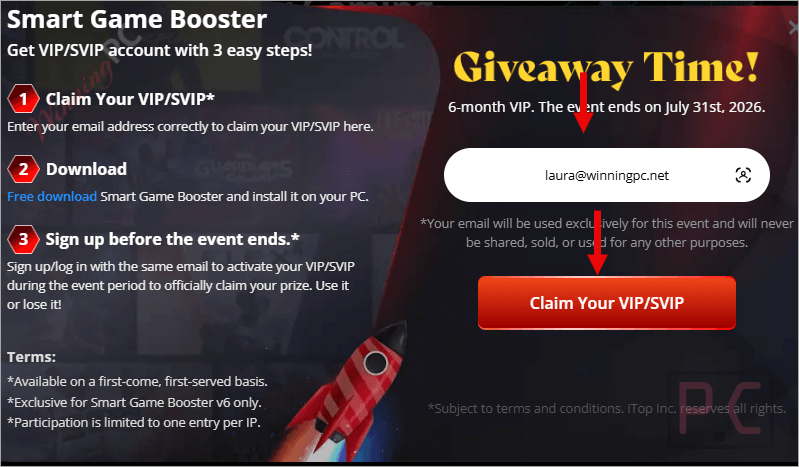
- On the giveaway page, please enter your email address correctly to claim your VIP.
- Download and install the software on your PC using the installer from the homepage.
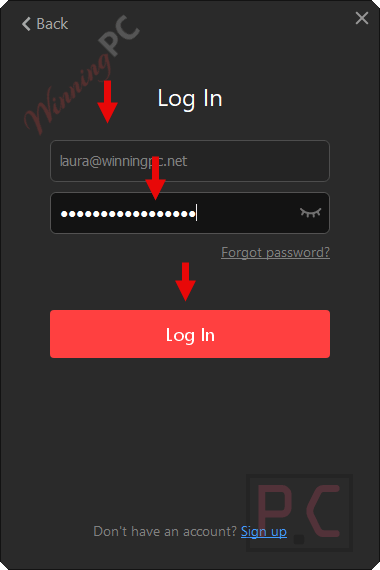
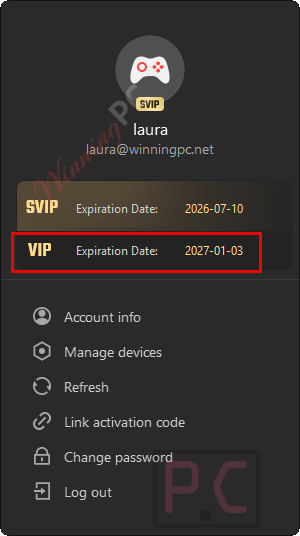
- Launch it, then sign up/log in with the same email to activate your VIP during the event period to officially claim your prize.
- Enjoy it for 6 months VIP subscription for free.
Smart Game Booster: In-Depth Review & Features
Smart Game Booster packs a lot into one installer: FPS optimization, network routing through dedicated gaming servers, GPU overclocking, temperature monitoring, driver updates, game compatibility checking, and a basic security layer. For a player on an older or mid-range PC, the system optimization features – killing background processes, cleaning RAM, tuning CPU priority – make a visible difference. On a modern, well-maintained gaming rig, the gains are more modest.
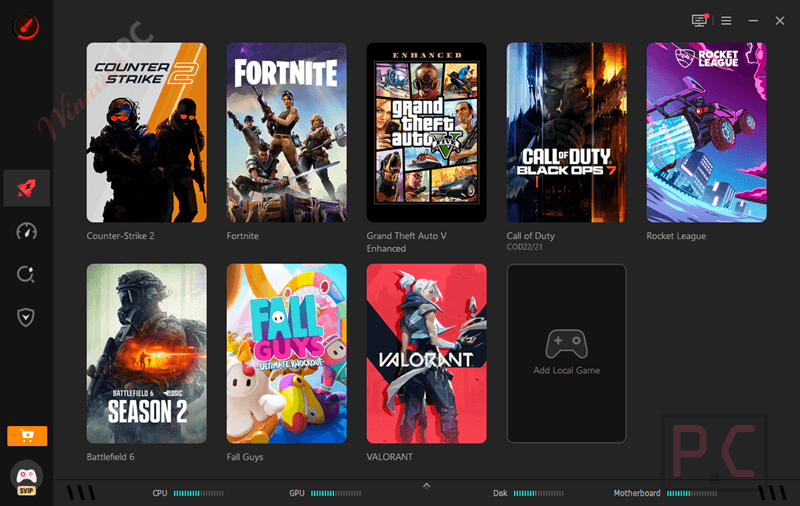
The ping reducer is the standout feature for competitive online players. Routing your game traffic through 500+ dedicated servers rather than your ISP’s standard paths does reduce latency in congested conditions. Results vary depending on your location and the game’s server infrastructure, so treat the “80% lower ping” figure as a best-case ceiling, not a guaranteed baseline.
The GPU overclocking (“Super Boost”) is a legitimate feature that uses safe clock-speed thresholds, but the developer’s own documentation is honest about the trade-offs: higher hardware temperatures, more fan noise, and added wear over time. Worth knowing before you enable it.
Key features
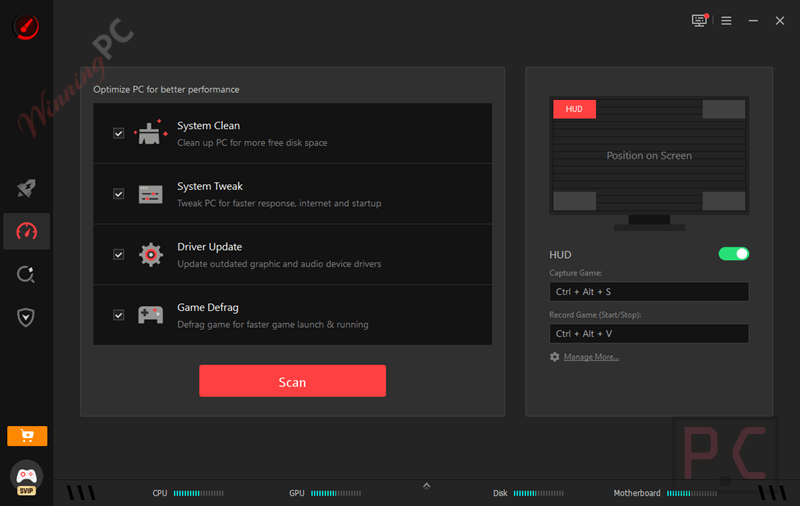
- FPS boost: one-click CPU/RAM optimization and background process killer; “Super Boost” mode for GPU and VRAM overclocking with real-time temperature monitoring.
- Ping reducer: routes game traffic through 500+ dedicated global servers to cut latency; auto-selects the fastest route, with manual region switching available.
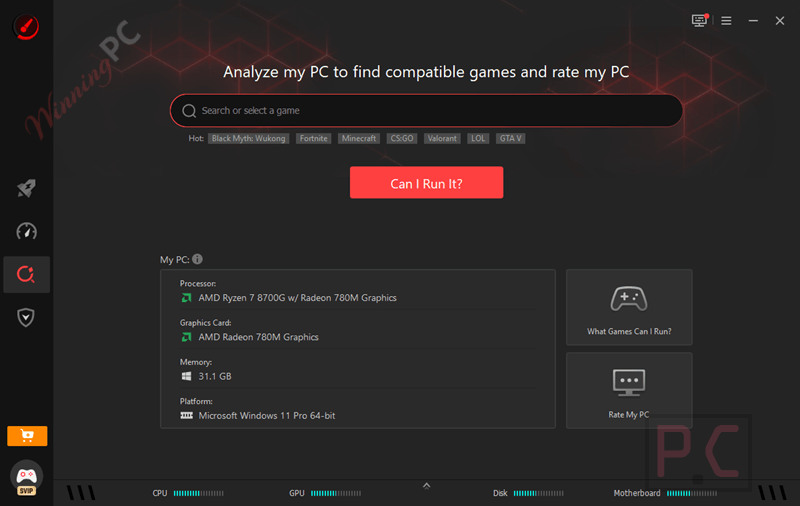
- “Can I Run It” game checker: database of 160,000+ games, 3,000+ GPUs, and 9,000+ CPUs; updated daily; checks minimum and recommended specs against your hardware.
- In-game HUD overlay: displays real-time FPS, CPU/GPU usage, temperatures, and RAM usage on-screen while you play.
- Driver updater: automatically installs the latest graphics and audio drivers to prevent crashes and improve compatibility.
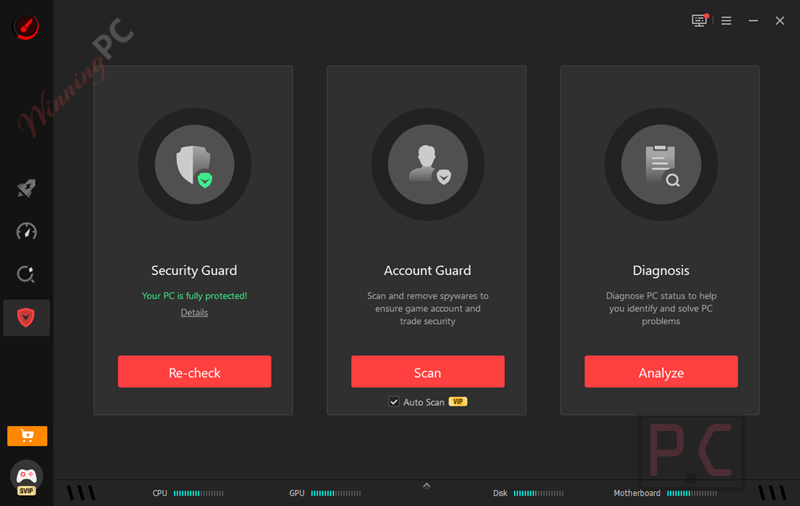
- Security guard: blocks malware and dangerous websites; monitors login credentials for breaches.
- PC game recorder: set custom hotkeys to capture or record gameplay without third-party software.
What we think
More Screenshots
Frequently Asked Questions
Where can I find a Smart Game Booster promo code?
WinningPC is a good place to check for Smart Game Booster coupons, alongside the official Smart Game Booster website.
What happens when the 6-month VIP period expires?
When the giveaway period ends, your account reverts to Smart Game Booster’s free tier. According to the developer, core features – FPS boost, junk file cleanup, and temperature monitoring – remain available for free. VIP-tier features (network acceleration, advanced overclocking, and priority access) would require a paid plan. Use code CLG15 at that point to continue at up to 87% off.
Can using it cause a game ban?
It is not designed to edit game files, inject code, or add unfair cheats. According to the provided information, anti-cheat systems treat it as a system utility rather than cheating software.
Does Smart Game Booster actually boost FPS, or are the 120% claims exaggerated?
The FPS gains are real, but the “up to 120%” figure is a best-case outcome on a heavily bottlenecked or cluttered system. The software frees up RAM and kills background processes before you game – and on an older, heavily loaded PC, that genuinely makes a visible difference. On a modern, well-configured gaming rig, expect more modest gains.
Can it reduce high ping?
Yes. Its network tools route game traffic through optimized connections intended to avoid congestion, poor ISP routing, and unstable paths to the game server.
Is it safe to overclock my GPU using Super Boost?
Smart Game Booster’s Super Boost uses calibrated thresholds and monitors temperatures in real time, which makes it safer than manual BIOS overclocking for most users. That said, any overclock increases hardware temperatures and adds wear over time. The product documentation itself acknowledges the trade-offs: higher heat, more fan noise, potential stability issues with some software. If your PC already runs hot, check your cooling situation before enabling Super Boost.
Is Smart Game Booster a VPN?
No. It routes your game traffic through optimized servers to reduce ping, but it does not encrypt all your internet traffic or mask your IP address the way a VPN does. The developer categorizes it as a “ping reducer” – a different tool for a different job. If you specifically need a VPN for privacy, you need a separate product.
Can I use Smart Game Booster on a low-end PC or older laptop?
Yes, and it may actually help more there than on high-end hardware. The system optimization side – killing background processes, cleaning RAM, tuning CPU priority – squeezes the most out of systems that are already stretched thin. The developer explicitly highlights budget PCs and older laptops as a primary use case.
System Requirements & Details
| Operating system | Windows 11 / 10 / 8.1 / 8 / 7 |
| Processor | 1 GHz or faster |
| RAM | 512 MB minimum |
| Screen resolution | 1400 × 990 or higher |
| Internet connection | Required for ping reducer / network acceleration features |
| Other | Email address required for giveaway activation; Steam account optional |
| Supported input formats | Not applicable (game optimization tool, no file conversion) |
| Supported output formats | Not applicable |




thanks it works xD
you’re welcome.
Dawm
and works fine, tks a lot
Hope you enjoy it 😀
That is insane thank you so much
You’re welcome.
OBRIGADO DEU CERTO!!!
it
worked