

On this page
SoftOrbits AI Photo Culling Giveaway
SoftOrbits AI Photo Culling
Reviews a folder of 1,000 to 10,000 shots, marks the unfocused, dark or just bad photos, and scores the best photo to keep for printing or sharing.
- Product
- SoftOrbits AI Photo Culling
- Product website
- softorbits.net
- License
- Lifetime
- Platform
- Windows 11/10/8.1/8/7 (32/64 bit)
- Usage
- Non-commercial only
- Updates
- No future upgrades
- Support
- No support
- Updated
- 2026-08-30
Continue on softorbits.com
Share to reveal the official giveaway page, then register there to receive your license.
The limited-time giveaway!
The free license is no longer available.
How to Get the SoftOrbits AI Photo Culling License Key for Free
- Click the giveaway download link on this page to start the SoftOrbits AI Photo Culling installer.
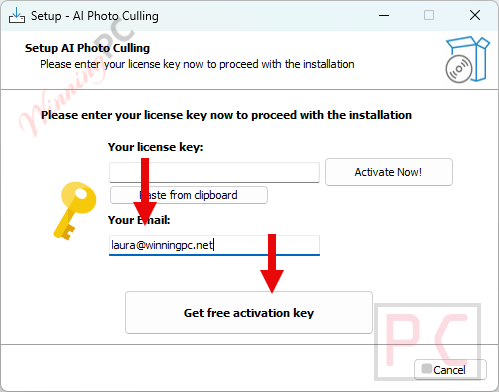
- During installation, enter your email address and click Get free registration key.
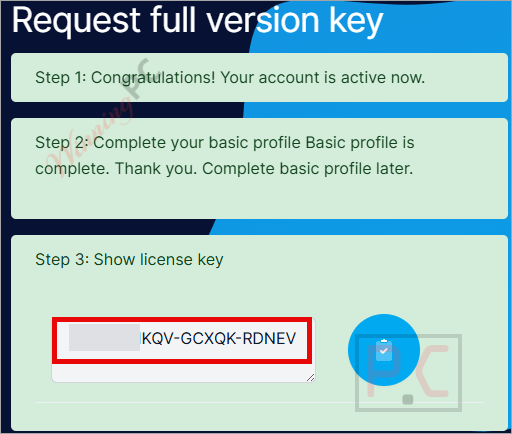
- You’ll be redirected to SoftOrbits’s giveaway page. Fill in your basic profile details to unlock the license.
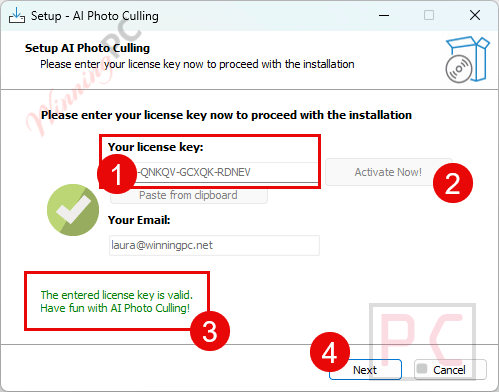
- Copy the license code shown on the giveaway page. Return to the SoftOrbits installation wizard, paste the key into the field provided, and press Activate Now!
- Your Lifetime license is now activated.
Top Duplicate Photo Finder Coupon Code Oct 2026

Excire Foto 2027
Lifetime license for a 1-computer | No subscription model


Is this SoftOrbits AI Photo Culling giveaway safe and legit?
No crack or keygen
You install the official SoftOrbits build and activate with a genuine license key. Nothing is patched, modified, or repackaged.
Official publisher source
The download and activation key come through SoftOrbits’ own giveaway page, not a grey-market reseller or third-party key shop
Your photos never leave your PC
The software processes everything locally. No upload, no cloud, no account required to run it – a genuine advantage for a tool handling personal photo archives.
14-day refund on the paid edition
If you later upgrade to the paid version, SoftOrbits offers a full refund within 14 days, no questions asked.
Hands-on with SoftOrbits AI Photo Culling
SoftOrbits AI Photo Culling doesn’t try to make the creative call for you; it handles the mechanical part, scoring and flagging every frame so your time goes to the ones actually worth a second look. The 0-to-100 rating pulls together three separate dimensions: technical quality (sharpness, exposure), aesthetic beauty, and composition. What keeps this honest is the hierarchy: a blurred or badly exposed frame can never outscore a clean one on looks alone. Technical quality leads, always.
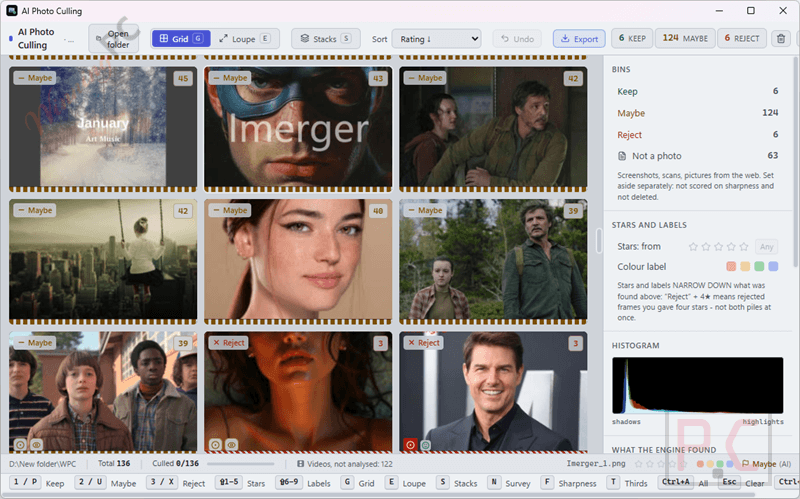
The burst stacking stands out in practice. Feed it a folder from a day’s shoot and it groups near-duplicate frames into stacks automatically, using both shooting time and visual similarity together. That distinction matters more than it sounds: it won’t fold an HDR bracket or shots fired from a moving car window into a single stack the way naive time-gap detection would. You end up reviewing a handful of candidates per moment, not dozens of nearly identical frames.
Key features
- AI scores every frame 0-to-100 across sharpness, beauty, and composition, with a breakdown visible on hover.
- Groups near-duplicate frames and burst sequences into reviewable stacks using time gap and visual similarity together.
- Reads 25+ RAW formats directly: Canon CR2/CR3, Nikon NEF, Sony ARW, Fujifilm RAF, Olympus ORF, Panasonic RW2, Pentax PEF, DNG, HEIC/HEIF, JPEG, PNG, WebP.
- Writes results to XMP sidecar files next to originals, compatible with Lightroom and other professional editors.
- Fully offline: no internet connection, no account, no upload required.
What we think
How SoftOrbits AI Photo Culling compares to the alternatives
| Tool | Price | What it does | Best for |
|---|---|---|---|
| SoftOrbits AI Photo Culling | Free (this giveaway) | Quality scoring + burst stacking + duplicate grouping | Windows users with large unsorted archives wanting a full first-pass cull |
| Excire Foto | $186.15/lifetime | AI culling + keywording, deep Lightroom integration | Pros who want AI tagging built into their catalog workflow |
| WebMinds Duplicate Photo Cleaner | $29.95/1 Year/ 1PC | Duplicate and similar photo detection only; no quality scoring | Cleaning a library that has many exact or near-identical copies |
| SORCIM Picture Echo | $15.99/year | Duplicate detection, basic similarity matching | Budget duplicate cleanup on smaller libraries |
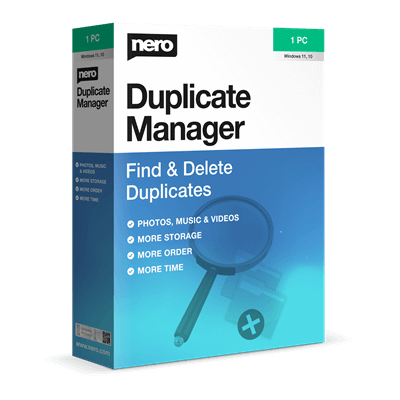
| Nero DuplicateManager Photo | $38.36/lifetime | Duplicate photo detection | Existing Nero users who don’t want a separate tool |
Worth saying plainly: for pure duplicate removal, PictureEcho’s free tier or the open-source digiKam handle most cases at no cost. SoftOrbits AI Photo Culling earns its place when you need quality scoring and burst management on top of duplicate detection – not just a list of identical files.
Frequently Asked Questions
What does photo culling mean?
Culling is the first pass after a shoot: you go through every frame and mark what to keep before any editing starts. It turns a card full of 1,000 shots into a manageable shortlist.
Does SoftOrbits AI Photo Culling delete my photos?
No. A reject is a label, not a deletion. When you close the session, rejected frames move into a _Rejected subfolder next to your originals. Nothing disappears without a second confirmation.
What RAW formats does it support?
It reads 25+ RAW formats directly: Canon CR2 and CR3, Nikon NEF, Sony ARW, Fujifilm RAF, Olympus ORF, Panasonic RW2, Pentax PEF, and DNG. HEIC/HEIF and everyday JPEG, PNG, and WebP are also supported.
Is there a free version I can try first?
Yes. The free version runs the full AI analysis with no features held back. The only cap is export: a maximum of 15 photos per session across all export types combined (Keep copies, XMP sidecars, and Reject moves share the same limit). For testing how the software scores your own shots, it’s fully functional.
System Requirements & Details
| Field | Value |
|---|---|
| Operating system | Windows 7, 10, 11 |
| Supported input formats | RAW (25+ formats): CR2, CR3, NEF, ARW, RAF, ORF, RW2, PEF, DNG; HEIC/HEIF; JPEG, PNG, WebP |
| Supported output formats | Keeper copies exported to _Selected subfolder; XMP sidecar files written next to originals; optional _Rejected subfolder for flagged frames |
| Other requirements | No internet connection required; no account or sign-up needed to run the software |




WARNING Softorbits DO NOT RESPECT THE INTEGRITY OF YOUR SYSTEMS. They build their programs and installers to bypass admin protections on program installation to allow non-admins like children and employees to install programs when they are not authorised or allowed to install unauthorised programs. They FORCE installation to the system drive, and force installation into an insecure folder hierarchy in the user AppData folders subfolder which is not write protected against non-elevated malware. I do not recommend the installation of products by such a self-serving malicious developer on your machines. The link on my name provides a giveaway link for a lifetime license…
whops the last sentence was relevant to a different sites giveaway of this… please disregard as it’s not relevant to this giveaway.