SoftOrbits Batch Picture Protector Giveaway: Lifetime License

SoftOrbits Batch Picture Protector helps you protect your digital images by adding your custom watermarks in batches. In a few easy steps, you can add your own photographer watermark from more than 400 photos. You can also combine text and a logo for a watermark and save it as a template for future use.

Official Giveaway

SoftOrbits Batch Picture Protector

Visit the publisher to register and receive your license.

  • ProductSoftOrbits Batch Picture Protector
  • Websitesoftorbits.net
  • LicenseLifetime
  • PlatformWindows 7/10/11
  • SupportNo support
  • UpdatesNo future upgrades
  • UsageNon-commercial only
  • Updated2026-06-21
Share to reveal the installer and your license code.
Verified by WinningPC HTTPS-only redirect
Verified for Jul 2026 by Chris: At the moment, no valid coupon codes are available for SoftOrbits Batch Picture Protector. However, you may consider the following alternative software options.
TechSmith Snagit Individual

TechSmith Snagit Individual

−25%
$29.99$39.99
Video Watermark Pro - Lifetime license

Video Watermark Pro - Lifetime license

−85%
$10.65$69.95
Watermark Software for Personal

Watermark Software for Personal

−69%
$12.45$39.90
Vovsoft Watermark Image

Vovsoft Watermark Image

−30%
$13.3$19

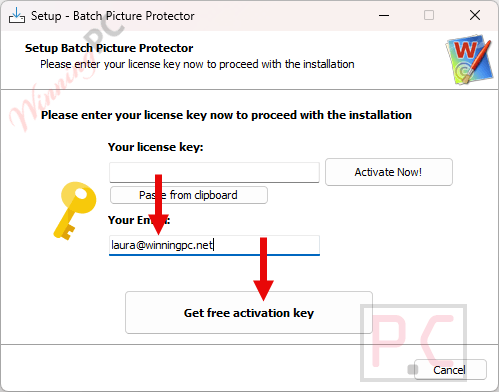
Access the software by clicking the giveaway installer link; then, as you install it, submit your email and press the button labeled “Get free registration key.”

get softorbits batch picture protector key
SoftOrbits Batch Picture Protector Giveaway: Lifetime License 1

Please confirm your email address. You will then immediately receive your free license key for Batch Picture Protector!

softorbits batch picture protector get code
SoftOrbits Batch Picture Protector Giveaway: Lifetime License 2

Download and install Batch Picture Protector on your computer. Please insert your license key and email address to register for the full version:

softorbits batch picture protector activation key
SoftOrbits Batch Picture Protector Giveaway: Lifetime License 3

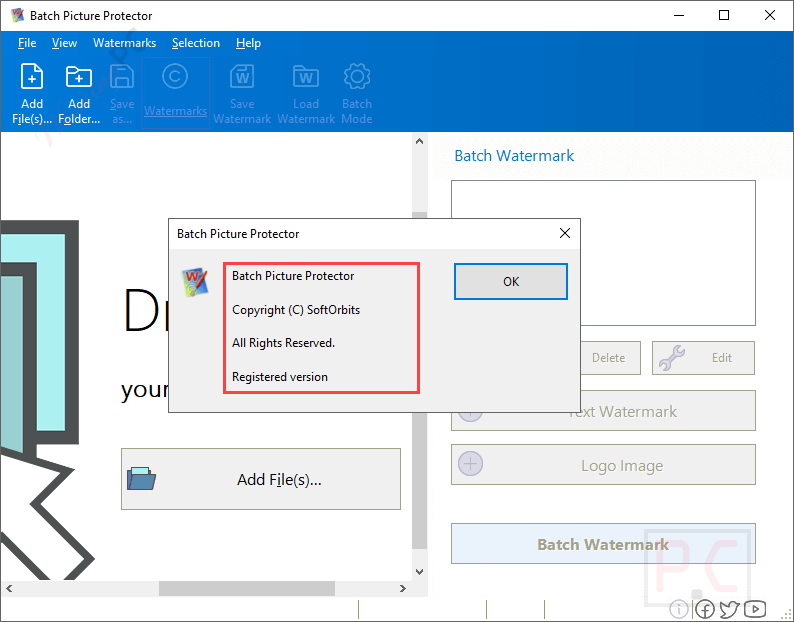
Got it for a lifetime free with full functions!

about softorbits batch picture protector free
SoftOrbits Batch Picture Protector Giveaway: Lifetime License 4

SoftOrbits Batch Picture Protector screenshot:

SoftOrbits Batch Picture Protector Main Screenshot Free
SoftOrbits Batch Picture Protector Giveaway: Lifetime License 5

Batch Watermark

batch watermark softorbits batch picture protector
SoftOrbits Batch Picture Protector Giveaway: Lifetime License 6

Add Watermark

add logo softorbits batch picture protector
SoftOrbits Batch Picture Protector Giveaway: Lifetime License 7

Batch Mode

batch mode softorbits batch picture protector
SoftOrbits Batch Picture Protector Giveaway: Lifetime License 8
  • Works with all major image formats
  • Transparent text generator
  • Watermark photos in Batch mode
  • Command line support
  • Add text to a photo easily
  • Put a logo on a picture easily
  • Watermark photos using recursive file processing
  • Automatic watermark positioning
  • Add text-shadow and glow effects
  • Load and save several watermarks
Language SupportEnglish, Français, Italian, Spanish, Swedish, and more…
Money Back Guarantee30-Day
Operating SystemWindows 7, 8, 10, and 11
ShippingRegister code will be sent to your email in minutes
Subscription1-Month, 1-Year, Lifetime
Support ServicesEmail, Tickets
4.6 Total Score
Good

SoftOrbits Batch Picture Protector supports you by adding a QR code to your picture. You need to generate the QR code, and then you can use the software to add it where you want to place it on the photo.
(Review by Chris Bruner – tech writer and software reviewer at WinningPC)

8.4Expert Score
Overall
8.3
Functionality
8
Ease-of-use
8
Customer Support
9.2
0.7User's score
Overall
1
Functionality
1
Ease-of-use
1
Customer Support
0
Add your review  |  Read reviews and comments
4.8/5 - (35 votes)

Affiliate Disclosure: Some links on WinningPC are affiliate links. If you purchase through them, we may earn a small commission at no extra cost to you. This helps support our site and keeps our content free.

Chris Bruner
Chris Bruner

Chris Bruner is a Senior Software Reviewer at WinningPC with a strong background in software analysis and technical writing. He has spent 5+ years testing applications across various categories, including antivirus, multimedia, and backup tools, providing readers with objective, in-depth insights. Chris’s reviews stand out for their accuracy, transparency, and real-world testing approach, making them a trusted resource for both beginners and tech-savvy users. Beyond reviewing software, Chris works closely with developers to secure exclusive coupons, ensuring users get authentic discounts on premium tools.

2 Comments
Show all Most Helpful Highest Rating Lowest Rating Add your review
  1. Reply Avatar of not so poor to use this
    not so poor to use this
    February 2, 2026 at 6:51 pm
    0.35
    Overall
    10
    Functionality
    10
    Ease-of-use
    10
    Customer Support
    0

    How can this “Batch Picture Protector” protect my pictures?
    I awaited some kind of invisible watermark in the data stream of the graphics file, but
    ut is just one of those watermarking tools flooding the market.

    and it addition is on the poor side:
    -it is not free
    -it is not stable
    -it makes things more complicated than they must be
    -the interface and appearance is pure cancer to my eyes
    -it can not install to a user defined destination
    -it is not trustable (it comes from a not closer described suspect Russian developer)

    I recommend to stay miles away from this vendor.

    + PROS: nothing
    Helpful(4) Unhelpful(0)You have already voted this
  2. WARNING Softorbits DO NOT RESPECT THE INTEGRITY OF YOUR SYSTEMS. They build their programs and installers to bypass admin protections on program installation to allow non-admins like children and employees to install programs when they are not authorised or allowed to install unauthorised programs. They FORCE installation to the system drive, and force installation into an insecure folder hierarchy in the user AppData folders subfolder which is not write protected against non-elevated malware. I do not recommend the installation of such a self-serving malicious developer on your machines.

Leave a reply

Your total score

WinningPC
Logo
Register New Account