

SoftOrbits SoftSkin Photo Makeup Giveaway
SoftOrbits SoftSkin Photo Makeup
Professional Makeup Software perfects your portraits by removing small imperfections, improving skin tone and texture, and applying all the basics of virtual makeup.
- Product
- SoftSkin Photo Makeup
- Product website
- softorbits.net
- License
- Lifetime
- Platform
- Windows 11/10/8.1/8/7 (32/64 bit)
- Installer
- PhotoMakeup.exe
- Usage
- Non-commercial only
- Updates
- No future upgrades
- Support
- No support
- Updated
- 2026-08-21
Continue on softorbits.net
Share to reveal your free license code, then activate it inside the app.
The limited-time giveaway!
The free license is no longer available.
Top Photo Editor Coupon Codes in Oct 2026



Photoins Photo Enhancer - Lifetime
Unlimited free upgrades and tech support

How to Get SoftSkin Photo Makeup License Key Free?
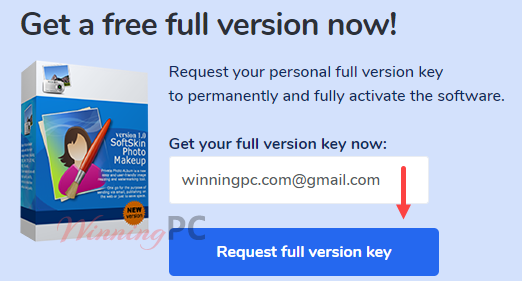
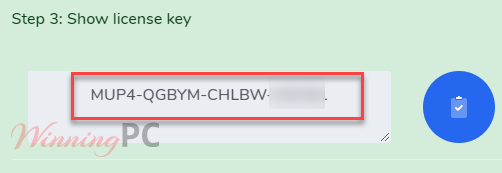
Enter your email address then press the “Request full version key” button on the SoftOrbits SoftSkin Photo Makeup giveaway page.Complete the basic profile to show the code.- Just click the download link above to start downloading the installer to your computer.
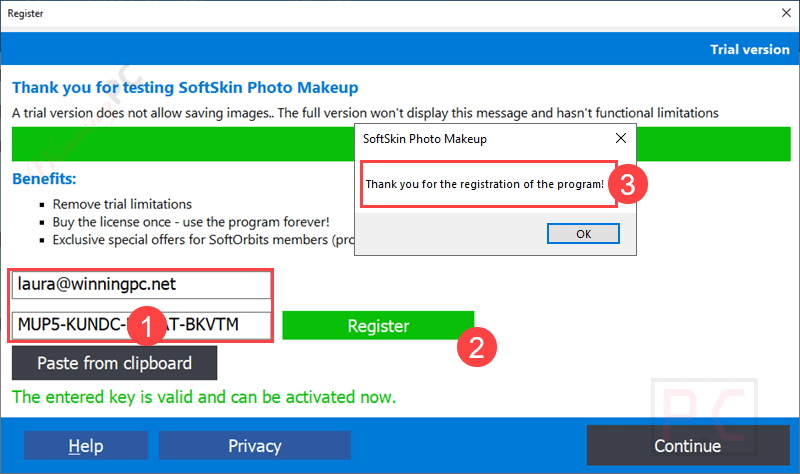
- When the installation is done, please enter your license code and your email address to activate the software.
- Done. The full feature set is active at no cost.
SoftOrbits SoftSkin Photo Makeup Review & Features
SoftOrbits SoftSkin Photo Makeup is a Windows portrait retouching tool for improving skin and applying virtual makeup to photos. It can soften skin, remove blemishes and red-eye, adjust skin tone, whiten teeth and eyes, and add lipstick, eyeliner, concealer, and other makeup effects. Its simple editing tools make it easy to enhance portraits without using a complex photo editor.

Key features
- Skin Softening and Smoothing: SoftSkin Photo Makeup utilizes advanced algorithms to soften skin and remove imperfections like wrinkles and blemishes to ensure a natural look without over-processing.
- Virtual Makeup Application: It includes tools for applying eye shadow, lipstick, blush, and more as well as features a Concealer Brush for covering spots and dark circles.
- Red-Eye Removal: This tool also automatically detects and corrects red-eye effects with a single click.
- Teeth Whitening: It offers a Bleach Tool to whiten teeth and enhance smiles.
- Eye Enhancement: Eye Pencil tool is provided to outline eyes and enhance their appearance. You can use it to adjust eye color and brightness.
- Spot and Noise Removal: Automatically remove small imperfections and noise from photos. Includes a Smudge Brush for manual touch-ups.
- Lighting Adjustments: It is also possible to soften highlights and eliminate hard shadows to create studio-quality lighting effects. It helps you adjust skin tone to match different lighting conditions.
- Undo and Restore: Features an Undo Brush to revert changes and restore the original photo if needed.
- Batch Processing: It allows you to edit multiple photos at once, saving time and effort.
- AI-Powered Enhancements: Uses artificial intelligence to ensure realistic and high-quality results. Automatically adjusts settings based on the photo’s characteristics.
more screenshot


System Requirements & Details
| Requirement | Details |
|---|---|
| Language Support | English |
| Operating System | Windows 11, 10, 8.1, 8, or 7 in 32-bit and 64-bit editions |
| Processor | Intel Core i3, AMD Ryzen 5, or above |
| RAM & Storage | 4 GB RAM or above; 1 GB of free hard disk space or above |
| Graphics | NVIDIA GeForce series 8/8M, Intel HD Graphics 2000, Quadro FX 4800/5600, AMD Radeon R600, Mobility Radeon HD 4330, Mobility FirePro series, Radeon R5 M230, or higher with current drivers |
| Display | 1280 × 768 resolution with 32-bit color |





After bad experience with almost every program from this “vendor”, I gave it a chance and tried it out again from ground up. New version – new chance.
Here is what I found out in this testing of SoftOrbits SoftSkin Photo Makeup 5.2:
-Installation is only possible into a fixed path (c:\…) (the new standard?)
-Check New Version: want to Update to v5.1 (from installed v5.2)
-View: playing around with Toolbar, Status Bar, enabling the Source Images lead to APPCRASH
-Undo-Levels are limited, you have to reload the image and start from zero
-Crop: the selection grips only correctly work in “Custom” setting, in all other aspect ratios sizing is only possible on the left and right side and the upper middle grip shows an up-/down-arrow and moves the selection instead of changing the size
-Crop: manual numeric input of New Width and New Height does not work
(the numeric input in general does not work anywhere)
-Rotate: does not show the angle before releasing the slider and before calculation and rotation is completely done
-Rotate: manual numeric input of the Angle value does not work
-Red Eye correction: tints the red area completely dark, unusable
-Undo Brush: Transparency setting has no influence, undo level is always 100%
-Undo Brush: manual numeric input of Radius and Transparency value does not work
-Skin Smoothing: Smears the skin and the hair-details
-Mask: what is good for…. ??? It has no influence on the applied effect.
and so on…
In short:
The frustration factor is very high.
If this might be the only remaining program on planet earth, I might not use it.
1 point out of 5 points is 1 point too much.
Thank you so much. It looks as good as the Cyberlink Make up program.
Thanks for your giveaway information.
This is the free license code: MUP5-PLDZC-AKGZN-TZDDQ (same for all)