WinningPC

Designed for only the Windows platform, Stable Diffusion Assembly (SDA) by MediaChance enhances the way you work with high-resolution images in Stable Diffusion. With the blend of advanced AI technology and an extensive feature set, this photo editing tool can help you have precise control over your image-processing tasks, making it possible to work on detailed and high-resolution images without compromising on performance.
With its user-friendly interface, Stable Diffusion Assembly can help a digital artist, graphic designer, or photographer take their image processing to the next level by providing the essential tools for editing images. It provides various slicing options to help the user create slices of different dimensions, including rotating slices, to suit their specific needs. The ControlNet shadow image is supported, providing additional control over the image processing.
Top Best Photo Editing Software Coupon Codes

HitPaw FotorPea
70% off coupon code: regular price $51.99, discounted price $15.67

ON1 Effects 2025 - Full Version
50% off coupon code: regular price $69.99, discounted price $34.99

PaintShop Pro 2023 Ultimate
30% Off coupon code, regular price $99.99, discounted price $69.99

Aiarty Image Enhancer (+ 2 Bonus Gifts) - Lifetime/ 3 PCs
50% off coupon code: regular price $155, discounted price $78.0

DVDFab Photo Enhancer AI - Lifetime
31% Off coupon code: regular price $109.99, discounted price $76.15
Stable Diffusion Assembly Main Features
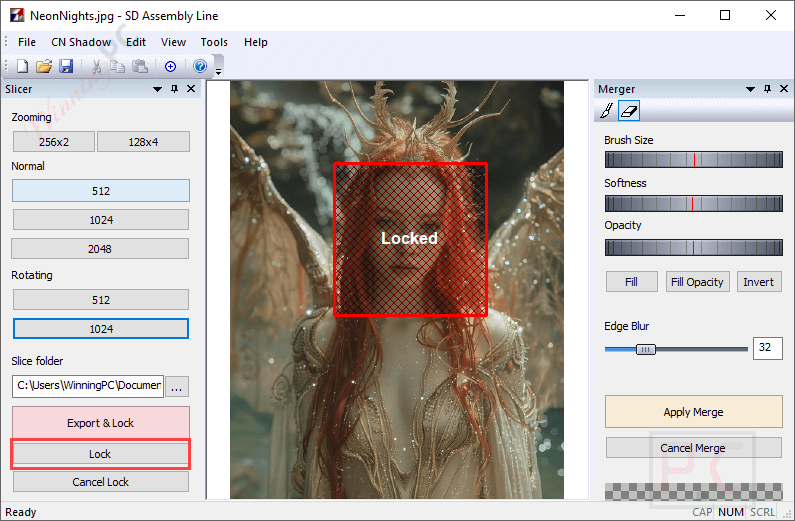
- High-Resolution Workflow: Stable Diffusion Assembly is designed to help you comfortably work with high-resolution images without taxing their GPU. It enables you to slice large images into smaller, manageable sections and process them, reducing memory and GPU requirements.
- Various Slicing Options: SDA offers different types of slices, including rotating slices, to suit specific needs and ensure precise editing. You can use it to slice large images into 512×512, 1024×1024, or custom-sized sections, process them in Stable Diffusion, and merge them back with no seams or distortions.
- Automatic Clipboard Export: You are allowed to send slices to the clipboard directly, making it easy to paste them directly into the inpainting window of Stable Diffusion to save time and streamline the workflow.
- ControlNet Integration: You are allowed to export ControlNet shadow images simultaneously with slices for more precise inpainting tasks, aiding in more controlled image processing.
- Brush Blending Tool: Similar to Photoshop’s brush layer blending, SDA includes a brush blending tool ensuring smooth transitions and invisible seams between slices. This feature is particularly useful for maintaining the integrity of the image during the merging process.
- Special Sizing and Fitting Methods: The tool employs advanced sizing and fitting methods that preserve color accuracy and prevent visible seams to ensure the final merged image looks cohesive and professional.
- Inpainting Support: You can export slices for inpainting in Stable Diffusion for fine-tuning and then merge them back into the main image seamlessly.
- Seamless Merging Mode: This function ensures processed slices are merged back into the main image at the exact place and angle without any guesswork.
- System Requirements: This tool is compatible with Windows 8, 10, and 11 and requires a local installation of Stable Diffusion, such as Automatic1111.
Stable Diffusion Assembly Screenshots


Frequently asked questions
What is Stable Diffusion Assembly (SDA)?
SDA is a Windows tool designed to help users work with large images in Stable Diffusion by slicing and merging them for easier processing.
How does SDA enhance the workflow for Stable Diffusion?
It allows users to work on high-resolution images without exceeding memory or GPU limits by processing smaller slices of the image.
What are the main features of SDA?
Key features include slicing images at various dimensions, rotating slices, automatic clipboard export, ControlNet shadow image support, and brush blending tools.
What is the purpose of the ControlNet shadow image feature?
This feature allows users to export a ControlNet source image simultaneously with the main slice, aiding in more precise image control.
What types of slices can SDA create?
SDA can create various types of slices, including rotating slices, to accommodate different image processing needs.
Have any discount codes in the market to buy SDA at the lowest price?
Yes. WinningPC is currently offering the coupon code BLA23** that provides a 30% discount on Stable Diffusion Assembly.
Technical Details
| Language Support | English, Français, Italian, Spanish, Swedish, and more… |
| Money Back Guarantee | 30-Day |
| Operating System | Windows 8, 10, 11 and working local installation of Stable Diffusion |
| Shipping | Register code will be sent to your email in minutes |
| Subscription | Lifetime |
| Support Services | Tickets |