Laura Marano
Why You Need Stellar Data Recovery for Mac
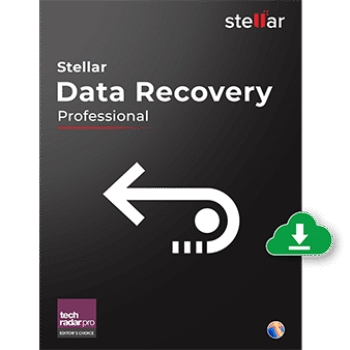
Stellar Data Recovery for Mac is professional Mac data recovery software that helps you rescue lost or deleted files from any storage drive, emptied “Trash,” and crashed or non-booting Mac. With its help, you can easily recover deleted images & graphics, movies & videos, audio & music, documents, archives, mail & other files from all Mac storage devices. Whether your data loss is caused by accidental deletion, drive formatting, or permanent deletion using the “Command + Option + Delete” key combination, Stellar Data Recovery for Mac helps you get them back quickly and securely.
Stellar Data Recovery for Mac Coupon Code (100% Working)
Stellar Data Recovery for Mac
10% coupon code: regular price: $69.99, discounted price: $62.99
Stellar Data Recovery for Mac Lifetime
10% coupon code: regular price: $129.99, discounted price: $116.10
Stellar Data Recovery Professional for Mac
20% coupon code: regular price: $99.99, discounted price: $80.99
Stellar Data Recovery Professional for Mac Lifetime
33% coupon code: regular price: $199.99, discounted price: $134.10
Stellar Data Recovery Premium for Mac
57% coupon code: regular price: $209.99, discounted price: $89.99
Stellar Data Recovery Premium for Mac Lifetime
44% coupon code: regular price: $319, discounted price: $179.10
Stellar Data Recovery Technician for Mac
10% coupon code: regular price: $149.99, discounted price: $134.10
Key Features and Screenshots

- Retrieves data lost due to accidental deletion, formatted drives, corrupted volumes, or system crashes.
- Restores a wide variety of file types, including documents, photos, videos, audio files, emails, and compressed archives.
- Recovers from SSDs, HDDs, external hard drives, USB flash drives, SD cards, and other removable media.
- Can restore data erased using the Command + Option + Delete shortcut.
- Supports recovery from APFS, HFS+, NTFS, and ExFAT partitions.
- Offers a dedicated recovery mode to rescue data from unbootable or crashed Macs without requiring an external boot disk.
- Bypasses the need to disable macOS System Integrity Protection (SIP) while still allowing secure access.
- Optimized for Apple Silicon (M1, M2, M3, M4) and T2 security chip-powered Macs.
- Choose preferred UI themes (Light, Dark, or Vibrant) for comfort.
- Lets you stop an in-progress scan and continue later without losing progress.
- Enables preview and selective recovery while scanning.
- Customizable file recovery allows users to select specific file types or storage drives for efficient scanning.
- Creates a complete image of a failing or damaged drive so you can perform recovery without further stressing the source media.
- Monitors temperature, performance, and S.M.A.R.T. attributes of connected drives.
- Duplicate Finder to detect and remove duplicate files.
- Large Files Finder to locate space-consuming items.
- SpeedUp Mac to clear junk files, caches, and other unnecessary data for improved system performance.
- Works with internal drives on MacBook, MacBook Air, MacBook Pro, iMac, and Mac mini.
Stellar Data Recovery for Mac: Pros and Cons
Conclusion – Is Stellar Data Recovery for Mac Worth It?
Stellar Data Recovery for Mac provides a powerful mix of deep scanning power, wide file format support, and compatibility with the latest macOS and Apple Silicon hardware. Designed to recover data loss from deleted files, formatted drives, or even non-booting Macs, this tool is a reliable, all-in-one Mac recovery solution for anyone who is facing serious data loss.
However, the application experiences slow performance and occasional user interface bugs, particularly in the cleanup and activation features. You should compare alternatives before making a purchase commitment.
How to Use (Step-by-Step Guide)
Step 1: Select Type of Data
Select the file types you want to recover, then click “Next.”
Step 2: Select Location
Select the storage drive where the data was lost.
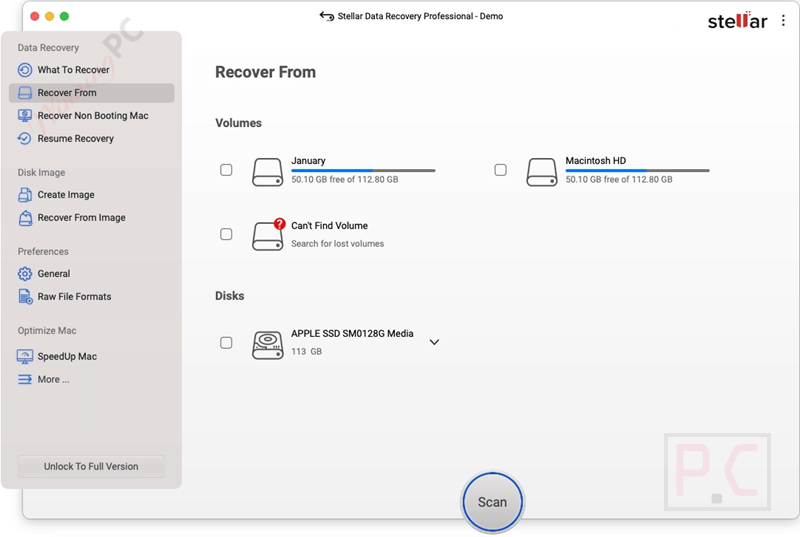
Step 3: Scan & Recover
Scan & Preview and Recover files from Mac storage disk.
FAQs
What is Stellar Data Recovery Professional for Mac used for?
It’s a professional-grade tool that helps you recover deleted, lost, or inaccessible files from Mac storage devices, including internal drives, SSDs, external disks, USB flash drives, and memory cards.
Can it recover files from a completely crashed or non-booting Mac?
Yes. The software offers a recovery mode that lets you rescue files from an unbootable Mac without creating an external boot disk, making it ideal for severe system failures.
Is the recovery process safe for my drive?
Yes. Stellar works in read-only mode and never writes to the source drive. For extra safety, you can create a disk image of the affected drive and recover from that.
What’s the difference between the Professional, Premium, and Technician editions?
– Professional: Core data recovery from all Mac devices.
– Premium: Adds photo and video repair capabilities.
– Technician: Includes all Premium features plus virtual machine recovery and Linux file system support.
Is there a discount available when buying through WinningPC?
Yes! Use the coupon code STE***R10 at checkout to save up to 57% off your purchase.
Why Choose WinningPC for the Best Software Discounts?
At WinningPC, we are committed to providing 100% valid and verified coupon codes, so you can always shop with confidence.
- If you come across an invalid code or a better offer, let us know.
- Our team updates all discount information regularly to ensure accuracy.
- Official Authorization: We only share authentic discounts from trusted software developers.
- No Fake Discounts: Unlike some sites, we never use misleading deals. The final price you see is the true discounted price.
- Secure Purchases: All transactions are processed on the official vendor’s website, ensuring authenticity and data protection.
- Extra Support: If you face order or vendor issues, contact us. We’ll liaise with the vendor to help resolve your problem quickly.