Laura Marano
Why You Need Stellar Eraser for iPhone
Designed to erase all content and settings permanently, Stellar Eraser for iPhone can permanently wipe any photos, videos, contacts, chats, documents, or other confidential data stored in your iPhone. This iPhone data eraser software can permanently erase iPhone data, ensuring that it cannot be recovered by any tool and is ready to be sold, donated, or reused. The software erases data from an iOS device only and does not support erasing data from iTunes and iCloud backups. Stellar Eraser for iPhone supports all iPhone series, including 16, 15, 14, 13, 12, and 11, as well as iPads, such as iPad Mini, iPad Air, and iPod touch.
Stellar Eraser for iPhone Coupon Code Oct 2026 (100% Working)
Stellar Eraser for iPhone
64% coupon code: regular price: $99.99, discounted price: $35.99
You may also like
Stellar Toolkit for iPhone-Windows
10% coupon code: regular price: $49.99, discounted price: $44.99
Stellar Toolkit for iPhone-Mac
10% coupon code: regular price: $49.99, discounted price: $44.99

Stellar Toolkit for iPhone 50-iPhones-Windows
10% coupon code: regular price: $149.99, discounted price: $134.99
Stellar Toolkit for iPhone 50-iPhones-Mac
10% coupon code: regular price: $149.99, discounted price: $134.99
Key Features and Screenshots
- Securely erase every bit of your data and settings from your iPhone, iPad, or iPod touch, leaving the device as clean as the day it left the factory, without any chance of recovery.
- Erases all types of data, including photos, videos, messages, contacts, Safari bookmarks, chats, app data, and more.
- Uses advanced overwriting algorithms to ensure that erased data is 100% unrecoverable by any software.
- Unlike many tools, Stellar Eraser for iPhone does not require iTunes to be installed for data erasure.
- Ideal for selling, exchanging, giving away, or recycling your iOS device, ensuring sensitive business or personal data stays private.
- This iOS data eraser tool can delete from a broken or water-damaged iPhone, ensuring privacy even if the device is non-functional.
- Offers a simple 3-step process: Connect -> Erase -> Confirm, making it accessible even for non-tech users.
- Works with the newest iPhone 16 lineup, earlier models, and all iPad and iPod touch variants.
- Runs smoothly on Windows (up to Windows 11) and macOS (including macOS Sequoia 15).
Stellar Eraser for iPhone Pros and Cons
Conclusion – Is Stellar Eraser for iPhone Worth It?
Below is a review by Laura of WinningPC:
“Whether you plan to sell, trade, donate, or recycle your iOS devices, Stellar Eraser for iPhone is a great solution to permanently wipe personal and sensitive information from iPhones, iPads, and iPod touch devices. It utilizes secure overwriting algorithms to permanently erase your contacts, messages, photos, videos, app data, and account credentials, ensuring that the deleted files cannot be retrieved under any circumstances.
The tool also offers targeted deletion for already “deleted” files, ensuring even hidden remnants are removed from the storage. This tool is easy to use; you can take three simple steps: connect the device, choose what to erase, and confirm. No technical expertise is needed to securely wipe your data.“
How to Use Stellar Eraser for iPhone (Step-by-Step Guide)
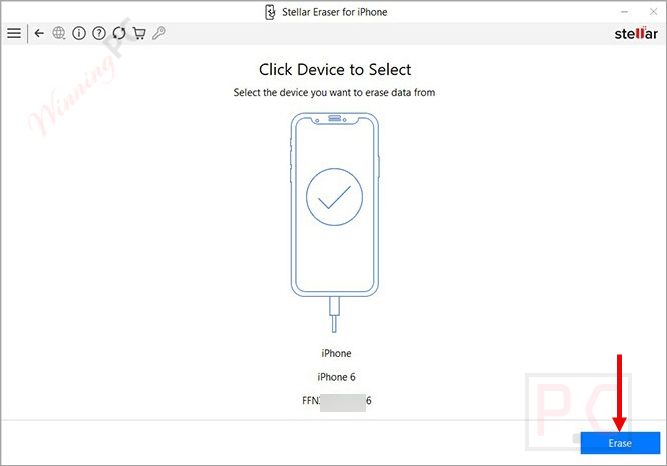
Step 1: Select “Device”
Select a connected device to “Erase iPhone Data.”
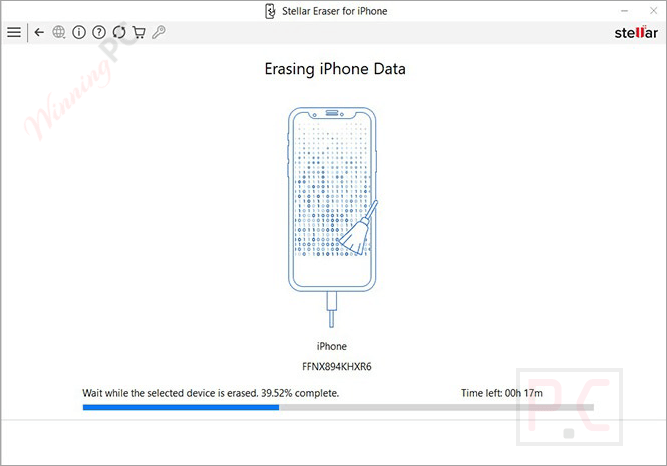
Step 2: Erase and Re-Write Process
The software will erase and rewrite the data from a connected iOS device.
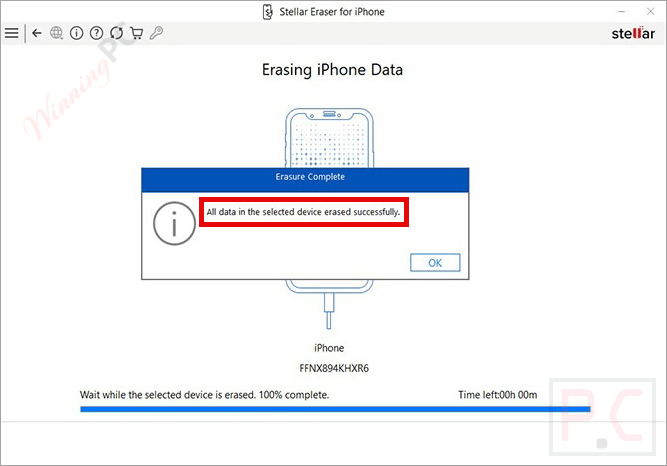
Step 3: Click “OK” to finish
After erasing data, the ‘All data from the selected device erased successfully’ message appears.
Stellar Eraser for iPhone FAQs
How is it different from Apple’s “Erase All Content and Settings”?
Apple’s option removes encryption keys, which is secure for most users, but Stellar Eraser adds multiple overwrite passes that meet recognized sanitization standards, offering extra assurance for sensitive data.
Can I erase only certain data types instead of the entire device?
Yes, you can selectively wipe specific categories such as messages, photos, contacts, videos, or Safari bookmarks.
Can I use it if my iPhone screen is broken?
Yes, as long as the device can be unlocked and recognized by your computer, the software can wipe it.
Does the software permanently remove the third-party apps’ data, like WhatsApp, WeChat, Kik, or Viber, on an iPhone?
Yes, it removes third-party apps and their data on the iOS device.
Can Stellar iPhone Eraser permanently erase data from a broken or water-damaged iPhone?
Yes, Stellar data eraser can delete from a broken or water-damaged iPhone, provided its touchscreen is working.
Can I get a discount when buying?
Yes, through WinningPC, you can use the coupon code STE***R10 to save up to 64% on your purchase.
Why Choose WinningPC for the Best Software Discounts?
At WinningPC, we are committed to providing 100% valid and verified coupon codes, so you can always shop with confidence.
- If you come across an invalid code or a better offer, let us know.
- Our team updates all discount information regularly to ensure accuracy.
- Official Authorization: We only share authentic discounts from trusted software developers.
- No Fake Discounts: Unlike some sites, we never use misleading deals. The final price you see is the true discounted price.
- Secure Purchases: All transactions are processed on the official vendor’s website, ensuring authenticity and data protection.
- Extra Support: If you face order or vendor issues, contact us. We’ll liaise with the vendor to help resolve your problem quickly.