
On this page
SwifDoo PDF Pro Giveaway
SwifDoo PDF Pro
Manage your PDFs with ease and edit, merge, convert, compress, sign, and protect PDF files across devices.
- Product
- SwifDoo PDF Pro
- Product website
- swifdoo.com
- License
- 6-Month/1 PC
- Platform
- Windows 11, 10, 8, 7
- Installer
- SwifDoo Pro.exe
- Updates
- 6-month free upgrade
- Support
- No support
- Updated
- 2026-08-22
Continue on swifdoo.com
Share to reveal your license code and the official claim page.
24-Hour Giveaway Only!
The free license is no longer available.
SwifDoo PDF Pro Coupons & Pricing
How to Get The SwifDoo PDF Pro License Key Free?
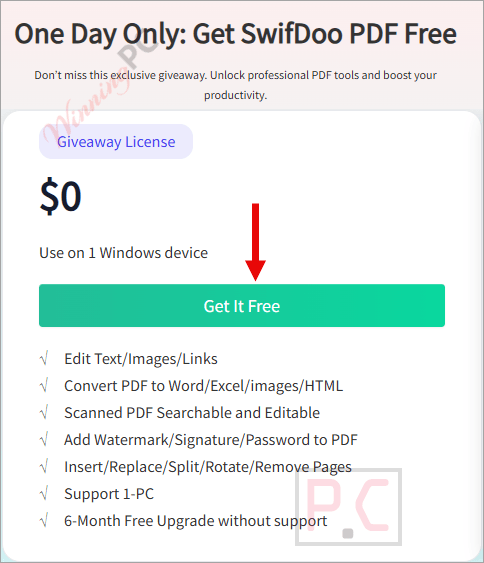
- Click the “Get it Free” button on SwifDoo’s official giveaway page. Your license code appears on screen.
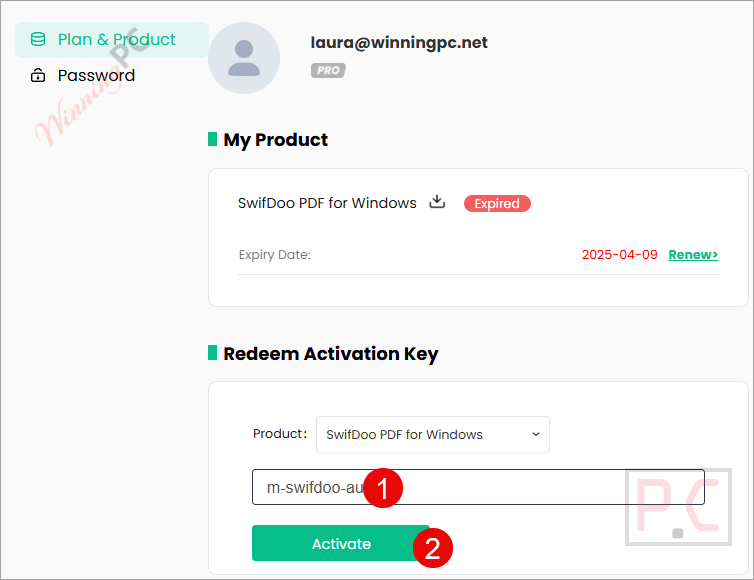
- Log in with your existing SwifDoo account, or register a new one at the SwifDoo registration page – email and password only, no credit card.
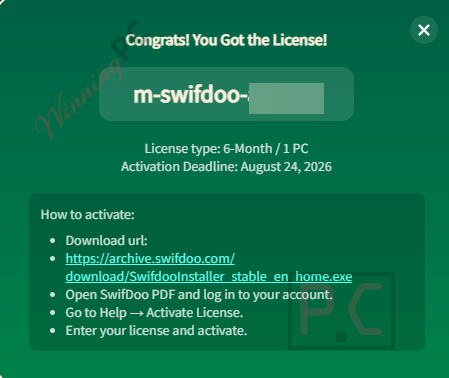
- Copy the license code and paste it into the activation field to upgrade your account to Pro.
- Download and install SwifDoo PDF Pro on your Windows PC using the official installer.
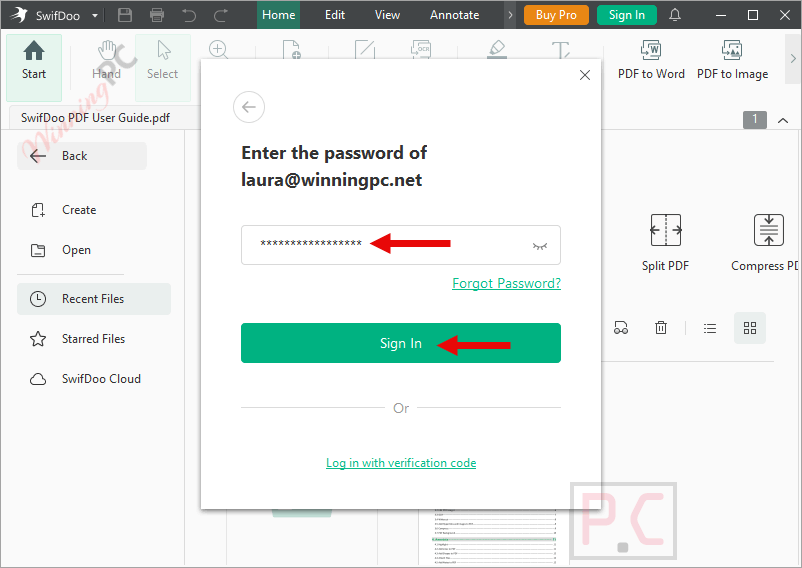
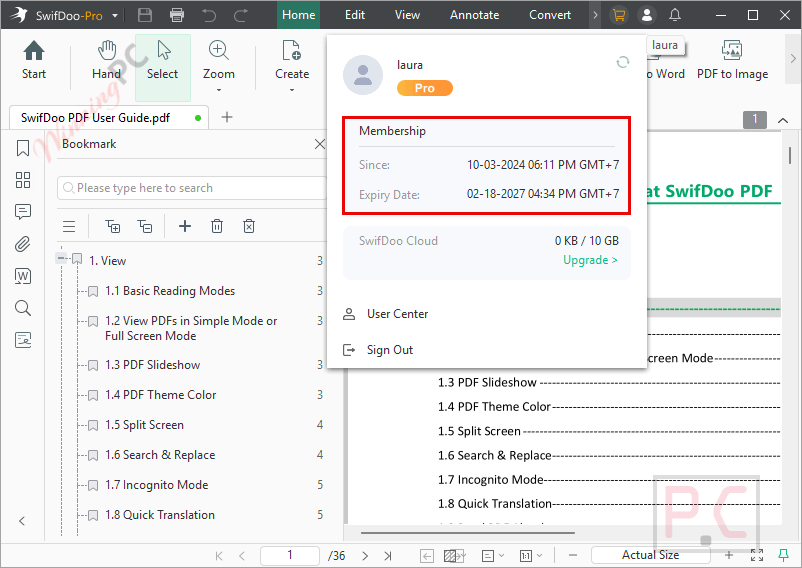
- Open the app and log in with your SwifDoo email and password. Your 6-month Pro license activates automatically on sign-in.
How to Remove Redaction from PDFs?
Step 1: Download and install SwifDoo PDF on your PC;
Step 2: Open a PDF document having redaction;
Step 3: Click on the Edit button and choose White-out, then apply redaction on the specified part
Step 4: Right-click on the redacted part and select Delete White-out to remove the redaction.
Hands-on with SwifDoo PDF Pro
SwifDoo PDF Pro is an all-in-one PDF editor for Windows that packs editing, conversion, AI summarisation, OCR, e-signing, and compression into a single 30 MB install. It’s aimed at anyone who needs to work with PDFs regularly but doesn’t want to pay Adobe Acrobat prices – or juggle five separate tools to get the same result. The software handles over a dozen input and output formats, including Word, Excel, CAD files, and scanned documents.

Key features
- Advanced PDF Editing: Modify text, images, hyperlinks, and backgrounds directly within your PDF documents.
- Comprehensive PDF Conversion: Seamlessly convert PDFs to and from various formats, including Office documents (Word, Excel, PowerPoint), EPUB, JPG, and other popular file types.
- Efficient PDF Merging and Splitting: Combine multiple PDF files into a single document or split a large PDF into smaller sections using various methods.
- Enhanced PDF Viewing: Enjoy multiple viewing modes, utilize the read-aloud feature, and translate PDFs for better accessibility and understanding.
- PDF Compression: Reduce the file size of PDFs without compromising quality, making them easier to share and store.
- PDF Creation: Create new PDFs from scratch or convert other documents (such as .docx, .xls, EPUB) into high-quality PDFs.
- Robust Annotation Tools: Annotate PDFs by typing and highlighting text, adding notes, and using various markup tools to enhance collaboration.
- Digital Signatures: Sign PDFs electronically with handwritten text or signature images, ensuring document authenticity.
- AI-Powered PDF Management: Leverage AI to summarize, translate, explain, proofread, rewrite, and interact with your PDFs efficiently.
- Secure PDF Protection: Password-protect your PDFs to prevent unauthorized viewing, copying, printing, and editing.
- Cloud Storage Integration: Store your PDFs securely in the cloud, ensuring universal access from anywhere at any time.
more screenshots


Frequently Asked Questions
What are the key features of SwifDoo PDF?
Key features include PDF editing, converting, merging, compressing, e-signing, and OCR text recognition.
Can I edit PDFs with SwifDoo PDF?
Yes, SwifDoo PDF allows you to add or delete text, change font size, style, color, and insert hyperlinks and images.
Does SwifDoo PDF support PDF conversion?
Yes, it can convert PDFs to/from Microsoft Word, Excel, PowerPoint, images, and more.
How does SwifDoo PDF handle OCR?
SwifDoo PDF includes an OCR feature to recognize and extract text from scanned PDFs.
Does SwifDoo PDF offer e-signature capabilities?
Yes, it includes tools for creating and adding legally binding electronic signatures to PDFs.
Is there a discount available for SwifDoo PDF?
Yes, you can use the coupon code TA**20 on WinningPC to save up to 78% on your purchase.
Can I receive a free license code for SwifDoo PDF?
Yes, you can visit WinningPC and join the giveaway to receive a free six-month license key.
How do I activate SwifDoo PDF Pro for free?
Follow the instructions provided by WinningPC to activate your free license key.
System Requirements & Details
| Requirement | Windows | Mac | iOS | Android |
|---|---|---|---|---|
| Supported OS | Windows 11, 10, 8, 7 | macOS 10.13 or later | iOS 14.0 or later | Android 6.0 or later |
| Processor | 1 GHz or faster | Intel Pentium 4 or higher, or equivalent processor | 1 GHz or faster | 1 GHz or faster |
| RAM | 1 GB RAM | 512 MB of memory (RAM), 1 GB recommended | 1 GB RAM | 1 GB RAM |
| Disk | 150 MB available space | 150 MB available space | 150 MB available space | 150 MB available space |
| Internet | Internet connection required for live updates, product activation, product assistance, translation, OCR, AI Assistant, and cloud features | Same | Same | Same |
| Language | English, German, French, Italian, Japanese, Traditional Chinese, Korean, Polish, Spanish, Portuguese | Same | Same | Same |
| File Conversion Formats | .pdf (PDF, PDF/A), .docx, .doc, .pptx, .ppt, .xlsx, .xls, .xml, .jpg, .jpeg, .png, .bmp, .heic, .tiff, .txt, .epub, .dwg, .html, .dxf | — | Word (.docx), Excel (.xlsx), PowerPoint (.pptx), Image (.jpg, .png), CAD (DWG and DXF) | Word (.docx), Excel (.xlsx), PowerPoint (.pptx), Image (.jpg, .png), CAD (DWG and DXF) |
| OCR Language Support | English, German, Spanish, etc. | Same | Same | Same |




https://www.virustotal.com/gui/file/8104e186c4433af85704ca6cf5abab8ee340f14d2f1088fb215038376b5208a3?nocache=1
What a generous offer. A 3-month trial period instead of a 1-month trial period.
The 6-month giveaway code is now available. Please activate it as soon as possible.
Code failed to activate
I think you have already redeemed this code, and since each code allows only one-time activation, you received this error.
Hi Sam,
A new giveaway code has been added, activate it ASAP.
the New Key : m-swifdoo-winx2024 does not work ! I received the message of : Failed to activate …. from Redeem Activation Key page on SwifDoo website and from my account ! is there any other key available by you ?
I think you have already redeemed this code, and since each code allows only one-time activation, you received this error.
Hi,
A new giveaway code has been added, activate it ASAP.
please send key
Hi,
A new giveaway key has been added. Let’s activate it as soon as possible.