On this page
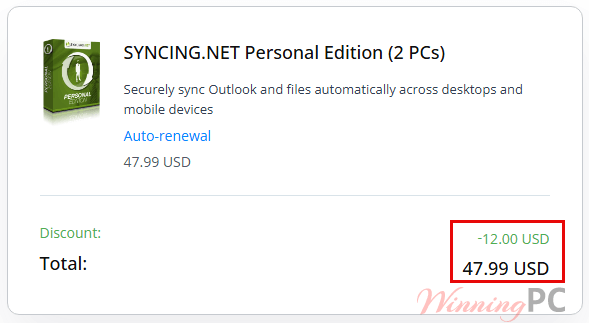
SYNCING.NET Personal prices with the code applied

You may also like


SYNCING.NET FileSharing Edition (3 PCs)
for individuals and workgroups
How to use the SYNCING.NET coupon code
- Click the Copy Code button above. Checkout opens on PayPro Global, the reseller SYNCING.NET uses for its own store.
- Paste WIN**GPC20 into the coupon field and apply it.
- Check the total before you pay. If you’re buying from an EU country, expect VAT on top of that figure.
- Complete the SYNCING.NET Personal payment.
How well does SYNCING.NET actually sync?
The thing SYNCING.NET does that most consumer sync tools can’t is Outlook. It reads both PST and OST files, so mail, calendar, contacts and tasks land on the second machine with no Exchange server in the middle, and it can also sync folders that live on an Exchange server. Because it sends only the changed part of a file, day-to-day syncing is quick once the first pass is done. That first pass is the slow part, and the vendor is upfront that it can run for hours on a big mailbox.
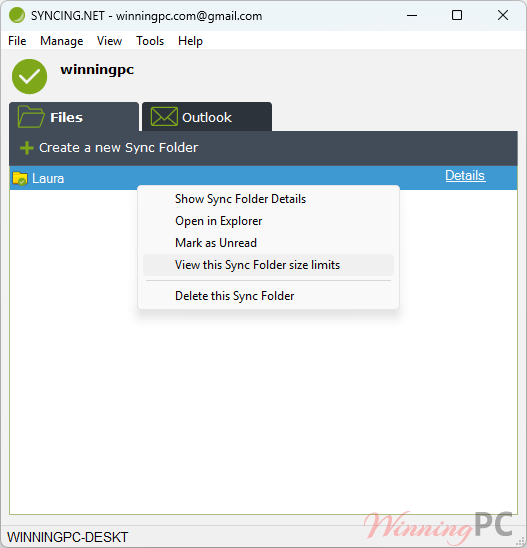
The other thing worth knowing before you buy is the offline path: when only one PC is online, changes are buffered on SYNCING.NET’s servers up to 50 MB per file and 500 MB in total, and anything larger waits until both machines are online together. The interface is dated and the published requirements read like a 2019 document, but the sync engine is what you’re paying for, and it’s specific about what it does.
What you get
- Outlook sync without Exchange: mail, contacts, calendars, tasks and notes across your PCs, using PST or OST files.
- File sync for any Windows folder you choose, with up to 10 Sync Folders and 300 Outlook folders on one account.
- Cloudless peer-to-peer transfer with 256-bit AES encryption and 1024-bit RSA authentication.
- Changes-only syncing, plus temporary encrypted buffering (50 MB per file, 500 MB total) when a PC is offline.
- Bandwidth control, proxy support and a two-click pause when you need the connection for something else.
What we liked, what we didn’t
Is there a cheaper or free way to do this?
| Tool | Price | Syncs Outlook? | Cloudless? | Best for |
|---|---|---|---|---|
| SYNCING.NET Personal (our pick for Outlook) | $47.99–$53.99/yr for 2–3 PCs with code | Yes, PST and OST | Yes, peer-to-peer | Keeping desktop Outlook identical on 2–3 home PCs |
| Syncthing | Free, open source | No | Yes, peer-to-peer | Files and folders only, if Outlook isn’t part of the job |
| Microsoft 365 (Exchange Online mailbox) | Subscription, around $99.99/yr for Personal | Yes, server-side | No, Microsoft’s cloud | People happy to move the mailbox to Microsoft’s servers |
If all you need is folders mirrored between computers and Outlook isn’t involved, Syncthing does that for nothing and does it well. SYNCING.NET Personal earns its price only if the Outlook side matters to you.
Questions people ask about SYNCING.NET
Does the WinningPC coupon code work on both plans?
Yes, both. It takes the 2-PC plan to $47.99/year and the 3-PC plan to $71.99/year. Apply it in the coupon field on the PayPro Global checkout page and confirm the total before paying.
Is this a one-time payment or a yearly subscription?
It’s a yearly subscription. The vendor’s FAQ states that a one-year license renews for another year while the subscription is active, and includes all minor updates and major upgrades during that time.
Does my data get uploaded to a cloud?
No. Files and Outlook items travel directly between your own PCs, encrypted with 256-bit AES.
Can I use the license on a Mac or a Linux PC?
Yes for files. SYNCING.NET Personal publishes Mac and Linux clients that sync folders in the same peer-to-peer network.
What you need to run it
| Operating system | Windows 10, 8, 7, Vista, XP, Server 2003/2008/2012 (x86 and x64) |
| Processor / RAM | Pentium-class 800 MHz or faster; 256 MB RAM (512 MB recommended) |
| Other software | Microsoft .NET Framework 2.0 or later |
| Outlook versions | Outlook 2019, 2016, 2013, 2010 (32 and 64-bit), 2007, 2003. Office apps from the Microsoft Store are not supported |
| What it syncs | Outlook mail, contacts, calendars, tasks and notes (PST and OST), plus any Windows folders you select |
| Connection | Internet access, broadband recommended; proxy servers supported |
| Account limits | Up to 3 PCs, 2 Outlook Groups, 10 Sync Folders, 300 Outlook folders |
| Offline buffering | 50 MB per file, 500 MB total, encrypted and deleted after delivery |
| Mac / Linux | Separate clients for file sync; Outlook sync requires Windows |