
 Laura Marano
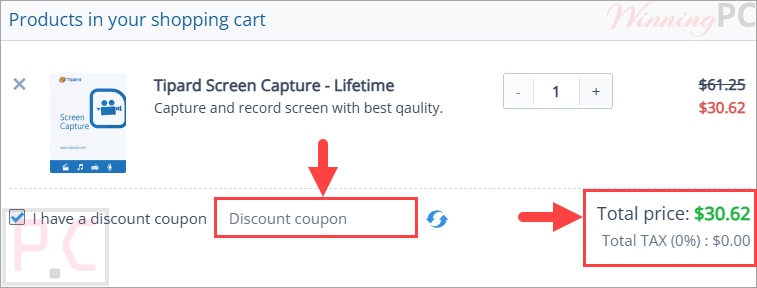
Tipard Screen Capture is free right now through an official giveaway — claim a 1-year license at no cost, ✅ verified by Laura. Just register on the developer’s giveaway page below to get your key. Prefer the latest version with updates? Use code TIPAG*TD for 50% off on a lifetime license ($30.62). Works on Windows 11/10/8/7.
Tipard Screen Capture lets you capture screen activity, webcam, gameplay, system audio, microphone input, and even iPhone or Android screens in high quality. It also includes built-in editing, compression, conversion, and DVD/Blu-ray burning features for creators, gamers, teachers, and remote workers.

Tipard Screen Capture
Record screen, video, audio, window, and external devices like iPhone in the best video quality.
- Product
- Tipard Screen Capture
- Product website
- tipard.com
- License
- 1-Year
- Platform
- Windows 11, 10, 8, 7
- Usage
- Non-commercial only
- Updates
- No future upgrades
- Support
- No support
- Updated
- 2026-07-10
Continue on winningpc.com
Share to reveal the official giveaway page, then register there to receive your license.
The free license is no longer available.
Table of Contents
Tipard Screen Capture Coupon Codes (100% Working)
Tipard Screen Capture - Lifetime
Use on 1 PC | Lifetime upgrade and support
Tipard Screen Capture for Mac - Lifetime
Use on 1 Mac | Lifetime upgrade and support
📄 Licensing & Support Details
- License type: lifetime license
- 30-day money-back guarantee
- The registration code will be sent to your email in minutes
- Free update
- 24/7 customer support
- The payment process is SSL-secured.
📝 How to apply
Tapping ‘Copy Code’ will save your code and lead you right to the checkout process so you can apply the price reduction.
Activation Guide: Tipard Screen Capture Giveaway Key Free
On the Tipard giveaway page, enter your name and email address, then click on the “Submit” button. In a few minutes, you will receive an email with a Tipard Screen Capture annual license.

Download and install Tipard Screen Capture on your PC using the above download link. Open and activate the software with your email address and license code:

Enjoy it for free!
The default language in Germany. To change the language to English, you need to close the software and then access the Language folder in the software installation location.
– Download the English language file here –> en.rcc and copy it to the language folder
– Just delete the file name “de.rcc” and open Tipard Screen Capture again.
Language folder:
Windows 64bit: C:\Program Files (x86)\Tipard Studio \Tipard Screen Capture\language
Windows 32bit: C:\Program Files \Tipard Studio \Tipard Screen Capture \language

Tipard Screen Capture: In-Depth Review & Features

Key Features:
- Flexible Capture Areas: Choose between full-screen recording, specific windows, or a custom-defined region.
- Mobile Screen Mirroring: Record your iPhone or Android screen directly on your computer with high-quality output.
- Real-Time Annotation: Draw on the screen, add text callouts, or insert images while the recording is active.
- Advanced Audio Control: Capture system sound and microphone audio independently or simultaneously.
- Scheduled Tasks: Set specific start and end times to automatically record webinars or live broadcasts.
Pros & Cons:
More screenshots:


Frequently Asked Questions
How can I get Tipard Screen Capture license key for free legally?
The safest and most legal way to obtain a free key is through WinningPC. We partner directly with developers like Tipard to provide official giveaway versions to our community.
Where can I find the best coupon code?
WinningPC offers exclusive discount codes, such as WIN**PC55, which provides the highest savings available for Tipard products.
Why is my giveaway software in German?
This specific giveaway campaign is localized for German partners. However, you can easily switch the interface to English by replacing the language files in the installation folder – check our site for a step-by-step guide.
Can I record my iPhone with Tipard Screen Capture?
Yes. By connecting your iPhone and PC to the same Wi-Fi network and using the “Screen Mirroring” feature, you can record your mobile screen in high resolution.
Is there a recording duration limit?
No. As long as you have sufficient disk space, you can record for an unlimited amount of time.
How do I share recordings to YouTube?
Within the Recording History window, right-click your file and select “Share” to upload directly to platforms like YouTube, Facebook, or Vimeo.
Can I use the giveaway key on multiple computers?
Generally, giveaway licenses are restricted to one PC. Check the specific activation email for hardware limit details.
System Requirements & Details
| Operating System | Windows 11, 10, 8, 7 macOS 10.13 or above (including macOS Sequoia) |
| Processor | 1.2GHz Intel or AMD CPU or higher |
| RAM & Storage | 1GB RAM or higher recommended |
| Supported Input | 4K Video, HD Video, SD Video, Audio formats including MP4, MOV, MKV, AVI, MP3, FLAC, WAV, AAC, WebM, and more. |
| Supported Output | Video: WMV/MP4/MOV/F4V/AVI/TS • Audio: MP3/WMA/AAC/M4A • Images: PNG/JPG/JPEG/GIF/TIFF/BMP |


thanks WinningPc for the detailed guide, it’s so easy to get a free license code and activate it.
The permotion is already over. No Use of this Posting
No! This is still active, I just personally tested.
Thanks for your info. This is a 24hrs giveaway.