
 Laura Marano

Tipard Video Enhancer improves video quality, upscaling footage to 1080p HD or 4K at 60 FPS, removing blur/noise, stabilizing shaky clips, and editing videos with simple tools.
Tipard Video Enhancer for Windows
2 plans · best save 50%
Tipard Video Enhancer for Mac
2 plans · best save 50%
📄 Licensing & Support Details
- License type: 1 year, lifetime license
- 30-day money-back guarantee
- Register code will be sent to your email in minutes
- Free update
- 24/7 customer support
- The payment process is SSL-secured.
📝 How to apply
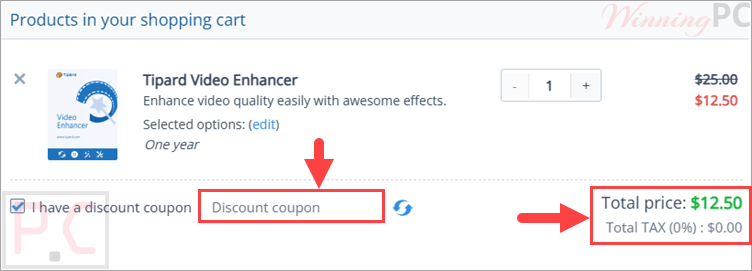
Tapping the ‘Copy Code’ button above records the info and forwards you to the payment screen to claim your reduction.
Tipard Video Enhancer License Key Free
- Product name: Tipard Video Enhancer
- Website: https://www.tipard.com
- License type: 1-year
- Platform: Windows
- Download: video-enhancer.exe
- Giveaway:
Tipard Video Enhancer giveaway link
How to get the license key?
On the Tipard Video Enhancer giveaway page, fill in the blanks for your name and e-mail address and click on the “Get Now” button. In a few minutes, you will receive an email with an annual license.


Click on the above download link to download Tipard Video Enhancer for free. Install the software on your computer then add your email address and your license key to activate it.

Tipard Video Enhancer: In-Depth Review & Features

Key Features:
- Upscale low-resolution videos to 1080p HD or 4K at 60 FPS
- Adjust brightness, contrast, saturation, and hue with AI color balance
- Remove video grain, speckles, blur, and color distortion
- Stabilize shaky footage recorded by hand
- Restore old, vintage, compressed, or low-quality videos
- Export to formats like 4K MP4, 4K MKV, and 4K AVI
- Use HEVC or H.264 encoders
- Prepare videos for iPhone, Apple TV, Samsung TV, PS4, Xbox, YouTube 4K, and more
- Cut, crop, rotate, and flip videos
- Add image or text watermarks
- Add, remove, or customize subtitles
- Mute audio or replace the soundtrack
- Convert interlaced videos to progressive
- Use GPU acceleration with Intel, AMD, or NVIDIA GPUs
- Enhance multiple videos at once with batch processing.
Pros & Cons:
More screenshots:


Frequently Asked Questions
Are there any promo codes for Tipard Video Enhancer?
Yes. WinningPC is a good place to check first for Tipard coupons, along with Tipard’s official offers and seasonal promotions.
What is the best discount right now?
The current WinningPC deal gives you 50% OFF, bringing the 1 Year License to $12.50 and the Lifetime License to $22.50.
Can Tipard Video Enhancer upscale videos to 4K?
Yes, it can upscale videos to 1080p HD or 4K at 60 FPS.
Does it remove video noise?
Yes. It can reduce grain, speckles, blur, and color distortion.
Can it fix shaky videos?
Yes. The software includes video stabilization for smoother footage.
Does Tipard Video Enhancer support batch processing?
Yes. You can process multiple videos at once.
Can I edit videos inside the software?
Yes. It includes clipping, cropping, rotating, flipping, watermark, subtitle, and audio tools.
Is Tipard Video Enhancer safe to use?
Yes. It is described as reliable and safe for processing media files.
Frequently Asked Questions
| Operating System | Windows 7, 8, 10, 11 Mac OS X 10.7 or above |
| Processor | Windows: 1.2GHz Intel or AMD CPU or above Mac: Intel processor and Apple M2/M3/M4/M5 chip |
| RAM & Storage | 1GB RAM or more |
| Supported Input | Video, HD Video, Audio; listed formats include MP4, MKV, MOV, AVI, WMV, MTS, DV, FLV, and more. |
| Supported Output | 4K MP4, 4K MKV, 4K AVI, HEVC, H.264, device/platform presets including iPhone, Apple TV, Samsung TV, PS4, Xbox, YouTube 4K. |





It does not do anything rather than changing the video resolution without upscaling or enhancing the video