
 Chris Bruner

Top Data Protector is a Windows folder lock tool that helps password-protect, hide, and restrict access to private files, folders, photos, videos, documents, and client data. It is built to stop unauthorized viewing, editing, deletion, and ransomware-related file hijacking.
- Product name: Top Data Protector v3.x
- Publisher: iTop Software
- Website: https://www.itopvpn.com/top-data-protector
- License type: 3-month
- Price:
$59.97$0.0 - Platform: Windows 11/10
- License code & download – last updated: May 26, 2026
Click here...
Unlocking content...
Top Data Protector Coupon Code Oct 2026

iTopVPN Summer Sale: Up to 86% Off
Take advantage of special offer up to 86% off iTop VPN software!
Top Data Protector Pro
4 plans · best save 87%

📄 Licensing & Support Details
- License Type: 1 Month / 1 PC, 1 Year / 3 PCs & 1 Year / 1 PC
- Support: Premium 24/7 technical support
- Guarantee: 30-Day Money Back Guarantee
📝 How to apply
- To claim your discount, click the “COPY” button above to access the Top Data Protector Pro Special Sale.
- Pick your preferred plan (1 Month / 1 PC, 1 Year / 1 PC, or 1 Year / 3 PCs) and hit the “GET” button to lock in your discounted price.
How to get the Top Data Protector License Code for Free?
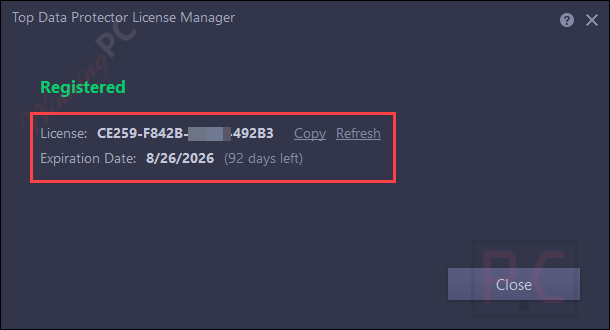
The download link for Top Data Protector is given above. Download it on your computer. Double-click the exe file and complete the installation steps. Launch it when the software is successfully installed. When you first use the software, you are asked to create a new account to access it.

Copy and paste the license key within the software to activate the Pro version

Got it for free with full function!
In-Depth Review & Features

Main Features
- Unlimited File Protection: Secure any quantity or size of private data without restrictions.
- One-Click Folder Guard: Instantly restrict unauthorized permission to personal directories.
- Deny Write Access: Stop shared PC users from modifying or deleting your work.
- Deny Read Access: Block others from opening, reading, or copying specific records.
- Invisible Mode: Hide items completely from File Explorer and other programs.
- Malware Defense: Cut off access to prevent ransomware from hijacking your system files.
Pros and Cons
More Top Data Protector Screenshots!
Add Files/Folders

Hide Items

Files/ Folders

Password Options

Frequently asked questions
Are there any active promo codes for Top Data Protector?
You can discover the most reliable promotional offers for this software directly on WinningPC, alongside the developer’s official channels.
How do I get the lowest price on a Top Data Protector license?
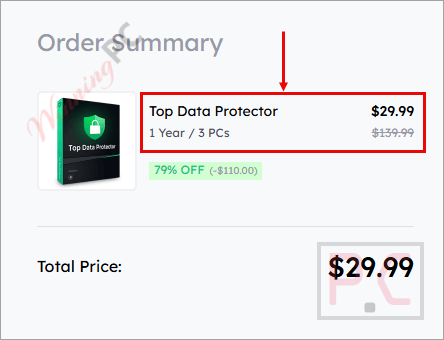
The best current savings is a massive 79% OFF deal, which you can easily grab right here on WinningPC.
Can I lock folders on a shared computer?
Yes, you can set specific access levels so that other users cannot view, modify, or delete your personal items.
How does the software handle ransomware?
It strongly cuts down access to your locked items, meaning malware cannot hijack or encrypt the data inside your safety box.
Is it difficult to add files to the safety box?
Not at all. After setting your master password, you simply drag and drop the items onto the main interface.
Can I allow someone to view a file but not edit it?
Yes, by selecting the “Deny Write Access” setting, others can read the document but cannot make changes or erase it.
Does this tool hide items completely from the system?
If you enable the “Hide from Explorer or other programs” option in the settings, the selected items will disappear from their normal locations.
What kind of files are compatible?
The software supports all file types, including photos, videos, text documents, and financial records.
System Requirements & Details
| Feature | Specifications |
|---|---|
| Language Support | English, Français, Italian, Spanish, Swedish, and more… |
| Operating System | Windows 11/10 |
| Supported Input | All file formats, including documents, photos, videos, folders, contracts, client data, medical records, and creative files |
| Supported Output | Locked, hidden, read-restricted, or write-protected files and folders |



From their FAQ page:
“Can Top Data Protector work on my system?
Top Data Protector supports all variants of the Windows Operating System, you can run it on Windows 11/10/8/7, Windows XP and Vista.”
is their FAQ page out of date?
It’s missing the FAQ what encryption system is used by Top Data Protector on the data and is it’s implementation certified secure by any independent auditing organisation?
One problem with programs like this is they are obviously present and therefore one opens oneself up to coercion by malicious individuals or legal authorities to reveal the passphrase and email address to access the program and encrypted/hidden content. There is no plausible deniability of concealment of data. One can lose limb function or liberty in the coercion attempts.