
 WinningPC

Vovsoft Desktop Diary is a powerful and user-friendly offline journal application designed for Windows users who value privacy. It allows you to write memories, track daily appointments, and manage personal notes directly on your PC without needing an internet connection.
By utilizing password protection and local storage, the software ensures that your private thoughts remain under your total control. Whether you want to write a simple daily log or maintain a detailed personal history, this tool provides a clutter-free environment to do so.
- Product name: Vovsoft Desktop Diary v3.1
- Publisher: Vovsoft
- Homepage: https://vovsoft.com
- License type: lifetime
- Price:
$19$0.0 - Platform: Windows 7/8/10/11
- Download: desktop-diary.exe
- License code – last updated: Apr 17, 2026
The giveaway has ended!
📝 Note: Please follow the Activation Guide to successfully claim your license.
The giveaway version usually comes with no free updates. If you want to use Vovsoft Desktop Diary forever with priority support, we highly recommend the lifetime deal below.

Vovsoft Desktop Diary
30% Off coupon code, regular price $19, discounted price $13.3

Vovsoft Universal License
115+ programs | Lifetime license | All future updates
Please follow the instructions below to get your license key or activate the software successfully. If you have any questions or need help, feel free to leave a comment at the bottom of this post.
You can download and install Vovsoft Desktop Diary for free using the download link above.
To insert a license key, simply click the designated box to activate it, then start entering the key.

Enjoy it for free!
Vovsoft Desktop Diary Screenshot!
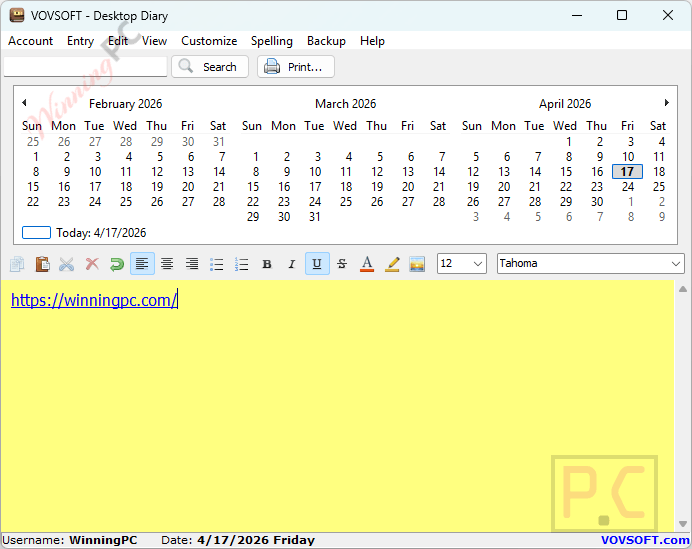
Main Features
- Total Privacy: As an offline application, no data is ever sent to the cloud or the internet.
- Password Protection: Secure your diary with a master password and create multiple user accounts if needed.
- Rich Text Formatting: Customize your entries with various fonts, colors, bulleted lists, and embedded images.
- Calendar Integration: Easily navigate through your past entries using the built-in calendar interface.
- Encrypted Backups: Create secure backup files and export/import data seamlessly when moving to a new computer.
Frequently Asked Questions
How can I get Vovsoft Desktop Diary license key for free legally?
The safest way is through WinningPC. We partner directly with Vovsoft to offer genuine license keys during official promotional periods.
Where can I find the best coupon code?
WinningPC offers exclusive deals. You can use the code WIN***GPC at checkout on the developer’s site to get 30% off any Vovsoft product.
Is my data safe with Vovsoft Desktop Diary?
Yes. Since the software is entirely offline, your entries are stored locally on your hard drive, not on a remote server.
Can I move my diary to a new computer?
Yes, you can use the built-in “Export” and “Import” functions to move your database to another device.
Can I have multiple diaries for different people?
Yes, the software supports multiple user accounts, each protected by its own password.
Technical Details
| Operating System | Windows 11, 10, 8.1, 8, 7, Vista, XP (32-bit & 64-bit). |
| Processor | 1GHz or faster. |
| RAM | 512 MB minimum. |
| Disk Space | 20 MB for installation. |






For my personal use, this is PERFECT. If I need to store highly sensitive information, I’ll rely on tools like KeePassXC or Bitwarden. That said, I do have a few suggestions that would make this software even better:
• Theme Selection Needs Control:
Currently, changing themes feels completely random. Selecting “Change Theme” cycles unpredictably with no clear way to return to a previously used or preferred theme. A simple improvement would be a theme selection list (by name) similar to Vov Sticky Notes, allowing users to preview, select, and switch themes intentionally. For my personal use, this is PERFECT. If I need to store highly sensitive information, I’ll rely on tools like KeePassXC or Bitwarden. That said, I do have a few suggestions that would make this software even better:
• Theme Selection Needs Control:
Currently, changing themes feels completely random. Selecting “Change Theme” cycles unpredictably with no clear way to return to a previously used or preferred theme. A simple improvement would be a theme selection list (by name) or a settings window similar to Vov Sticky Notes, allowing users to preview, select, and switch themes intentionally.
•Custom Theme Support:
Even better—provide a settings interface where users can customize appearance (colors, fonts, layout) and save those configurations as reusable themes. That would elevate usability significantly.
•Password Storage (Registry):
Storing the password as plain text in the registry is outdated from a security standpoint. However, for my specific use case, this does not impact functionality.
For what I need—a clean, simple, offline desktop journal to organize notes and documentation—this application is absolutely ideal. It’s fast, lightweight, and does exactly what it’s designed to do without unnecessary complexity.
• Huge thank you to WinningPC.com for the awesome GIVEAWAY!!!
• Huge thank you to Vovsoft for continuing to build straightforward, effective desktop software. In a world full of bloated subscriptions and forced cloud integrations, this is refreshing.
Keep up the excellent work—you’ve earned a loyal fan. 🔥
There is only trivial protection for access WITHIN the program BUT the diary entries are stored as .rtf files renamed to .dat in the logged in users folder named after the user name in the program e.g.
C:\Users\[WindowsUSERNAME]\AppData\Roaming\VOVSOFT\Desktop Diary\user1\2026-04-17.dat
THERE IS NO ENCRYPTION you can view the contents by simply tagging .rtf on the end of the filenames .dat extension so it becomes 2026-04-17.dat.rtf of course you’ll need a program capable of displaying an RTF file but that’s quite easy to find.
In addition the claimed encrypted backups are NOT encrypted at all but they are encoded and are trivial to decode as the ASCII characters are converted into their ASCII codes as decimal number characters interspersed with “-” characters… which bloats them out no end as each single byte ASCII character is expanded into a maximum of 4 byte representations. I see no support for UNICODE 16bit character encoding either mind you I have not tried inputting a UNICODE 16 bit character to see if it survived the UI and backup encoding…
this needs to be completely re-thought out to what it’s intended to be and not use security through obscurity as that is no security at all and should not claim to encrypt anything when it’s only encoding the plain text using a fixed algorithm.
Arrrg the password for the users account is stored as plain text in the registry key:
HKEY_CURRENT_USER\SOFTWARE\VOVSOFT\Desktop Diary\Passwords
Each user has a string named with the user name and contains the actual password not even encoded let alone encrypted!
If you must use this do not re-use any important passwords in this as that’d just be giving it away to any software process scanning for passwords or intruder looking for passwords to exploit.