
On this page
Vovsoft PDF to Text Converter Giveaway
Vovsoft PDF to Text Converter
Converts PDF to text
- Product
- Vovsoft PDF to Text Converter
- Product website
- vovsoft.com
- License
- Lifetime
- Platform
- Windows 11, 10, 8/8.1, 7 (32-bit & 64-bit)
- Usage
- Non-commercial only
- Updates
- No future upgrades
- Support
- No support
- Updated
- 2026-07-27
Continue on vovsoft.com
Share to reveal your free license code, then activate it inside the app.
This giveaway ended on .
30% Off Vovsoft PDF to Text Converter
How to Get Your Free Vovsoft PDF to Text Converter License
- Click the giveaway unlock button on this WinningPC page to reveal Vovsoft’s official download link.
- Download and install Vovsoft PDF to Text Converter on your Windows PC.
- Launch the software once installation is complete.
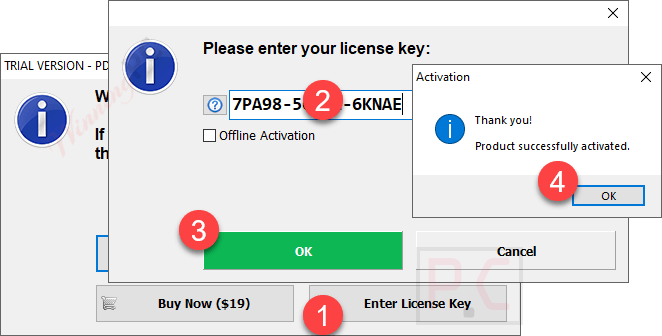
- In the main window, go to Help > Edit License. Copy the license code from this page and paste it into the activation field.
- Your Lifetime license is now active – no payment required.
Vovsoft PDF to Text Converter Discount Codes (100% Working)

Vovsoft Universal License
115+ programs | Lifetime license | All future updates
Is this Vovsoft PDF to Text Converter giveaway safe?
Yes. This is a legitimate giveaway run through Vovsoft’s direct partnership with WinningPC.
No crack or keygen
You install Vovsoft’s official build and activate it with a genuine license code issued by the developer. Nothing is patched or modified.
Official publisher giveaway
The key comes from Vovsoft directly — not a reseller, not a grey-market key shop.
Secure HTTPS checkout
If you choose to buy instead, payment is handled on Vovsoft’s encrypted store via PayPro Global. No payment data touches WinningPC.
30-day money-back on paid plans
The giveaway costs nothing, so there’s no financial risk either way. Paid purchases carry a 30-day refund guarantee.
Hands-on with Vovsoft PDF to Text Converter
For a utility this focused, Vovsoft PDF to Text Converter does its job without fuss. The interface is a clean list view: drop in your PDFs, hit convert, pick an output folder. Batch processing handles entire directories at once, and CLI support means you can slot it into automated scripts – genuinely useful for scheduled workflows. The header-labeling option (filename, directory, or full path at the top of each TXT block) is a small but practical touch when you’re organizing large batch output.
The limitation to know upfront: this tool only extracts text that is digitally embedded in a PDF. Feed it a scanned document saved as an image-only PDF, and the output will be blank. There is no OCR. For standard digital PDFs, extraction is clean and the offline approach means your documents stay on your machine throughout.

Key features
- Batch conversion: load and process multiple PDFs at once, including whole folders.
- Fully offline: all processing stays local; no files are uploaded to any server.
- Command-line support: pass files via CLI parameters for automation and scripting workflows.
- Editable output preview: read, cut, copy, and paste text in the preview window before saving.
- Customizable file headers: each TXT block can show the source filename, directory, or full path for easy organization.
Pros & Cons
more screenshot

Free license or paid: what’s the difference?
| Feature | Giveaway License | Paid License ($13.30 with WIN***GPC) |
|---|---|---|
| License duration | Lifetime | Lifetime |
| Commercial use | No (personal only) | Yes |
| Future version updates | No | Yes – all future updates included |
| Tech support | No | Live chat + ticket support |
| Version received | v1.5 only | The latest version always |
| Activation deadline | Must activate by August 2, 2026 | Instant delivery, no deadline |
| Refund guarantee | N/A (free) | 30-day money-back |
Common Questions About Vovsoft PDF to Text Converter
How do I convert multiple PDF files at once?
The software supports batch conversion, enabling users to convert multiple PDF files to text simultaneously, saving time and effort.
What file formats does the software support for conversion?
The software converts PDF files to plain text (TXT) format, allowing for easy editing and use in other applications.
Does the Vovsoft PDF to Text Converter work offline?
Yes, all conversions are performed locally on your computer, ensuring your files remain private and secure.
How can I get the best price for Vovsoft PDF to Text Converter?
The WinningPC coupon code NEW****24 offers a 30% discount on the purchase of Vovsoft PDF to Text Converter, making it more affordable for you to access the software’s full features.
System Requirements & Details
| Language Support | English, Français, Italian, Spanish, Swedish, and more… |
| Operating System | Windows 11, Windows 10, Windows 8/8.1, Windows 7 (32-bit & 64-bit) |
| File size | 5.65 MB (Installer) / 5.06 MB (Portable) |
| Supported input formats | |
| Supported output formats | TXT (plain text) |
| Internet connection | Not required — fully offline |



Of course you could just open PDF in any viewer and press CTRL A to select all the text and press CTRL-C to copy it to clipboard and then paste it into notepad…
There is no OCR of text in images within the PDF so does not work with scanned to PDF raster PDF files. This is just a simple GUI on top of a 3rd party pdftotext.exe that apparently is licensed GPLv3 and as this is a closed source product the distribution of GPLv3 pdftotext.exe is illegal as the vovsoft license is not compatible with the GPLv3 license
Correction: I saw now that the procedure to get a license has changed (but the site text is still the previous one, implying the code should be on it).
I’ve received the license now, thanks.
Missing license code!
Heute am 2025-09-06 ist meine Lizenz wiedermal verschwunden!
Licensed to:
UNLICENSED
License key has EXPIRED …
Installiert und registriert am: 2024-07-01
License code: 7PA98-56UP2-6KNAE mit Erfolg registriert!
Lizenzgültigkeitsdauer: LEBENSLANG
Thanks for your feedback.
We will bring back this giveaway.
Hi,
This giveaway is currently ongoing. You can obtain the license before it expires.